
XPTracker
Monitors your experience gains in real time, breaks them down by source, and displays everything in a clean, configurable HUD overlay.
Screenshots
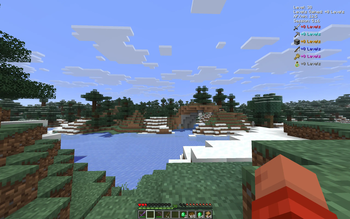
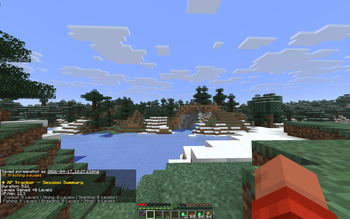
About this Mod
XPTracker
Track every point of XP you earn and find out where it comes from!
This lightweight client-side Fabric mod monitors your experience gains in real time, breaks them down by source, and displays everything in a clean, configurable HUD overlay.
Features
Session Tracking
- Total XP gained - See exactly how much experience you've earned this session
- Level gains - Track how many levels you've gained since starting
- Session time - Know how long you've been grinding
- XP per minute - Measure your farming efficiency in real time
Source Detection
- Combat - XP from killing mobs
- Mining - XP from breaking ores (Coal, Diamond, Emerald, Lapis, Redstone, Nether Quartz, Nether Gold, Sculk, Spawners)
- Smelting - XP from collecting furnace outputs
- Trading - XP from villager trades
- Fishing - XP from reeling in catches
- Breeding - XP from breeding animals
- Percentage breakdown - See which sources contribute most to your XP
Smart Session Management
- Toggle tracking - Start and pause freely with a single keybind
- Auto-pause - Automatically pauses when you open the pause menu
- Auto-resume - Picks back up when you return to the game
- Session persistence - Optionally keep your session across world changes
- Chat summary - Detailed breakdown printed to chat when you reset
Customizable HUD
- Four positions - Top-left, top-right, bottom-left, bottom-right
- Adjustable scale - Make it bigger or smaller
- Custom colors - Choose text and background colors
- Toggle individual stats - Show only what you care about
- Background opacity - Adjust for readability
Player-Friendly
- Keybinds -
Jto toggle tracking,Kto reset session - In-game config - Full YACL config screen via ModMenu
- Bilingual - English and German translations included
- Client-side only - No server installation required
Requirements
- Minecraft: 26.1+
- Fabric Loader: 0.18.4 or higher
- Fabric API: Required
- Java: 25 or higher
- ModMenu + YACL: Optional (for in-game config screen)
Perfect For
- Grinders - Measure and optimize your XP farming setups
- Builders - Track XP from mining sessions
- Traders - See how much XP villager trading actually gives you
- Everyone - Anyone curious about where their XP comes from!
Links
- Issues & Bugs: GitHub Issues
- Source Code: GitHub Repository
License
This mod is open-source and licensed under the MIT License.
Made with love by DennisTheGamer
Available Versions
How to Install XPTracker on Your Server
Order Server
Order a Minecraft Java server with at least 3 GB RAM (4 GB recommended).
Set fabric Loader
In the panel under "Egg", select the fabric loader and matching Minecraft version (26.1.2).
Install Mod
Open the mod browser in the dashboard and search for "XPTracker". Click "Install" – done! Alternatively, upload the .jar via SFTP to the /mods folder.
Compatibility
Mod Loaders
Minecraft Versions
26.1.2, 26.1.1, 26.1
Server-side
✗ UnsupportedRecommended RAM
4 GB(min. 3 GB)Frequently Asked Questions
XPTracker server crashes on startup – what to do?
Most common cause: wrong fabric version or insufficient RAM. Check the server log (latest.log) for "OutOfMemoryError" or "Mixin" errors. With Mado Hosting: ensure at least 3 GB RAM is allocated and the loader matches the mod version (26.1.2). You can switch loaders with one click in the panel.
Is XPTracker compatible with fabric?
XPTracker officially supports fabric for Minecraft 26.1.2, 26.1.1, 26.1. The Mado dashboard automatically detects incompatible loader combinations.
Server lagging with XPTracker – how to optimize performance?
Recommended RAM: 4 GB (per 8 players). Use /spark profiler to check if XPTracker consumes the most tick time. Common fixes: reduce server view-distance to 8-10, install "performant" or "starlight" as supplementary mods on Forge. With Mado Hosting, your server runs on NVMe SSDs with dedicated CPU cores for minimal latency.
Similar Mods
![[EMF] Entity Model Features](https://cdn.modrinth.com/data/4I1XuqiY/6e5bbd0d06b1741bfdab6c0cfab6de8fdaf0064c_96.webp)


Rent Modded Server
Install XPTracker with just one click on your server.