
Yiv's Preset
Lets you cycle Build, Explore, and Combat graphics with one hotkey and remembers the choice per world/server. Client-only; vanilla settings only.
Screenshots



About this Mod
Yiv’s Presets




Client-only presets you can cycle with one key. Tune render/FPS options for Build, Explore, and Combat, then swap instantly in-game with a small top-center HUD toast.
- Default keybind:
F9(Cycle Preset) - Presets out of the box: Build → Explore → Combat
- Environment: Client only
✨ Features
- One-key preset cycling with a minimal toast (top-center, 4.5s)
- Per-world/server persistence via JSON config
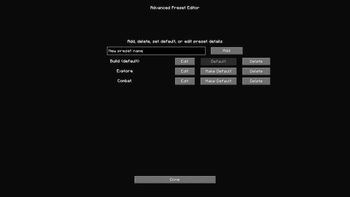
- Advanced Preset Editor (CRUD, set default)
- Options per preset include:
- Render Distance (chunks)
- Simulation Distance (chunks) [clamped to vanilla-safe min 5]
- Graphics: Fast / Fancy / Fabulous
- Particles: Minimal / Decreased / All
- Clouds: Off / Fast / Fancy
- Smooth Lighting (Ambient Occlusion) On/Off
- Entity Shadows On/Off
- Entity Distance Scaling
- Mipmap Levels
- Biome Blend Radius
- View Bobbing On/Off
- Distortion Effects Scale
- Max FPS (Unlimited at 260)
- VSync On/Off (applied on title screen for stability)

🧩 Requirements
✅ Required
- Fabric Loader:
>= 0.17.2 - Minecraft:
1.21.x(declared as~1.21) - Java:
>= 21 - Fabric API: any 1.21-compatible version
⚙️ Optional
- Mod Menu: Adds a “Settings” button that opens the mod’s settings screen (your mod runs fine without it).
📌 Notes:
- Cloth Config isn’t required; the Advanced Editor is built-in.
- The mod is client-only; no server installation needed.
📸 Screenshots
1) Settings screen (entry)
- Access the Advanced Editor
- Reset to default presets (with confirmation dialog)

2) Advanced Editor hub
- Add, Delete, Edit, and Make Default for your presets.
- The current default preset is labeled.

3) Preset Editor (edit a profile)
- Fields for every supported option (Render/Simulation Distance, Graphics, Particles, Clouds, Smooth Lighting, Entity Shadows, Entity Distance Scaling, Mipmap Levels, Biome Blend, View Bobbing, Distortion, Max FPS, and VSync).
- Save/Cancel buttons at the bottom.

🎮 Usage
- Press
F9in-game to cycle: Build → Explore → Combat. - A toast shows which preset was applied.
- Open the settings (via Mod Menu) to tweak or add new presets.
⚖️ Stability
- Simulation Distance is clamped to a safe minimum (5) to avoid vanilla errors.
- VSync and Fabulous graphics can cause GPU pipeline resets; to stay stable, VSync changes and Fabulous mode are applied on the title screen.
- In-world, Fabulous is mapped to Fancy for safety.
- Mipmap changes don’t force a mid-frame resource reload (avoids crashes). If needed, manually reload via Minecraft’s resource pack reload.
📜 License
This project is licensed under the MIT License.
Available Versions
How to Install Yiv's Preset on Your Server
Order Server
Order a Minecraft Java server with at least 3 GB RAM (4 GB recommended).
Set fabric Loader
In the panel under "Egg", select the fabric loader and matching Minecraft version (1.21.8).
Install Mod
Open the mod browser in the dashboard and search for "Yiv's Preset". Click "Install" – done! Alternatively, upload the .jar via SFTP to the /mods folder.
Compatibility
Mod Loaders
Minecraft Versions
1.21.8, 1.21.7, 1.21.6 (+6 more)
Server-side
✗ UnsupportedRecommended RAM
4 GB(min. 3 GB)Frequently Asked Questions
Yiv's Preset server crashes on startup – what to do?
Most common cause: wrong fabric version or insufficient RAM. Check the server log (latest.log) for "OutOfMemoryError" or "Mixin" errors. With Mado Hosting: ensure at least 3 GB RAM is allocated and the loader matches the mod version (1.21.8). You can switch loaders with one click in the panel.
Is Yiv's Preset compatible with fabric?
Yiv's Preset officially supports fabric for Minecraft 1.21.8, 1.21.7, 1.21.6. The Mado dashboard automatically detects incompatible loader combinations.
Server lagging with Yiv's Preset – how to optimize performance?
Recommended RAM: 4 GB (per 8 players). Use /spark profiler to check if Yiv's Preset consumes the most tick time. Common fixes: reduce server view-distance to 8-10, install "performant" or "starlight" as supplementary mods on Forge. With Mado Hosting, your server runs on NVMe SSDs with dedicated CPU cores for minimal latency.
Similar Mods


Rent Modded Server
Install Yiv's Preset with just one click on your server.