
Zelash's Clutch Items
3X3 Hammers, Paxels, XP Tome, Elevators and more to come!
Screenshots
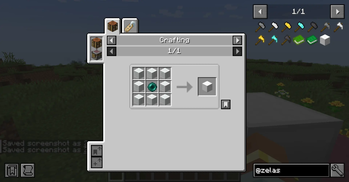
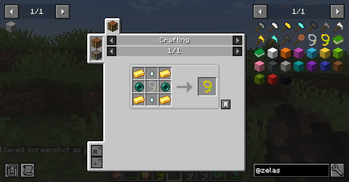
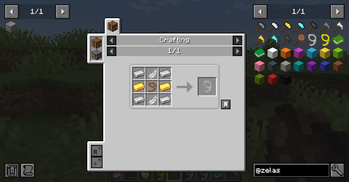
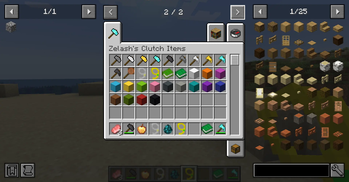
About this Mod
Zelash's Clutch Items (ZCI)
yes, this mod basically steals borrow items and blocks from other mods, but i have a few ideas for original items coming soon
ZCI is a utility mod that adds several highly useful items and blocks to improve your survival experience, reduce grinding, and optimize exploration and building.
Features
Hammers:
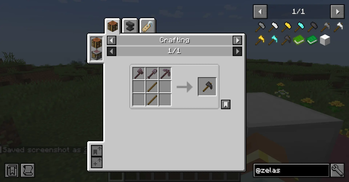
Hammers are upgraded mining tools that allow you to mine blocks in an area, saving time when clearing out large spaces.
- Tiers: Stone, Iron, Golden, Diamond, Netherite.
- Variable Mining Area: By default, Hammers mine a 3x3 area. You can Crouch + Right-Click to toggle the mining radius (3x3 -> 5x5 -> 7x7).
- Normal Mining: If you Crouch while using the hammer, it will mine a 1x1 area.
Paxels:
Tired of carrying a Pickaxe, an Axe, and a Shovel? The Paxel combines all three into one universal tool!
- Tiers: same as hammers
- All-in-One: Mines stone, dirt, wood, and everything in between.
- Special Actions: You can use the Paxel to strip logs, scrape/wax copper, and flatten grass into dirt paths just like the standard tools.
XP Tomes:
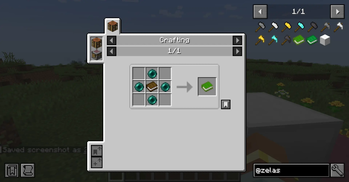
Store your hard-earned experience safely so you don't lose it upon death!
- XP Tome: Stores up to 30 experience levels (1395 XP).
- Large XP Tome: Stores 10x the amount (13950 XP).
- Crouch + Right-Click to store your current XP into the tome.
- Right-Click to retrieve XP from the tome.
- Configurability: In the mod's configuration file, you can change the max capacities, choose whether XP is transferred one level at a time or all at once, and even set an "XP retrieval cost" percentage.
Elevators:
Navigate your multi-level bases instantly with Elevator blocks!
- Usage: Place Elevators directly above or below each other (up to 32 blocks default, configurable).
- Stand and Go: Stand on the Elevator and Jump to teleport to the floor above, or Crouch to teleport to the floor below.
- Colors: There are 16 colored variants, you can configure elevators to only connect to elevators of the exact same color directly in the mod config (defaults to
false, allowing mixed colors).
Crafting on a Stick:
Access a 3x3 crafting grid anywhere, anytime!
- Crafting: Combine a Crafting Table and a Stick in the crafting grid.
- Usage: Simply Right-Click to open a fully functional, portable crafting menu. You can also press C while having the crafting stick in your hotbar to open the crafting menu.
Mob lasso:
Easily capture and transport friendly mobs around! With the superior mob lasso you can even capture villagers and hostile mobs.
- Usage: Simply Right-Click a mob with a lasso in hand.
- Blacklist: Mobs can be prevented from being captured by adding them to the entity type tag
zelashsclutchitems:mob_lasso_blacklist. To do this, create a datapack or use KubeJS/CraftTweaker to add the mob's registry name (e.g.minecraft:vindicator) todata/zelashsclutchitems/tags/entity_type/mob_lasso_blacklist.json.
⚙️ Configuration
ZCI includes a config file that allows server and modpack creators to tweak various parameters to fit their desired experience, more parameters coming soon.
Note: a good chunk of the code was ai generated, the logo and all the pixel art inside the game was made by me based on minecraft's assets
feel free to ask for similar items from other mods, or even an original one you think it should be in minecraft!
Created by Zelash.
Available Versions
How to Install Zelash's Clutch Items on Your Server
Order Server
Order a Minecraft Java server with at least 3 GB RAM (4 GB recommended).
Set neoforge Loader
In the panel under "Egg", select the neoforge loader and matching Minecraft version (1.21.1).
Install Mod
Open the mod browser in the dashboard and search for "Zelash's Clutch Items". Click "Install" – done! Alternatively, upload the .jar via SFTP to the /mods folder.
Compatibility
Mod Loaders
Minecraft Versions
1.21.1
Server-side
✓ RequiredRecommended RAM
4 GB(min. 3 GB)Frequently Asked Questions
Zelash's Clutch Items server crashes on startup – what to do?
Most common cause: wrong neoforge version or insufficient RAM. Check the server log (latest.log) for "OutOfMemoryError" or "Mixin" errors. With Mado Hosting: ensure at least 3 GB RAM is allocated and the loader matches the mod version (1.21.1). You can switch loaders with one click in the panel.
Is Zelash's Clutch Items compatible with neoforge?
Zelash's Clutch Items officially supports neoforge for Minecraft 1.21.1. The Mado dashboard automatically detects incompatible loader combinations.
Server lagging with Zelash's Clutch Items – how to optimize performance?
Recommended RAM: 4 GB (per 8 players). Use /spark profiler to check if Zelash's Clutch Items consumes the most tick time. Common fixes: reduce server view-distance to 8-10, install "performant" or "starlight" as supplementary mods on Forge. With Mado Hosting, your server runs on NVMe SSDs with dedicated CPU cores for minimal latency.
Similar Mods




![[ETF] Entity Texture Features](https://cdn.modrinth.com/data/BVzZfTc1/af683d206d50b05258d865b0d6e4aa2f2cee12f2_96.webp)
![[EMF] Entity Model Features](https://cdn.modrinth.com/data/4I1XuqiY/6e5bbd0d06b1741bfdab6c0cfab6de8fdaf0064c_96.webp)
Rent Modded Server
Install Zelash's Clutch Items with just one click on your server.