
ZoomW (WAIZA)
The Enhanced ZoomWMod allows players to fine-tune their zoom settings in Minecraft, providing a more immersive and customizable experience. Easily adjust zoom speed, default zoom levels, and enjoy a smooth, responsive zoom functionality with this mod.
Screenshots
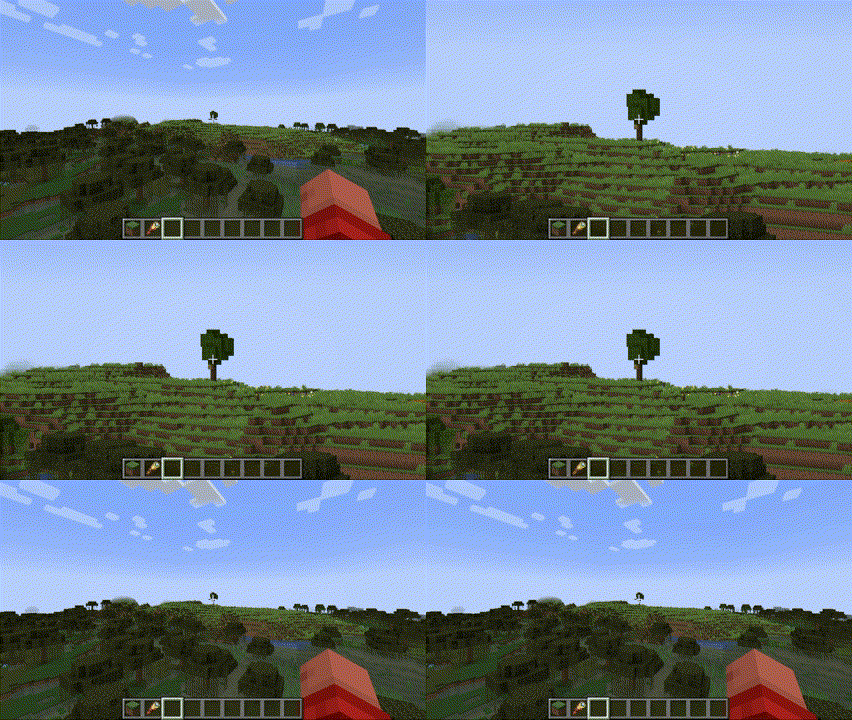
About this Mod




Overview
The Enhanced WAIZA Mod (What Am I Zooming At?) provides Minecraft players with a fully customizable zooming experience, allowing for more precise control over how you view the world. Whether you need to zoom in for a closer look at distant landscapes, or quickly zoom out for a broader view, this mod offers a range of settings that can be fine-tuned to match your preferences. Perfect for adventurers, builders, and anyone who enjoys a more tailored visual experience in Minecraft.

Dependencies
From now on you will need 2 new dependencies to run this mod.
- Mod Menu: This handles the config button.
- YACL: This handles the configuration screen and is a very reliable and thrustworthy mod.
You can find YACL here and Mod Menu here.
Mod Menu Integration
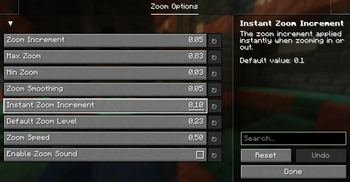
Upon first launch, the mod will generate a configuration file inside Mod Menu. You can access it through the Menu of Mod Menu. Here’s what each setting controls:
zoom_increment: Determines how much the zoom level changes with each scroll or key press. (Default: 0.05)
Description: A lower value allows for finer adjustments, while a higher value makes zooming faster but less precise.
max_zoom: Sets the maximum zoom level you can achieve. (Default: 0.83)
Description: This limits how far in you can zoom. Useful to prevent excessive zooming that might distort the view.
min_zoom: Sets the minimum zoom level you can achieve. (Default: 0.03)
Description: This controls how far out you can zoom, allowing for a wide-angle view of your surroundings.
zoom_smoothing: Controls the smoothness of the zoom transition. (Default: 0.05)
Description: A lower value results in a quicker, more immediate zoom, while a higher value makes zooming feel more gradual.
instant_zoom_increment: Defines the increment for instant zoom adjustments. (Default: 0.1)
Description: Use this setting for faster zoom changes when you need to quickly get closer or further away.
default_zoom_level: Sets the default zoom level that the mod reverts to when you release the zoom key. (Default: 0.23)
Description: This is your “starting point” for zooming, ensuring a consistent and comfortable level of zoom when not actively zooming in or out.

Installation
Install Minecraft Fabric Loader:
Ensure you have the Fabric Loader installed for your version of Minecraft.
Download and Place the Mod:
Download the Enhanced waiza .jar file and place it in your .minecraft/mods folder.
Run Minecraft
The mod will automatically create the configuration file on first run.
Tweak the settings to your liking through the in-game Mod Menu.
Languages supported
WAIZA supports the following languages:
- English
- Spanish
- Italian
- French
- German
- More to come...
Available Versions
How to Install ZoomW (WAIZA) on Your Server
Order Server
Order a Minecraft Java server with at least 3 GB RAM (4 GB recommended).
Set fabric Loader
In the panel under "Egg", select the fabric loader and matching Minecraft version (1.21.1).
Install Mod
Open the mod browser in the dashboard and search for "ZoomW (WAIZA)". Click "Install" – done! Alternatively, upload the .jar via SFTP to the /mods folder.
Compatibility
Mod Loaders
Minecraft Versions
1.21.1
Server-side
✗ UnsupportedRecommended RAM
4 GB(min. 3 GB)Frequently Asked Questions
ZoomW (WAIZA) server crashes on startup – what to do?
Most common cause: wrong fabric version or insufficient RAM. Check the server log (latest.log) for "OutOfMemoryError" or "Mixin" errors. With Mado Hosting: ensure at least 3 GB RAM is allocated and the loader matches the mod version (1.21.1). You can switch loaders with one click in the panel.
Is ZoomW (WAIZA) compatible with fabric?
ZoomW (WAIZA) officially supports fabric for Minecraft 1.21.1. The Mado dashboard automatically detects incompatible loader combinations.
Server lagging with ZoomW (WAIZA) – how to optimize performance?
Recommended RAM: 4 GB (per 8 players). Use /spark profiler to check if ZoomW (WAIZA) consumes the most tick time. Common fixes: reduce server view-distance to 8-10, install "performant" or "starlight" as supplementary mods on Forge. With Mado Hosting, your server runs on NVMe SSDs with dedicated CPU cores for minimal latency.
Similar Mods




Rent Modded Server
Install ZoomW (WAIZA) with just one click on your server.