
Zzoyn Markers
Adds a clean 3D marker system that displays distance in the world. Perfect for teamwork and PvP.
Screenshots
About this Mod



Zzoyn Markers
Clean 3D world-space markers for perfect teamwork
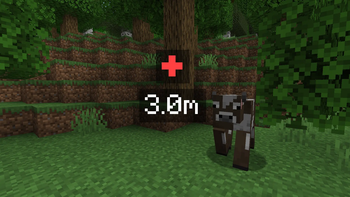
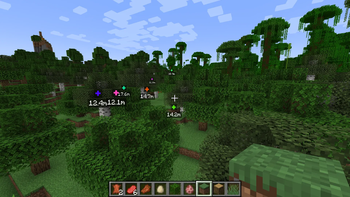
Zzoyn Markers adds a minimal and precise 3D marker system, rendered directly in the world — not on the HUD.
Place a marker with a keypress, and your teammates instantly see a floating distance label exactly where you pointed.
Smooth, readable and tactical — perfect for PvP and squad-based gameplay.
Features
- 3D world marker at the exact targeted location
- Visible through blocks (just like tactical pings in shooters)
- Smooth fade-in / fade-out animation
- Randomized marker colors for easier visual distinction
- Automatic distance display
- Marker distance automatically scales with your render distance
→ Max ping range = your render distance in blocks × 16 + 50 - Fully team-based marker sharing
- Lightweight, clean and performance-friendly
Commands
Built-in team system so your markers stay private unless you choose to share them.
/madd <player>
Adds the player to your marker team.
They will see all markers you create.
/mkick <player>
Removes the player from your marker team.
They will no longer receive your markers.
/mleave
You leave your own marker team.
Others will no longer see your markers until you form a new team.
Perfect for
- Tactical PvP
- Squad-based gameplay
- Military / mil-sim servers
- RP missions and scenarios
- Exploration with friends
- Any situation where you need a clean “ping” without clutter
Why this mod?
Unlike minimap waypoints or HUD icons, Zzoyn Markers places information directly into the world, making communication fast and intuitive — exactly how modern tactical games do it.
Clean. Precise. Zero noise.
Available Versions
How to Install Zzoyn Markers on Your Server
Order Server
Order a Minecraft Java server with at least 3 GB RAM (4 GB recommended).
Set forge Loader
In the panel under "Egg", select the forge loader and matching Minecraft version (1.20.1).
Install Mod
Open the mod browser in the dashboard and search for "Zzoyn Markers". Click "Install" – done! Alternatively, upload the .jar via SFTP to the /mods folder.
Compatibility
Mod Loaders
Minecraft Versions
1.20.1
Server-side
~ OptionalRecommended RAM
4 GB(min. 3 GB)Frequently Asked Questions
Zzoyn Markers server crashes on startup – what to do?
Most common cause: wrong forge version or insufficient RAM. Check the server log (latest.log) for "OutOfMemoryError" or "Mixin" errors. With Mado Hosting: ensure at least 3 GB RAM is allocated and the loader matches the mod version (1.20.1). You can switch loaders with one click in the panel.
Is Zzoyn Markers compatible with forge?
Zzoyn Markers officially supports forge for Minecraft 1.20.1. The Mado dashboard automatically detects incompatible loader combinations.
Server lagging with Zzoyn Markers – how to optimize performance?
Recommended RAM: 4 GB (per 8 players). Use /spark profiler to check if Zzoyn Markers consumes the most tick time. Common fixes: reduce server view-distance to 8-10, install "performant" or "starlight" as supplementary mods on Forge. With Mado Hosting, your server runs on NVMe SSDs with dedicated CPU cores for minimal latency.
Similar Mods




![[ETF] Entity Texture Features](https://cdn.modrinth.com/data/BVzZfTc1/af683d206d50b05258d865b0d6e4aa2f2cee12f2_96.webp)

Rent Modded Server
Install Zzoyn Markers with just one click on your server.