
Cottage World
Welcome to a cozy modpack filled with tons of explorable beautiful lands and building blocks for your tiny cottage. I hope you enjoy this pack, i'm open for feedback on the pack!
Screenshots
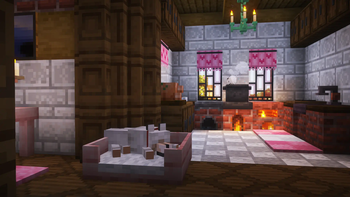
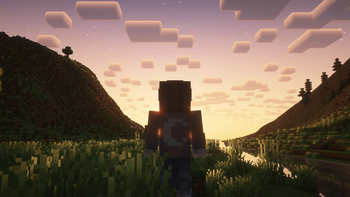
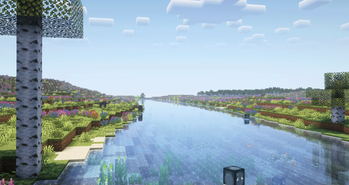
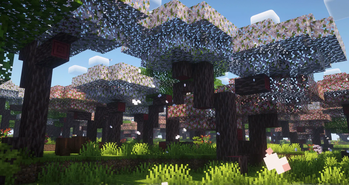
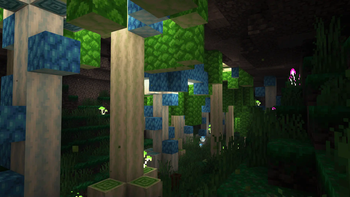
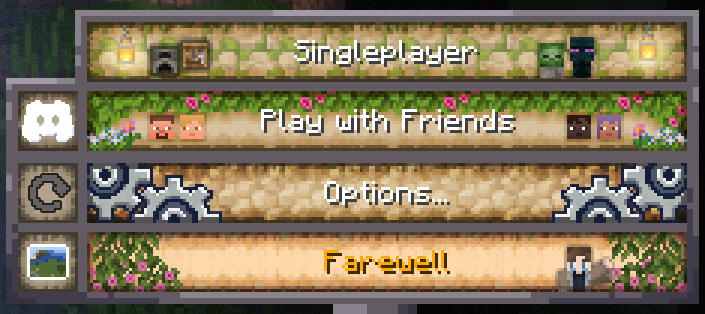
Über dieses Modpack
🏡 Welcome to Cottage World!
Immerse yourself in a cozy, relaxing Minecraft experience designed for players who love to build, farm, and explore at their own pace. Cottage World transforms your Minecraft world into a charming, atmospheric countryside filled with lush landscapes, adorable animals, and warm, homely aesthetics.
🌿 Features
- 🌱Cozy Aesthetic - Beautiful biomes, soft lighting, and rustic building options create a warm and welcoming atmosphere.
- 🌾Enhanced Farming & Cooking - A variety of crops, cooking mechanics, and decorative elements make for a richer homestead experience.
- ⚙️Create Mod Support - Automate your world with intuitive mechanical systems while keeping the cozy theme alive.
- 🎵Custom Music & Menu - Includes Sunlit Meadows and a fully customized Menu so you can start the pack with a calm cozy feel.
- 🗳️Exploration & Discovery - Discover vibrant villages, custom structures, and hidden secrets across the world.
- 🌟Low-Stress Gameplay - Designed for casual play, whether solo or with friends.
Experience the simple joys of Cottage World. Whether you're farming under the sunset, designing the perfect rustic home, or just taking in the scenery, this modpack is perfect for a stress-free Minecraft adventure. 🌾✨
Coziest Modpack Trailer!
New VR Support!
- Finally added working and optimized support for VR, creating extra fun moments with friends or a brand new experience in the Cottage World modpack!
🔗 Community & Support
- Report Bugs here!
- Feedback & Bug Reports - Let us know about any issues or suggestions!
With 240+ mods to explore, Cottage World transforms your Minecraft world into a lush, vibrant haven of adventure. Plus, we’re always improving! Join the community to share feedback and suggestions.
Remember to allocate at least 4GB = 4096MB Ram!
Verfügbare Versionen
Cottage World Server einrichten
Server bestellen
Wähle mindestens 6 GB RAM (8 GB empfohlen für Cottage World). Je nach Spieleranzahl: +1 GB pro 5 Spieler.
Modpack im Dashboard installieren
Öffne den Modpack-Browser im Dashboard, suche nach "Cottage World" und klicke "Installieren". Der fabric-Loader und Minecraft 1.20.1 werden automatisch konfiguriert.
Server starten & spielen
Starte den Server – alle Mods werden automatisch geladen. Teile die Server-IP mit Freunden und spielt zusammen!
Häufige Fragen
Cottage World Server crasht oder startet nicht – was tun?
Häufigste Ursachen: zu wenig RAM oder falscher fabric-Loader. Prüfe latest.log auf "OutOfMemoryError" → erhöhe RAM auf mindestens 8 GB. Bei "Mixin" oder "ClassNotFoundException": Modpack-Version und Loader stimmen nicht überein. Bei Mado Hosting werden Loader und Minecraft-Version beim Modpack-Install automatisch konfiguriert – das verhindert die meisten Startprobleme.
Wie viel RAM braucht ein Cottage World Server wirklich?
Minimum 6 GB, empfohlen 8 GB für stabile Performance. +1 GB pro 5 Spieler. Wichtig: Minecraft-Modpacks brauchen mehr RAM als Vanilla – plane pro zusätzlichem Spieler extra ein. Bei Mado Hosting kannst du den RAM jederzeit live hochskalieren, ohne Datenverlust (ab €7.800000000000001/Monat).
Kann ich eigene Mods zu Cottage World hinzufügen, ohne Konflikte?
Ja, aber achte auf die Kompatibilität: Nutze nur Mods für den gleichen Loader (fabric) und die gleiche Minecraft-Version (1.20.1). Häufige Probleme: ID-Konflikte bei Rezept-Mods und inkompatible Coremod-Versionen. Im Mado Dashboard zeigt der Mod-Browser nur kompatible Mods an und warnt bei bekannten Konflikten.
Cottage World Server laggt – Performance-Tipps
1) RAM auf 8 GB+ erhöhen. 2) Server-View-Distance auf 8 reduzieren (server.properties). 3) Pre-Generiere Chunks mit dem "Chunky" Plugin. 4) Prüfe mit /spark profiler welche Mods die meiste Tick-Time verbrauchen. Bei Mado Hosting laufen alle Server auf NVMe-SSDs mit dedizierten CPU-Kernen – das eliminiert Hardware als Engpass.
Ähnliche Modpacks
![Cobblemon Official Modpack [Fabric]](https://cdn.modrinth.com/data/5FFgwNNP/e7f9ee2e9d361623847853fe2ddce42f519ee64f.png)
![COBBLEVERSE - Pokemon Adventure [Cobblemon]](https://cdn.modrinth.com/data/Jkb29YJU/581ecf54530972afb18a04660afd820f2f24f6c7.png)
![Better MC [FABRIC] - BMC2](https://cdn.modrinth.com/data/shFhR8Vx/a19c2bcb51d38f32f138d3607e91cb2b7b8e387f_96.webp)


![Better MC [FORGE] - BMC4](https://cdn.modrinth.com/data/4BV47HRn/7f5ef7cc61b2593609aabef3ed07a866a4f11b73_96.webp)
Cottage World Server mieten
Starte deinen eigenen Server mit automatischer Modpack-Installation.
Details
- Lizenz
- LicenseRef-All-Rights-Reserved
- Server-seitig
- Erforderlich
- Client-seitig
- Erforderlich
Unterstützte Versionen
Starte deinen Cottage World Server jetzt
Ab €7.80/Monat; für die beste Performance werden 8 GB RAM empfohlen.
Server konfigurieren →