
Create: Cinematic
Create Cinematic enhances visuals, integrates the Replay Mod, and adds exciting structures for all players. Create, explore, and share cinematic adventures in Minecraft. Made with Content Creators in mind!
Screenshots
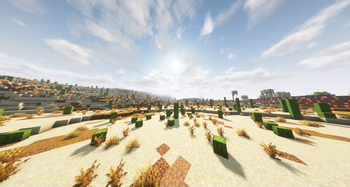
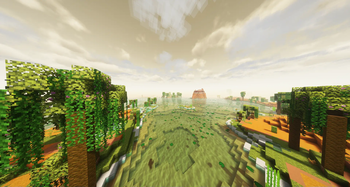
Über dieses Modpack
Create Cinematic
Create Cinematic is a Minecraft modpack designed to elevate the cinematic and visual aspects of your Minecraft adventures. Available only on Modrinth, this modpack combines the power of the Create mod, Replay Mod, and additional enhancements to create a truly immersive and visually stunning gaming experience. Crafted with content creators in mind, this modpack is accessible to all Minecraft players who seek to enhance their gameplay. It also introduces a variety of new structures to enrich your world.
Key Features
Cinematic Enhancements
- Immersive Camera Effects: Take control of your in-game camera to capture cinematic moments and explore your creations from unique angles. Perfect for in-game photography and cinematography, enhanced further by the Replay Mod.
Replay Mod Integration
- Cinematic Video Creation: The inclusion of Replay Mod allows content creators to record and edit gameplay, creating captivating cinematic videos to share with their audience. Craft your own Minecraft stories and engage your viewers.
Create Mod Integration
- Seamless Compatibility: This modpack seamlessly integrates with the Create mod, enabling you to take full advantage of Create's mechanics and features, enhancing your gameplay and creativity.
New Structures
- Exciting Additions: Explore new structures and elements within your Minecraft world, including stunning architectural additions, mysterious dungeons, and hidden treasures. These enrich your Minecraft adventures, making each journey more exciting.
Explore and Share
Create Cinematic transforms your Minecraft experience into a visual masterpiece. Capture and share breathtaking moments, create captivating cinematic videos, and immerse yourself in an enhanced Minecraft universe. While it was designed with content creators in mind, this modpack is accessible to all Minecraft players who seek to enhance their gameplay, making it an excellent choice for both creators and regular players alike.
Discover the beauty and wonder of Minecraft like never before with the Create Cinematic Modpack. Take your in-game cinematography and creativity to new heights, all while seamlessly recording and sharing your adventures through the Replay Mod.
Sponsored By Bisect Hosting
Verfügbare Versionen
Create: Cinematic Server einrichten
Server bestellen
Wähle mindestens 6 GB RAM (8 GB empfohlen für Create: Cinematic). Je nach Spieleranzahl: +1 GB pro 5 Spieler.
Modpack im Dashboard installieren
Öffne den Modpack-Browser im Dashboard, suche nach "Create: Cinematic" und klicke "Installieren". Der forge-Loader und Minecraft 1.20.1 werden automatisch konfiguriert.
Server starten & spielen
Starte den Server – alle Mods werden automatisch geladen. Teile die Server-IP mit Freunden und spielt zusammen!
Häufige Fragen
Create: Cinematic Server crasht oder startet nicht – was tun?
Häufigste Ursachen: zu wenig RAM oder falscher forge-Loader. Prüfe latest.log auf "OutOfMemoryError" → erhöhe RAM auf mindestens 8 GB. Bei "Mixin" oder "ClassNotFoundException": Modpack-Version und Loader stimmen nicht überein. Bei Mado Hosting werden Loader und Minecraft-Version beim Modpack-Install automatisch konfiguriert – das verhindert die meisten Startprobleme.
Wie viel RAM braucht ein Create: Cinematic Server wirklich?
Minimum 6 GB, empfohlen 8 GB für stabile Performance. +1 GB pro 5 Spieler. Wichtig: Minecraft-Modpacks brauchen mehr RAM als Vanilla – plane pro zusätzlichem Spieler extra ein. Bei Mado Hosting kannst du den RAM jederzeit live hochskalieren, ohne Datenverlust (ab €7.800000000000001/Monat).
Kann ich eigene Mods zu Create: Cinematic hinzufügen, ohne Konflikte?
Ja, aber achte auf die Kompatibilität: Nutze nur Mods für den gleichen Loader (forge) und die gleiche Minecraft-Version (1.20.1). Häufige Probleme: ID-Konflikte bei Rezept-Mods und inkompatible Coremod-Versionen. Im Mado Dashboard zeigt der Mod-Browser nur kompatible Mods an und warnt bei bekannten Konflikten.
Create: Cinematic Server laggt – Performance-Tipps
1) RAM auf 8 GB+ erhöhen. 2) Server-View-Distance auf 8 reduzieren (server.properties). 3) Pre-Generiere Chunks mit dem "Chunky" Plugin. 4) Prüfe mit /spark profiler welche Mods die meiste Tick-Time verbrauchen. Bei Mado Hosting laufen alle Server auf NVMe-SSDs mit dedizierten CPU-Kernen – das eliminiert Hardware als Engpass.
Ähnliche Modpacks
![Cobblemon Official Modpack [Fabric]](https://cdn.modrinth.com/data/5FFgwNNP/e7f9ee2e9d361623847853fe2ddce42f519ee64f.png)
![COBBLEVERSE - Pokemon Adventure [Cobblemon]](https://cdn.modrinth.com/data/Jkb29YJU/581ecf54530972afb18a04660afd820f2f24f6c7.png)
![Better MC [FABRIC] - BMC2](https://cdn.modrinth.com/data/shFhR8Vx/a19c2bcb51d38f32f138d3607e91cb2b7b8e387f_96.webp)


![Better MC [FORGE] - BMC4](https://cdn.modrinth.com/data/4BV47HRn/7f5ef7cc61b2593609aabef3ed07a866a4f11b73_96.webp)
Create: Cinematic Server mieten
Starte deinen eigenen Server mit automatischer Modpack-Installation.
Unterstützte Versionen
Starte deinen Create: Cinematic Server jetzt
Ab €7.80/Monat; für die beste Performance werden 8 GB RAM empfohlen.
Server konfigurieren →