
Create: Cinematic
Create Cinematic enhances visuals, integrates the Replay Mod, and adds exciting structures for all players. Create, explore, and share cinematic adventures in Minecraft. Made with Content Creators in mind!
Screenshots
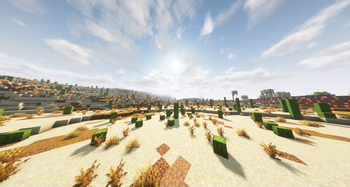
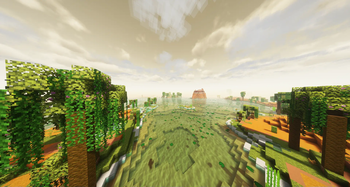
About this Modpack
Create Cinematic
Create Cinematic is a Minecraft modpack designed to elevate the cinematic and visual aspects of your Minecraft adventures. Available only on Modrinth, this modpack combines the power of the Create mod, Replay Mod, and additional enhancements to create a truly immersive and visually stunning gaming experience. Crafted with content creators in mind, this modpack is accessible to all Minecraft players who seek to enhance their gameplay. It also introduces a variety of new structures to enrich your world.
Key Features
Cinematic Enhancements
- Immersive Camera Effects: Take control of your in-game camera to capture cinematic moments and explore your creations from unique angles. Perfect for in-game photography and cinematography, enhanced further by the Replay Mod.
Replay Mod Integration
- Cinematic Video Creation: The inclusion of Replay Mod allows content creators to record and edit gameplay, creating captivating cinematic videos to share with their audience. Craft your own Minecraft stories and engage your viewers.
Create Mod Integration
- Seamless Compatibility: This modpack seamlessly integrates with the Create mod, enabling you to take full advantage of Create's mechanics and features, enhancing your gameplay and creativity.
New Structures
- Exciting Additions: Explore new structures and elements within your Minecraft world, including stunning architectural additions, mysterious dungeons, and hidden treasures. These enrich your Minecraft adventures, making each journey more exciting.
Explore and Share
Create Cinematic transforms your Minecraft experience into a visual masterpiece. Capture and share breathtaking moments, create captivating cinematic videos, and immerse yourself in an enhanced Minecraft universe. While it was designed with content creators in mind, this modpack is accessible to all Minecraft players who seek to enhance their gameplay, making it an excellent choice for both creators and regular players alike.
Discover the beauty and wonder of Minecraft like never before with the Create Cinematic Modpack. Take your in-game cinematography and creativity to new heights, all while seamlessly recording and sharing your adventures through the Replay Mod.
Sponsored By Bisect Hosting
Available Versions
How to Set Up a Create: Cinematic Server
Order Server
Choose at least 6 GB RAM (8 GB recommended for Create: Cinematic). Based on player count: per 5 players.
Install Modpack in Dashboard
Open the modpack browser in the dashboard, search for "Create: Cinematic" and click "Install". The forge loader and Minecraft 1.20.1 are configured automatically.
Start Server & Play
Start the server – all mods are loaded automatically. Share the server IP with friends and play together!
Frequently Asked Questions
Create: Cinematic server crashes or won't start – what to do?
Most common causes: insufficient RAM or wrong forge loader. Check latest.log for "OutOfMemoryError" → increase RAM to at least 8 GB. For "Mixin" or "ClassNotFoundException" errors: modpack version and loader don't match. With Mado Hosting, loader and Minecraft version are auto-configured on modpack install – preventing most startup issues.
How much RAM does a Create: Cinematic server really need?
Minimum 6 GB, recommended 8 GB for stable performance. per 5 players. Important: Minecraft modpacks need more RAM than vanilla – plan extra per additional player. With Mado Hosting, you can scale RAM up live at any time without data loss (from €7.800000000000001/month).
Can I add custom mods to Create: Cinematic without conflicts?
Yes, but check compatibility: only use mods for the same loader (forge) and same Minecraft version (1.20.1). Common issues: ID conflicts with recipe mods and incompatible coremod versions. The Mado dashboard mod browser only shows compatible mods and warns about known conflicts.
Create: Cinematic server lagging – performance tips
1) Increase RAM to 8 GB+. 2) Reduce server view-distance to 8 (server.properties). 3) Pre-generate chunks with the "Chunky" plugin. 4) Use /spark profiler to check which mods consume the most tick time. With Mado Hosting, all servers run on NVMe SSDs with dedicated CPU cores – eliminating hardware as a bottleneck.
Similar Modpacks
![Cobblemon Official Modpack [Fabric]](https://cdn.modrinth.com/data/5FFgwNNP/e7f9ee2e9d361623847853fe2ddce42f519ee64f.png)
![COBBLEVERSE - Pokemon Adventure [Cobblemon]](https://cdn.modrinth.com/data/Jkb29YJU/581ecf54530972afb18a04660afd820f2f24f6c7.png)
![Better MC [FABRIC] - BMC2](https://cdn.modrinth.com/data/shFhR8Vx/a19c2bcb51d38f32f138d3607e91cb2b7b8e387f_96.webp)


![Better MC [FORGE] - BMC4](https://cdn.modrinth.com/data/4BV47HRn/7f5ef7cc61b2593609aabef3ed07a866a4f11b73_96.webp)
Rent Create: Cinematic Server
Start your own server with automatic modpack installation.
Supported Versions
Start your Create: Cinematic Server now
From €7.80/month; 8 GB RAM is recommended for best performance.
Configure Server →