
Modrinth · Forge
Create Colony Server mieten
Dein eigener Create Colony Server auf AMD Ryzen 9 ohne Thread-Limit. Der Server ist in der Regel unter 60 Sekunden bereit, das Pack installierst du danach mit einem Klick im Modpack-Browser.
Create + Minecolonies Modpack
- Downloads
- 6.9K
- Follower
- 0
- Loader
- Forge
- Minecraft
- 1.20.1
- Aktualisiert
- –
Screenshots
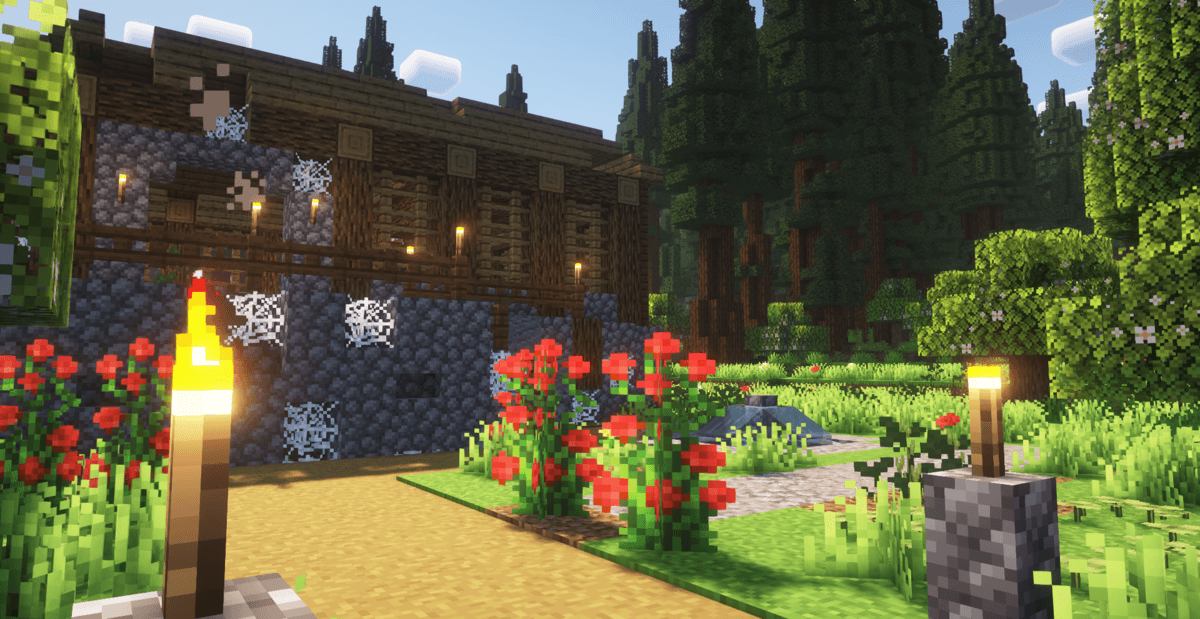
So sieht Create Colony aus


Bilder: Create Colony auf Modrinth, vom Projektteam veröffentlicht.
Einrichtung
In vier Schritten zum Create Colony Server
Prüfe bei Fehlern zuerst Startprotokoll, Java-Version, Loader und Abhängigkeiten. Erhöhe RAM nur bei Hinweisen auf Speichermangel. Behalte vor Updates eine Kopie der funktionierenden Installation.
- 01
Konfigurieren
8 GB RAM sind vorausgewählt und Create Colony ist im Konfigurator vorgemerkt. Laufzeit und Add-ons wählst du selbst.
- 02
Bezahlen
Per Kreditkarte oder PayPal. Der Server ist in der Regel unter 60 Sekunden bereit.
- 03
Pack installieren
Öffne den Modpack-Browser im Panel, wähle Modrinth, prüfe die Projekt-ID und installiere die gewünschte Pack-Version. Sichere eine bestehende Welt vorher.
- 04
Verbinden
Alle Spieler installieren dieselbe Pack-Version in einem kompatiblen Launcher und verbinden sich über die Serveradresse aus dem Panel.
Modrinth-Projekt-ID: byYPiovQ
Das Panel
Pack installieren, Fehler finden.
Echte Screenshots aus dem Mado Panel. Beides ist bei jedem Minecraft Server enthalten.
Modpack-Browser
Modrinth und CurseForge direkt im Panel.
Pack suchen, Version wählen, installieren. Loader und Serverdateien musst du nicht von Hand hochladen.

KI-Crash-Analyse
Wenn ein Mod crasht, liest die Analyse das Log.
Große Modpacks scheitern oft an einer einzelnen Mod, Java-Version oder fehlenden Abhängigkeit. Die Analyse nennt eine wahrscheinliche Ursache und einen Lösungsvorschlag.

Versionen
Veröffentlichte Pack-Versionen
Server und Spieler brauchen dieselbe Pack-Version. Wähle sie im Modpack-Browser passend zu den Clients deiner Gruppe.
Create Colony · ModrinthOriginalbeschreibung des Projektautors

📃 About This Modpack:
Create Colony is a modpack that combines the powerful automation of Create with the immersive colony-building of MineColonies. This modpack offers a gameplay experience where you can automate production, manage a growing population, and explore a world full of life and detail. With popular addons for both Create and MineColonies, Alex’s Mobs, Biomes o' Plenty and several performance mods included.📁 Modpack Contents:
Main Mods:
- Create - Aesthetic Technology that empowers the Player.
- Create: Steam 'n' Rails - Adding depth to Create's rail network & steam system.
- Create Crafts & Additions - Create Crafts & Additions extends Create and acts as a bridge between electricity and kinetic energy.
- Create: Copycats+ - All the copycats you've ever wanted, combined into a single mod.
- Create Slice & Dice - Making automation for Farmers Delight more sensible.
- Create Deco - Industrial decoration themed around the aesthetics of the Create mod.
- Create: Structures - Add-on for Create that implements naturally generating structures containing early-game Create contraptions and items. - Create Big Cannons - A Minecraft mod for building large cannons with the Create mod. - Create: New Age - An addon for the Create mod that adds integration with electricity. - Create Goggles - Adds Goggle Helmets and Armored Backtanks for Create Mod. - Create: Bells & Whistles - Additions and adornments for the modern Create engineer. - Create: Interiors - A complement to the Create mod that adds new furniture. - Create: Enchantment Industry - Automatic Enchanting, with Create. - And many more Create Addons. - Alex's Mobs - 85+ New mobs with stylistic quality above the default game. - Biomes O' Plenty - Adds 50+ unique biomes to enhance your world, with new trees, flowers, and more. - MineColonies and some Addons. - AppleSkin - Food/hunger-related HUD improvements. - Carry On - Carry On allows you to pick up Tile Entities and Mobs and carry them around. - Comforts - Adds sleeping bags and hammocks for, respectively, portability and turning day to night, without setting new spawns. - Corpse - Never lose your items again. - Chipped - Every block deserves a friend. - Lootr - All loot chests are instanced per player and visually unique. - Rechiseled - Allows you to chisel blocks into various decorative blocks with connected textures. - Rechiseled: Create - Adds new decorative variants of blocks in Create. - Quark - This mod is a collection of small things. - Nature's Compass - Allows you to locate biomes anywhere in the world. - Explorer's Compass - Allows you to locate structures anywhere in the world. - More Mob Variants - Adds new variants to existing mobs. - Sophisticated Backpacks - Yet another backpack mod this time with backpack you can place in world, color in different color combinations, upgrade with more inventory, etc. - Simple Voice Chat - A working voice chat in Minecraft. - Xaero's Minimap - Displays a map of the nearby world terrain, players, mobs, entities in the corner of your screen. - Xenon - A Forge port of the Sodium performance mod. - FerriteCore - Memory usage optimizations. - Entity Culling - Using async path-tracing to hide Block-/Entities that are not visible. - And many more Perfomance Mods.
Main Resourcepacks:
- Tom's Create Storage (not enabled by default) - Create Styled Tom's Simple Storage. (More Immersive)
- Create Style Sophisticated Backpacks (not enabled by default) - Sophisticated Backpacks but Creatified. (More Immersive)
Shaderpacks:
- Aurora's Shaders (not enabled by default) - Recommended shaderpack.
- Complementary Shaders - Reimagined (not enabled by default) - Recommended shaderpack.
💻 System Requirements
- Minimum RAM: It is recommended that you have 4GB allocated
Mods that need to be in the description
- Cosmetic Armor Reworked: https://www.curseforge.com/minecraft/mc-mods/cosmetic-armor-reworked
- Create Compact Exp: https://www.curseforge.com/minecraft/mc-mods/create-compact-exp
- Create Recycle Everything: https://www.curseforge.com/minecraft/mc-mods/create-recycle-everything
Ähnliche Packs
Weitere server-fähige Modpacks
 Server-fähig

Cobblemon Official Modpack [Fabric]
von CobbledStudios
The official modpack of the Cobblemon mod, for Fabric!
 Server-fähig

COBBLEVERSE - Pokemon Adventure [Cobblemon]
von LUMYVERSE
Start a true Pokémon adventure in Minecraft: Cobblemon 1.8.4 | ALL 1025 Pokémon! | Mega Evolutions | Gyms & Badges | Starter Kit | Unique Structures | Custom Music | Shaders | Optimized | So much more! [1.21.1]
 Server-fähig

Better MC [FABRIC] - BMC2
von SHXRKIE
Version 1.20 | A Proper Vanilla+ Modpack | Don't play Vanilla play this!
 Server-fähig

Vanilla Perfected
von demonjoeTV
A compilation of Vanilla Plus mods & packs to perfect the Minecraft experience without drifting too far from the feel of the base game!
Bereit für deinen Create Colony Server?
8 GB RAM ab 16,00 € im Monat. 35 % auf den 1. Monat mit MADO35.