
Create Aeronautics +
Build anything from airships to planes and cars!
Screenshots
Über dieses Modpack
About
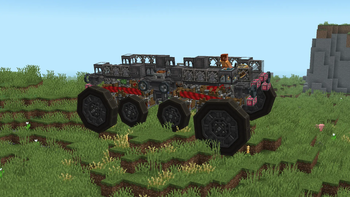
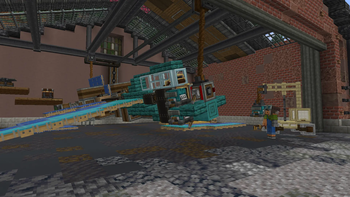
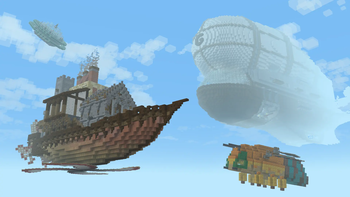
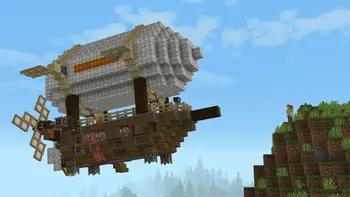
Create Aeronautics expands on the systems of Create to enable players to build all types of vehicles and physics contraptions using Sable. It features content and blocks for building anything from planes, drones, and hot-air balloons, to cars, trucks, and whimsical gizmos.
It contains 3 "sections" of content:
Simulated is the core of the project. It provides assembly, redstone components, and all tools necessary for interacting with simulated contraptions.
Aeronautics enables all manner of flying contraptions with hot air, propellers, and magic floating rocks.
Offroad allows you to put almost anything that looks like a wheel to use in making land vehicles.
Aeronautics is out, and an alpha release of Create+ is out with it! Remember though, it is an alpha. The summary is that some mods, like Tetra, are missing due to not being updated to the latest version, and as of right now, there is no server pack. However, a beta version is getting closer and closer over time.
Create+ is built around a simple concept: A simple Vanilla+ modpack, but with one exception that the pack revolves around: Create.
You can expect Vanilla+ mods like Supplementaries as well as Create addons such as Create: Aeronautics. It will also have mods to have players focus on the Create way of doing things - that is, the build it yourself way - such as Aileron. With it, in order to venture vast distances or travel quickly, players can't just make a bunch of firework rockets. They'll have to actually build planes, trains, helicopters, or whatever else floats their boat to do so. And don't forget about the infrastructure they'll need to build to do so.
Create Aeronautics also:
Is Performant and lightweight. See the:
List of performance mods
Is Built for survival multiplayer with friends.
Voicechat is already included, and it also has e4mc if you don't want to pay for a server or host one yourself. Although, if you want your friends to be able to play while you aren't on, Kinetic is pretty cheap... $7/month? For 8GB RAM? In this economy!?!
Has the visual upgrades your used to, like EMF+ETF for Fresh Animations and Fresh Player Extension, Polytone to support Visual Effects+, Continuity for connected textures, etc.. There are also smaller niceties like smooth swapping and eating animations.
Has a truly Vanilla+ base. No unbalanced, bloated, unnecessary mods. For example, Farmer's Delight and some addons for it, Quark (with some modules disabled), Amendments, etc. as well as smaller tweaks like potions stacking to 16 and Lootr.
And plenty more. I hope you like it! If you have any suggestions or encounter any issues, just visit the report issues link of the side of this description.
Verfügbare Versionen
Create Aeronautics + Server einrichten
Server bestellen
Wähle mindestens 6 GB RAM (8 GB empfohlen für Create Aeronautics +). Je nach Spieleranzahl: +1 GB pro 5 Spieler.
Modpack im Dashboard installieren
Öffne den Modpack-Browser im Dashboard, suche nach "Create Aeronautics +" und klicke "Installieren". Der neoforge-Loader und Minecraft 1.21.1 werden automatisch konfiguriert.
Server starten & spielen
Starte den Server – alle Mods werden automatisch geladen. Teile die Server-IP mit Freunden und spielt zusammen!
Häufige Fragen
Create Aeronautics + Server crasht oder startet nicht – was tun?
Häufigste Ursachen: zu wenig RAM oder falscher neoforge-Loader. Prüfe latest.log auf "OutOfMemoryError" → erhöhe RAM auf mindestens 8 GB. Bei "Mixin" oder "ClassNotFoundException": Modpack-Version und Loader stimmen nicht überein. Bei Mado Hosting werden Loader und Minecraft-Version beim Modpack-Install automatisch konfiguriert – das verhindert die meisten Startprobleme.
Wie viel RAM braucht ein Create Aeronautics + Server wirklich?
Minimum 6 GB, empfohlen 8 GB für stabile Performance. +1 GB pro 5 Spieler. Wichtig: Minecraft-Modpacks brauchen mehr RAM als Vanilla – plane pro zusätzlichem Spieler extra ein. Bei Mado Hosting kannst du den RAM jederzeit live hochskalieren, ohne Datenverlust (ab €7.800000000000001/Monat).
Kann ich eigene Mods zu Create Aeronautics + hinzufügen, ohne Konflikte?
Ja, aber achte auf die Kompatibilität: Nutze nur Mods für den gleichen Loader (neoforge) und die gleiche Minecraft-Version (1.21.1). Häufige Probleme: ID-Konflikte bei Rezept-Mods und inkompatible Coremod-Versionen. Im Mado Dashboard zeigt der Mod-Browser nur kompatible Mods an und warnt bei bekannten Konflikten.
Create Aeronautics + Server laggt – Performance-Tipps
1) RAM auf 8 GB+ erhöhen. 2) Server-View-Distance auf 8 reduzieren (server.properties). 3) Pre-Generiere Chunks mit dem "Chunky" Plugin. 4) Prüfe mit /spark profiler welche Mods die meiste Tick-Time verbrauchen. Bei Mado Hosting laufen alle Server auf NVMe-SSDs mit dedizierten CPU-Kernen – das eliminiert Hardware als Engpass.
Ähnliche Modpacks
![Cobblemon Official Modpack [Fabric]](https://cdn.modrinth.com/data/5FFgwNNP/e7f9ee2e9d361623847853fe2ddce42f519ee64f.png)
![COBBLEVERSE - Pokemon Adventure [Cobblemon]](https://cdn.modrinth.com/data/Jkb29YJU/581ecf54530972afb18a04660afd820f2f24f6c7.png)
![Better MC [FABRIC] - BMC2](https://cdn.modrinth.com/data/shFhR8Vx/a19c2bcb51d38f32f138d3607e91cb2b7b8e387f_96.webp)


![Better MC [FORGE] - BMC4](https://cdn.modrinth.com/data/4BV47HRn/7f5ef7cc61b2593609aabef3ed07a866a4f11b73_96.webp)
Create Aeronautics + Server mieten
Starte deinen eigenen Server mit automatischer Modpack-Installation.
Details
- Lizenz
- LicenseRef-All-Rights-Reserved
- Server-seitig
- Erforderlich
- Client-seitig
- Erforderlich
Unterstützte Versionen
Starte deinen Create Aeronautics + Server jetzt
Ab €7.80/Monat; für die beste Performance werden 8 GB RAM empfohlen.
Server konfigurieren →