
FPSTODOMOON Sodium Edition
Are you looking for a potato pc resurrection? Then look no further. No unnecessary extra mods. Just fps boost and some necessary quality of life mods.
Screenshots


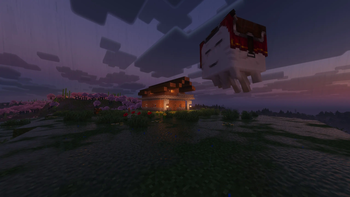



Über dieses Modpack
🚀 FPSTODOMOON: Sodium Edition
Elevate your Minecraft experience to the stratosphere.
Tired of suboptimal performance? FPSTODOMOON is the ultimate, high-octane optimization suite meticulously engineered to eliminate bottlenecks and launch your frame rates to the moon. We don't just add mods; we overhaul the entire engine for a seamless, crystal-clear experience.
🛠️ The Optimization Arsenal
🏎️ The Core Engine
Sodium: The crown jewel of the pack. By rewriting the rendering pipeline from the ground up, Sodium eliminates micro-stutters and provides a massive boost to frame rates that vanilla simply cannot match.

Lithium: A general-purpose optimization tool for the game engine. It refines physics, AI, and block-ticking logic to deliver up to 50% faster tick times, keeping your world running smoothly even under heavy loads.

C2ME (Concurrent Chunk Management Engine): Designed for the modern era. C2ME utilizes multiple CPU cores to parallelize world generation and chunk loading, making exploration fast and stutter-free.
🛡️ Resource & Memory Management
FerriteCore: Memory is precious. FerriteCore swoops in to optimize RAM usage through JVM-level tweaks, making your game run leaner and significantly reducing the risk of "Out of Memory" crashes.

Dynamic FPS: Intelligent resource allocation. When you're tabbed out or multitasking, Dynamic FPS automatically throttles the frame rate to conserve your system's power for other tasks.

ImmediatelyFast: Focused on immediate-mode rendering. This mod optimizes the UI and text rendering, ensuring that every menu and interface feels snappy and responsive.
🔭 Advanced Rendering Logic
Entity Culling & More Culling: Why render what’s behind a wall? These mods work in tandem to aggressively skip the rendering of hidden objects and occluded faces, freeing up massive amounts of GPU bandwidth for what actually matters.

Krypton: A professional-grade networking stack. Krypton streamlines data packets to reduce latency and jitter, ensuring your multiplayer sessions are stable and "rubber-band" free.

Spark: The ultimate diagnostic tool. If you ever encounter a performance hiccup, Spark acts as your personal detective, profiling CPU and memory usage to help you maintain peak performance.
💎 Why It's Different
Unlike bloated modpacks that prioritize quantity, FPSTODOMOON focuses on pure efficiency. Every mod in this list is selected for its compatibility and its ability to contribute to a "zero-lag" environment.
"Experience Minecraft at its absolute peak performance. Don't just play—ascend."
📥 Technical Setup
Download the latest .mrpack file.

Import into your preferred launcher (Modrinth, Prism, etc.).

Lift-off: Launch the game and witness the performance leap immediately.
Bugs:
If your system language is not English, or if Java is running with a non-English locale (for example Turkish), Minecraft may crash on startup due to a bug introduced in the latest Sodium update. This happens because Sodium currently does not fully handle locale-specific characters during initialization.
To fix this issue, force Java to use the English (US) locale by adding the following JVM arguments to your launcher: -Duser.language=en -Duser.country=US
Verfügbare Versionen
FPSTODOMOON Sodium Edition Server einrichten
Server bestellen
Wähle mindestens 6 GB RAM (8 GB empfohlen für FPSTODOMOON Sodium Edition). Je nach Spieleranzahl: +1 GB pro 5 Spieler.
Modpack im Dashboard installieren
Öffne den Modpack-Browser im Dashboard, suche nach "FPSTODOMOON Sodium Edition" und klicke "Installieren". Der fabric-Loader und Minecraft 26.2 werden automatisch konfiguriert.
Server starten & spielen
Starte den Server – alle Mods werden automatisch geladen. Teile die Server-IP mit Freunden und spielt zusammen!
Häufige Fragen
FPSTODOMOON Sodium Edition Server crasht oder startet nicht – was tun?
Häufigste Ursachen: zu wenig RAM oder falscher fabric-Loader. Prüfe latest.log auf "OutOfMemoryError" → erhöhe RAM auf mindestens 8 GB. Bei "Mixin" oder "ClassNotFoundException": Modpack-Version und Loader stimmen nicht überein. Bei Mado Hosting werden Loader und Minecraft-Version beim Modpack-Install automatisch konfiguriert – das verhindert die meisten Startprobleme.
Wie viel RAM braucht ein FPSTODOMOON Sodium Edition Server wirklich?
Minimum 6 GB, empfohlen 8 GB für stabile Performance. +1 GB pro 5 Spieler. Wichtig: Minecraft-Modpacks brauchen mehr RAM als Vanilla – plane pro zusätzlichem Spieler extra ein. Bei Mado Hosting kannst du den RAM jederzeit live hochskalieren, ohne Datenverlust (ab €7.800000000000001/Monat).
Kann ich eigene Mods zu FPSTODOMOON Sodium Edition hinzufügen, ohne Konflikte?
Ja, aber achte auf die Kompatibilität: Nutze nur Mods für den gleichen Loader (fabric) und die gleiche Minecraft-Version (26.2). Häufige Probleme: ID-Konflikte bei Rezept-Mods und inkompatible Coremod-Versionen. Im Mado Dashboard zeigt der Mod-Browser nur kompatible Mods an und warnt bei bekannten Konflikten.
FPSTODOMOON Sodium Edition Server laggt – Performance-Tipps
1) RAM auf 8 GB+ erhöhen. 2) Server-View-Distance auf 8 reduzieren (server.properties). 3) Pre-Generiere Chunks mit dem "Chunky" Plugin. 4) Prüfe mit /spark profiler welche Mods die meiste Tick-Time verbrauchen. Bei Mado Hosting laufen alle Server auf NVMe-SSDs mit dedizierten CPU-Kernen – das eliminiert Hardware als Engpass.
Ähnliche Modpacks

![Cobblemon Official Modpack [Fabric]](https://cdn.modrinth.com/data/5FFgwNNP/e7f9ee2e9d361623847853fe2ddce42f519ee64f.png)
![COBBLEVERSE - Pokemon Adventure [Cobblemon]](https://cdn.modrinth.com/data/Jkb29YJU/581ecf54530972afb18a04660afd820f2f24f6c7.png)
![Better MC [FABRIC] - BMC2](https://cdn.modrinth.com/data/shFhR8Vx/a19c2bcb51d38f32f138d3607e91cb2b7b8e387f_96.webp)


FPSTODOMOON Sodium Edition Server mieten
Starte deinen eigenen Server mit automatischer Modpack-Installation.
Details
- Lizenz
- BSD 3-Clause "New" or "Revised" License
- Server-seitig
- Erforderlich
- Client-seitig
- Erforderlich
Unterstützte Versionen
Starte deinen FPSTODOMOON Sodium Edition Server jetzt
Ab €7.80/Monat; für die beste Performance werden 8 GB RAM empfohlen.
Server konfigurieren →