
GABG's XVanilla
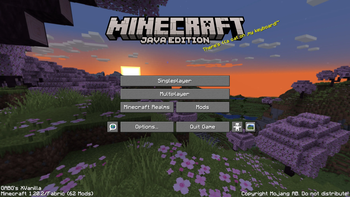
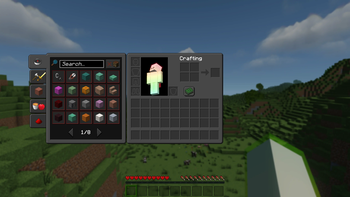
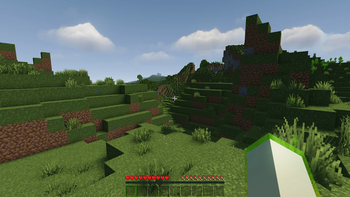
Derived from Fabulously Optimized, GABG's XVanilla adds many QoL improvements to the game. Faithful 32x and Shaders included!
Screenshots
Über dieses Modpack
GABG's XVanilla



GABG's XVanilla (GABG's XV or GXV if it's too long for you) is an opinionated modpack derived from Fabulously Optimized (FO for short) with the goal of adding even more QoL (Quality of Live) improvements
Differences from FO
Items with their names formatted with strikethough are present in FO, but are removed from GABG's XVanilla
Mods
- 3D Skin Layers - Render the player skin layer in 3D
- Advancement Plaques - Replace the advancement popups with something flashier.
- AmbientSounds - Adds a rich ambience to the minecraft world
- Better Animations Collection - Adds a bunch of animations to the game
Better Beds- Changes the renderer of the bed to use json models instead of a block entity renderer- Better Enchanted Books - Colorized lace in the Enchanted Books and shows the max possible level
- Better Mount HUD - Improves the ingame HUD while riding a mount
- Better Command Block UI - Enhances the Command Block UI
- Blur - Adds a blur effect to all GUI backgrounds
- Better Recipe Book - Adds a 'few' quality of life changes to the recipe book
- Cake Chomps - Adds sound and crumb particles when you eat a piece of cake
- Chat Heads - Adds player heads next to player-specific chat messages
- Dark Loading Screen - Makes the loading screen darker
FastQuit- Lets you return to the Title Screen early while your world is still saving in the background- Fluid Void Fading - Renders fluids flowing into the void
- Mouse Tweaks - Enhances inventory management by adding various functions to the mouse buttons
- Not Enough Animations - Bringing first-person animations to the third-person
- Repeater Sound - Add click sound to some redstone components
- Screenshot Viewer - View your screenshots in game
- Sound Physics Remastered - Provides realistic sound attenuation, reverberation, and absorption through blocks
- Stendhal - New and enhanced visual utilities for books, signs, anvil and the in-game chat
- Timeless - Brings back old features
- Visuality - Little visual improvements
Some mods were omited from this list since they have very little or no user-facing functions.
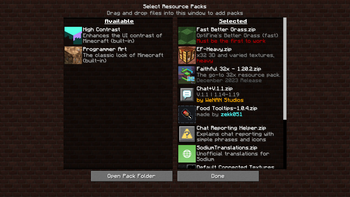
Resource Packs
- Faithful 32x - The iconic Faithful 32x resource pack
- Enhanced Faithcraft - Faithful 32x addon that adds a few improvements
- Chat + - Adding tiny icons to vanilla chat messages
- Food Tooltips - Display food value on tooltips
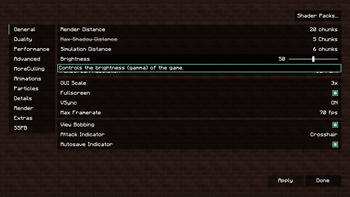
Vanilla settings
- Render distance: 20
- Max FPS: 70
Verfügbare Versionen
GABG's XVanilla Server einrichten
Server bestellen
Wähle mindestens 4 GB RAM (6 GB empfohlen für GABG's XVanilla). Je nach Spieleranzahl: +1 GB pro 8 Spieler.
Modpack im Dashboard installieren
Öffne den Modpack-Browser im Dashboard, suche nach "GABG's XVanilla" und klicke "Installieren". Der fabric-Loader und Minecraft 26.1.2 werden automatisch konfiguriert.
Server starten & spielen
Starte den Server – alle Mods werden automatisch geladen. Teile die Server-IP mit Freunden und spielt zusammen!
Häufige Fragen
GABG's XVanilla Server crasht oder startet nicht – was tun?
Häufigste Ursachen: zu wenig RAM oder falscher fabric-Loader. Prüfe latest.log auf "OutOfMemoryError" → erhöhe RAM auf mindestens 6 GB. Bei "Mixin" oder "ClassNotFoundException": Modpack-Version und Loader stimmen nicht überein. Bei Mado Hosting werden Loader und Minecraft-Version beim Modpack-Install automatisch konfiguriert – das verhindert die meisten Startprobleme.
Wie viel RAM braucht ein GABG's XVanilla Server wirklich?
Minimum 4 GB, empfohlen 6 GB für stabile Performance. +1 GB pro 8 Spieler. Wichtig: Minecraft-Modpacks brauchen mehr RAM als Vanilla – plane pro zusätzlichem Spieler extra ein. Bei Mado Hosting kannst du den RAM jederzeit live hochskalieren, ohne Datenverlust (ab €5.2/Monat).
Kann ich eigene Mods zu GABG's XVanilla hinzufügen, ohne Konflikte?
Ja, aber achte auf die Kompatibilität: Nutze nur Mods für den gleichen Loader (fabric) und die gleiche Minecraft-Version (26.1.2). Häufige Probleme: ID-Konflikte bei Rezept-Mods und inkompatible Coremod-Versionen. Im Mado Dashboard zeigt der Mod-Browser nur kompatible Mods an und warnt bei bekannten Konflikten.
GABG's XVanilla Server laggt – Performance-Tipps
1) RAM auf 6 GB+ erhöhen. 2) Server-View-Distance auf 8 reduzieren (server.properties). 3) Pre-Generiere Chunks mit dem "Chunky" Plugin. 4) Prüfe mit /spark profiler welche Mods die meiste Tick-Time verbrauchen. Bei Mado Hosting laufen alle Server auf NVMe-SSDs mit dedizierten CPU-Kernen – das eliminiert Hardware als Engpass.
Ähnliche Modpacks

![Cobblemon Official Modpack [Fabric]](https://cdn.modrinth.com/data/5FFgwNNP/e7f9ee2e9d361623847853fe2ddce42f519ee64f.png)
![COBBLEVERSE - Pokemon Adventure [Cobblemon]](https://cdn.modrinth.com/data/Jkb29YJU/581ecf54530972afb18a04660afd820f2f24f6c7.png)

![Better MC [FABRIC] - BMC2](https://cdn.modrinth.com/data/shFhR8Vx/a19c2bcb51d38f32f138d3607e91cb2b7b8e387f_96.webp)

GABG's XVanilla Server mieten
Starte deinen eigenen Server mit automatischer Modpack-Installation.
Details
- Lizenz
- GNU General Public License v3.0 or later
- Server-seitig
- Nicht unterstützt
- Client-seitig
- Erforderlich
Unterstützte Versionen
Starte deinen GABG's XVanilla Server jetzt
Ab €5.20/Monat; für die beste Performance werden 6 GB RAM empfohlen.
Server konfigurieren →