
Gensokyo Reimagined QOL
Quality of Life mods curated by the Gensokyo Reimagined Team to improve your experience on the server!
Screenshots

Über dieses Modpack

This modpack is designed for usage on the Gensokyo Reimagined Minecraft Server, it provides numerous performance increases and quality-of-life additions that revolve around the server's experience. Learn more on our website!
Note:
The Voxy mod may cause crashes on some machines. If you are experiencing crashes trey disabling the mod until further notice.
Performance Increase
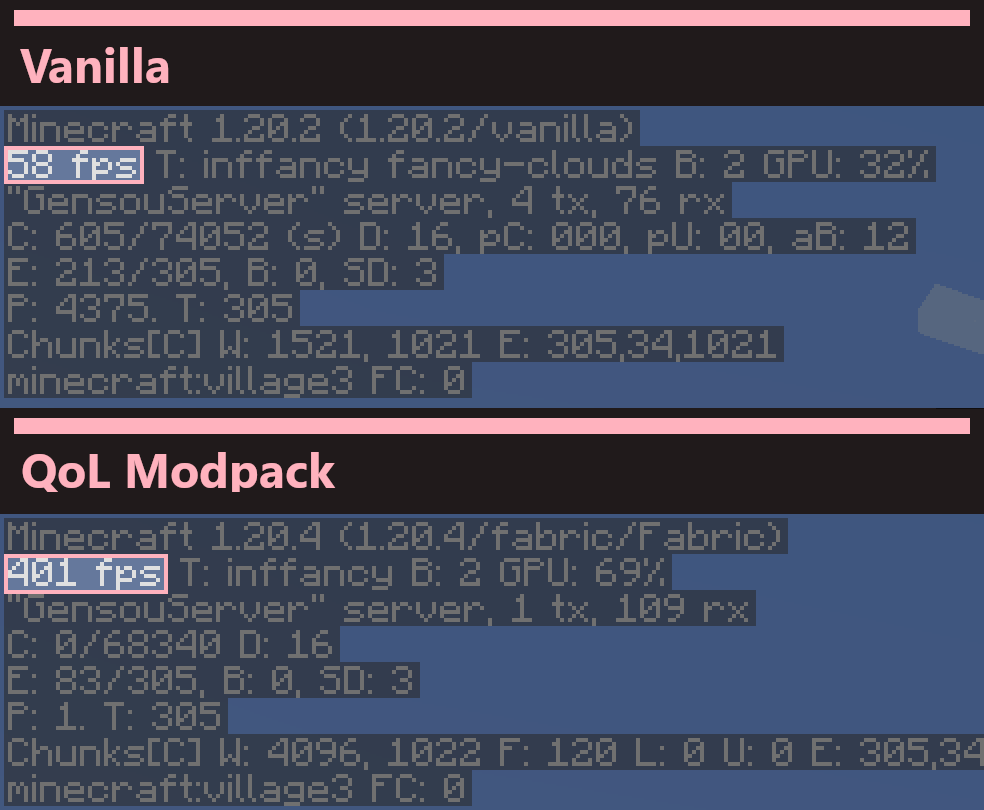
With modern performance enhancing mods like Sodium, Lithium and more, Gensokyo Reimagined QOL has the potential to massively outclass* vanilla and Optifine framerates, allowing you to experience Gensokyo as it was meant to be.
Minor tweaks
In order to smoothen the MMO experience in Minecraft, Gensokyo Reimagined QOL provides a few tweaks that don't break the Vanilla feel. These include but are not limited to: extended chat history, borderless window mode, a toggleable mini-map, and more!
Reach out
We have a growing community of friendly members and staff who like to discuss the pack and and help out with any issues that may arise. Join us today!
*Disclaimer
While the performance enhancing mods in this modpack can and will provide a much smoother Minecraft experience, the choice to use shaders or otherwise may further impact performace depending on your particular PC specifications.
This pack only adds optimization and other client-side mods. If looking for a touhou-inspired singleplayer experience, we recommend trying out Maxmani's Touhou Mods
Verfügbare Versionen
Gensokyo Reimagined QOL Server einrichten
Server bestellen
Wähle mindestens 4 GB RAM (6 GB empfohlen für Gensokyo Reimagined QOL). Je nach Spieleranzahl: +1 GB pro 8 Spieler.
Modpack im Dashboard installieren
Öffne den Modpack-Browser im Dashboard, suche nach "Gensokyo Reimagined QOL" und klicke "Installieren". Der fabric-Loader und Minecraft 26.3 werden automatisch konfiguriert.
Server starten & spielen
Starte den Server – alle Mods werden automatisch geladen. Teile die Server-IP mit Freunden und spielt zusammen!
Häufige Fragen
Gensokyo Reimagined QOL Server crasht oder startet nicht – was tun?
Häufigste Ursachen: zu wenig RAM oder falscher fabric-Loader. Prüfe latest.log auf "OutOfMemoryError" → erhöhe RAM auf mindestens 6 GB. Bei "Mixin" oder "ClassNotFoundException": Modpack-Version und Loader stimmen nicht überein. Bei Mado Hosting werden Loader und Minecraft-Version beim Modpack-Install automatisch konfiguriert – das verhindert die meisten Startprobleme.
Wie viel RAM braucht ein Gensokyo Reimagined QOL Server wirklich?
Minimum 4 GB, empfohlen 6 GB für stabile Performance. +1 GB pro 8 Spieler. Wichtig: Minecraft-Modpacks brauchen mehr RAM als Vanilla – plane pro zusätzlichem Spieler extra ein. Bei Mado Hosting kannst du den RAM jederzeit live hochskalieren, ohne Datenverlust (ab €5.2/Monat).
Kann ich eigene Mods zu Gensokyo Reimagined QOL hinzufügen, ohne Konflikte?
Ja, aber achte auf die Kompatibilität: Nutze nur Mods für den gleichen Loader (fabric) und die gleiche Minecraft-Version (26.3). Häufige Probleme: ID-Konflikte bei Rezept-Mods und inkompatible Coremod-Versionen. Im Mado Dashboard zeigt der Mod-Browser nur kompatible Mods an und warnt bei bekannten Konflikten.
Gensokyo Reimagined QOL Server laggt – Performance-Tipps
1) RAM auf 6 GB+ erhöhen. 2) Server-View-Distance auf 8 reduzieren (server.properties). 3) Pre-Generiere Chunks mit dem "Chunky" Plugin. 4) Prüfe mit /spark profiler welche Mods die meiste Tick-Time verbrauchen. Bei Mado Hosting laufen alle Server auf NVMe-SSDs mit dedizierten CPU-Kernen – das eliminiert Hardware als Engpass.
Ähnliche Modpacks

![Cobblemon Official Modpack [Fabric]](https://cdn.modrinth.com/data/5FFgwNNP/e7f9ee2e9d361623847853fe2ddce42f519ee64f.png)
![COBBLEVERSE - Pokemon Adventure [Cobblemon]](https://cdn.modrinth.com/data/Jkb29YJU/581ecf54530972afb18a04660afd820f2f24f6c7.png)
![Better MC [FABRIC] - BMC2](https://cdn.modrinth.com/data/shFhR8Vx/a19c2bcb51d38f32f138d3607e91cb2b7b8e387f_96.webp)


Gensokyo Reimagined QOL Server mieten
Starte deinen eigenen Server mit automatischer Modpack-Installation.
Unterstützte Versionen
Starte deinen Gensokyo Reimagined QOL Server jetzt
Ab €5.20/Monat; für die beste Performance werden 6 GB RAM empfohlen.
Server konfigurieren →