
Gensokyo Reimagined QOL
Quality of Life mods curated by the Gensokyo Reimagined Team to improve your experience on the server!
Screenshots


About this Modpack

This modpack is designed for usage on the Gensokyo Reimagined Minecraft Server, it provides numerous performance increases and quality-of-life additions that revolve around the server's experience. Learn more on our website!
Note:
The Voxy mod may cause crashes on some machines. If you are experiencing crashes trey disabling the mod until further notice.
Performance Increase
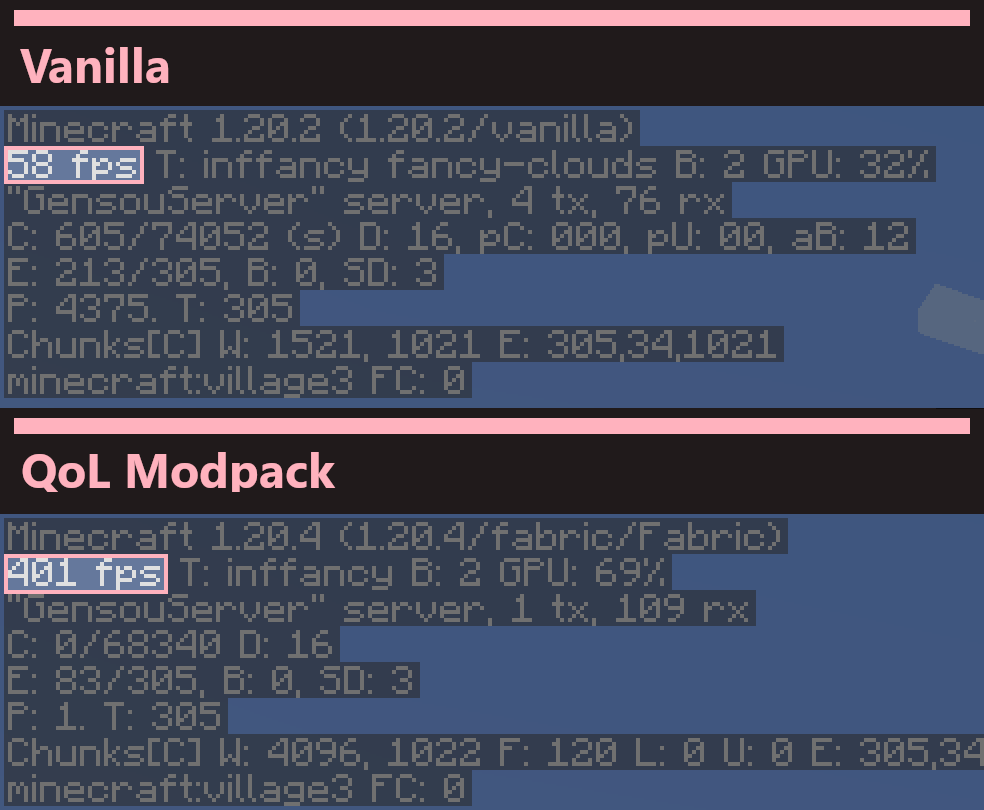
With modern performance enhancing mods like Sodium, Lithium and more, Gensokyo Reimagined QOL has the potential to massively outclass* vanilla and Optifine framerates, allowing you to experience Gensokyo as it was meant to be.
Minor tweaks
In order to smoothen the MMO experience in Minecraft, Gensokyo Reimagined QOL provides a few tweaks that don't break the Vanilla feel. These include but are not limited to: extended chat history, borderless window mode, a toggleable mini-map, and more!
Reach out
We have a growing community of friendly members and staff who like to discuss the pack and and help out with any issues that may arise. Join us today!
*Disclaimer
While the performance enhancing mods in this modpack can and will provide a much smoother Minecraft experience, the choice to use shaders or otherwise may further impact performace depending on your particular PC specifications.
This pack only adds optimization and other client-side mods. If looking for a touhou-inspired singleplayer experience, we recommend trying out Maxmani's Touhou Mods
Available Versions
How to Set Up a Gensokyo Reimagined QOL Server
Order Server
Choose at least 4 GB RAM (6 GB recommended for Gensokyo Reimagined QOL). Based on player count: per 8 players.
Install Modpack in Dashboard
Open the modpack browser in the dashboard, search for "Gensokyo Reimagined QOL" and click "Install". The fabric loader and Minecraft 26.3 are configured automatically.
Start Server & Play
Start the server – all mods are loaded automatically. Share the server IP with friends and play together!
Frequently Asked Questions
Gensokyo Reimagined QOL server crashes or won't start – what to do?
Most common causes: insufficient RAM or wrong fabric loader. Check latest.log for "OutOfMemoryError" → increase RAM to at least 6 GB. For "Mixin" or "ClassNotFoundException" errors: modpack version and loader don't match. With Mado Hosting, loader and Minecraft version are auto-configured on modpack install – preventing most startup issues.
How much RAM does a Gensokyo Reimagined QOL server really need?
Minimum 4 GB, recommended 6 GB for stable performance. per 8 players. Important: Minecraft modpacks need more RAM than vanilla – plan extra per additional player. With Mado Hosting, you can scale RAM up live at any time without data loss (from €5.2/month).
Can I add custom mods to Gensokyo Reimagined QOL without conflicts?
Yes, but check compatibility: only use mods for the same loader (fabric) and same Minecraft version (26.3). Common issues: ID conflicts with recipe mods and incompatible coremod versions. The Mado dashboard mod browser only shows compatible mods and warns about known conflicts.
Gensokyo Reimagined QOL server lagging – performance tips
1) Increase RAM to 6 GB+. 2) Reduce server view-distance to 8 (server.properties). 3) Pre-generate chunks with the "Chunky" plugin. 4) Use /spark profiler to check which mods consume the most tick time. With Mado Hosting, all servers run on NVMe SSDs with dedicated CPU cores – eliminating hardware as a bottleneck.
Similar Modpacks

![Cobblemon Official Modpack [Fabric]](https://cdn.modrinth.com/data/5FFgwNNP/e7f9ee2e9d361623847853fe2ddce42f519ee64f.png)
![COBBLEVERSE - Pokemon Adventure [Cobblemon]](https://cdn.modrinth.com/data/Jkb29YJU/581ecf54530972afb18a04660afd820f2f24f6c7.png)
![Better MC [FABRIC] - BMC2](https://cdn.modrinth.com/data/shFhR8Vx/a19c2bcb51d38f32f138d3607e91cb2b7b8e387f_96.webp)


Rent Gensokyo Reimagined QOL Server
Start your own server with automatic modpack installation.
Supported Versions
Start your Gensokyo Reimagined QOL Server now
From €5.20/month; 6 GB RAM is recommended for best performance.
Configure Server →