
Hypixel SkyBlock Modpack
Hypixel SkyBlock Modpack for 1.21.1
Screenshots
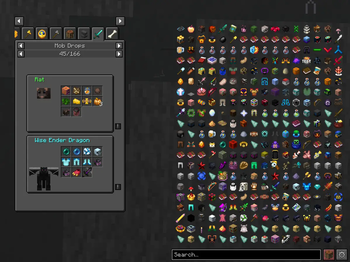
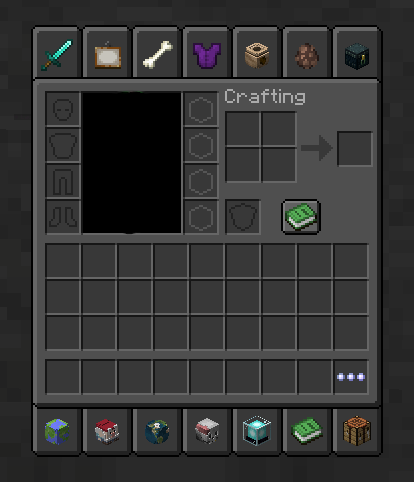
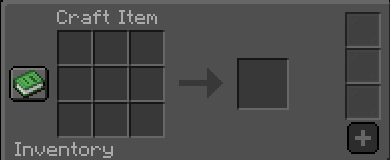
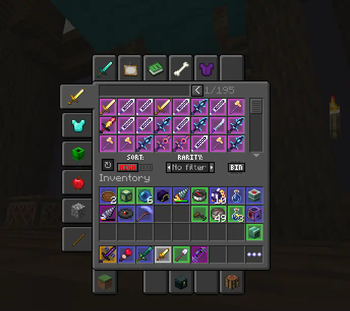
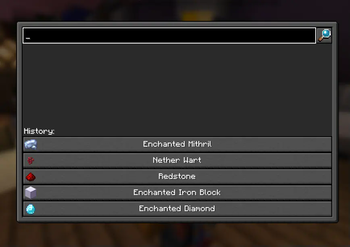
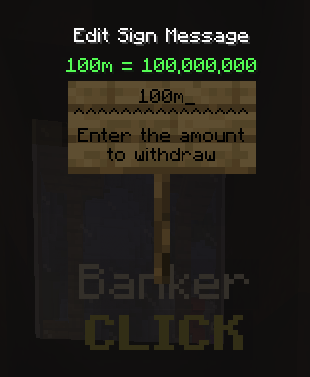
Über dieses Modpack
Skyblock Made Easy: Modpack for easier gameplay on Hypixel Skyblock


Do you want to progress faster on Hypixel Skyblock, but don't want to spend hours farming? This modpack is for you! It was created to make your gameplay easier and allow you to focus on what you really love about Skyblock - building, trading, and exploring.
What does this modpack offer?
- Fast travel: Teleports to important locations on the map to save time and energy.
- Convenient features: Item price information, automatic equipment sorting, and many other conveniences.
- Additional features: recipes list and more.
This modpack is the perfect solution for:
- New players: Quickly master the basics of the game and start enjoying more advanced gameplay.
- Experienced players: Optimize your time and focus on more challenging aspects of the game.
- Players looking for ease: You don't have to spend hours farming to achieve your goals.
Mods List (50)
[EMF] Entity Model Features by Traben
[ESF] Entity Sound Features by Traben
[ETF] Entity Texture Features by Traben
3D Skin Layers by tr7zw
AdaptiveTooltips
AmbientSounds by creativemd
Architectury API by architectury
Capes by caelthecolher
CITResewnBackwardsCompat by GrahamKracker
Cloth Config API by shedaniel
Clumps by jaredlll08
Clumps-fabric-1.21.1-19.0.0.1.jar
Collective by Serilum
Concurrent Chunk Management Engine by ishland
Continuity by PepperCode1
Controlling by jaredlll08
CreativeCore by creativemd
Dark Loading Screen by A5b84
Default Dark Mode by nebulr
Enhanced Block Entities by FoundationGames
Entity Culling by tr7zw
Entity View Distance by Patbox
Essential Mod by SparkUniverse
Fabric API by modmuss50
Fabric Language Kotlin by modmuss50
FabricSkyboxes by FlashyReese
FerriteCore by malte0811
Firmament for Hypixel SkyBlock by nea89o
ImmediatelyFast by RaphiMC
Indium by comp500
Lithium
by CaffeineMC
MaLiLib by masa
MineMath by Oiha
Mod Menu by Terraformers
Model Gap Fix by MehVahdJukaar
ModernFix by embeddedt
ModpackUtils by UltimatChamp
oωo by Wisp Forest
Presence Footsteps by Sollace
Reese's Sodium Options by FlashyReese
Roughly Enough Items by shedaniel
Searchables by jaredlll08
Simple Menu by Serilum
Skyblock Mod by Kevinthegreat
Skyblocker by Wohlhabend
Sodium by CaffeineMC
Sodium Extra by FlashyReese
Sound Physics Remastered by henkelmax
Tweakeroo by masa
Very Many Players by ishland
YetAnotherConfigLib by isxander
Resourcepack (2)
Default Dark Mode by nebulr 2024.6.0-1.21
Hypixel Plus 0.20.7 by ic22487
Verfügbare Versionen
Hypixel SkyBlock Modpack Server einrichten
Server bestellen
Wähle mindestens 6 GB RAM (10 GB empfohlen für Hypixel SkyBlock Modpack). Je nach Spieleranzahl: +1 GB pro 4 Spieler.
Modpack im Dashboard installieren
Öffne den Modpack-Browser im Dashboard, suche nach "Hypixel SkyBlock Modpack" und klicke "Installieren". Der fabric-Loader und Minecraft 1.21.5 werden automatisch konfiguriert.
Server starten & spielen
Starte den Server – alle Mods werden automatisch geladen. Teile die Server-IP mit Freunden und spielt zusammen!
Häufige Fragen
Hypixel SkyBlock Modpack Server crasht oder startet nicht – was tun?
Häufigste Ursachen: zu wenig RAM oder falscher fabric-Loader. Prüfe latest.log auf "OutOfMemoryError" → erhöhe RAM auf mindestens 10 GB. Bei "Mixin" oder "ClassNotFoundException": Modpack-Version und Loader stimmen nicht überein. Bei Mado Hosting werden Loader und Minecraft-Version beim Modpack-Install automatisch konfiguriert – das verhindert die meisten Startprobleme.
Wie viel RAM braucht ein Hypixel SkyBlock Modpack Server wirklich?
Minimum 6 GB, empfohlen 10 GB für stabile Performance. +1 GB pro 4 Spieler. Wichtig: Minecraft-Modpacks brauchen mehr RAM als Vanilla – plane pro zusätzlichem Spieler extra ein. Bei Mado Hosting kannst du den RAM jederzeit live hochskalieren, ohne Datenverlust (ab €7.800000000000001/Monat).
Kann ich eigene Mods zu Hypixel SkyBlock Modpack hinzufügen, ohne Konflikte?
Ja, aber achte auf die Kompatibilität: Nutze nur Mods für den gleichen Loader (fabric) und die gleiche Minecraft-Version (1.21.5). Häufige Probleme: ID-Konflikte bei Rezept-Mods und inkompatible Coremod-Versionen. Im Mado Dashboard zeigt der Mod-Browser nur kompatible Mods an und warnt bei bekannten Konflikten.
Hypixel SkyBlock Modpack Server laggt – Performance-Tipps
1) RAM auf 10 GB+ erhöhen. 2) Server-View-Distance auf 8 reduzieren (server.properties). 3) Pre-Generiere Chunks mit dem "Chunky" Plugin. 4) Prüfe mit /spark profiler welche Mods die meiste Tick-Time verbrauchen. Bei Mado Hosting laufen alle Server auf NVMe-SSDs mit dedizierten CPU-Kernen – das eliminiert Hardware als Engpass.
Ähnliche Modpacks

![Cobblemon Official Modpack [Fabric]](https://cdn.modrinth.com/data/5FFgwNNP/e7f9ee2e9d361623847853fe2ddce42f519ee64f.png)
![COBBLEVERSE - Pokemon Adventure [Cobblemon]](https://cdn.modrinth.com/data/Jkb29YJU/581ecf54530972afb18a04660afd820f2f24f6c7.png)
![Better MC [FABRIC] - BMC2](https://cdn.modrinth.com/data/shFhR8Vx/a19c2bcb51d38f32f138d3607e91cb2b7b8e387f_96.webp)


Hypixel SkyBlock Modpack Server mieten
Starte deinen eigenen Server mit automatischer Modpack-Installation.
Unterstützte Versionen
Starte deinen Hypixel SkyBlock Modpack Server jetzt
Ab €7.80/Monat; für die beste Performance werden 10 GB RAM empfohlen.
Server konfigurieren →