
Modrinth · Forge
Immersive VR Essentials Server mieten
Dein eigener Immersive VR Essentials Server auf AMD Ryzen 9 ohne Thread-Limit. Der Server ist in der Regel unter 60 Sekunden bereit, das Pack installierst du danach mit einem Klick im Modpack-Browser.
A Minecraft Modpack Created Specifically for VR to be as Immersive and Realistic as Possible
- Downloads
- 22.2K
- Follower
- 0
- Loader
- Forge
- Minecraft
- 1.20.1
- Aktualisiert
- –
Screenshots
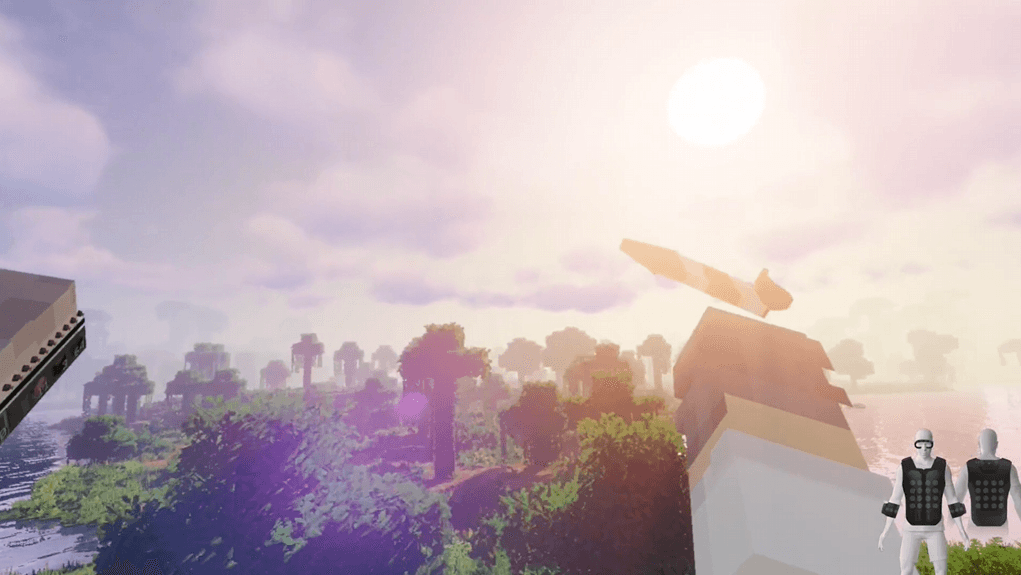
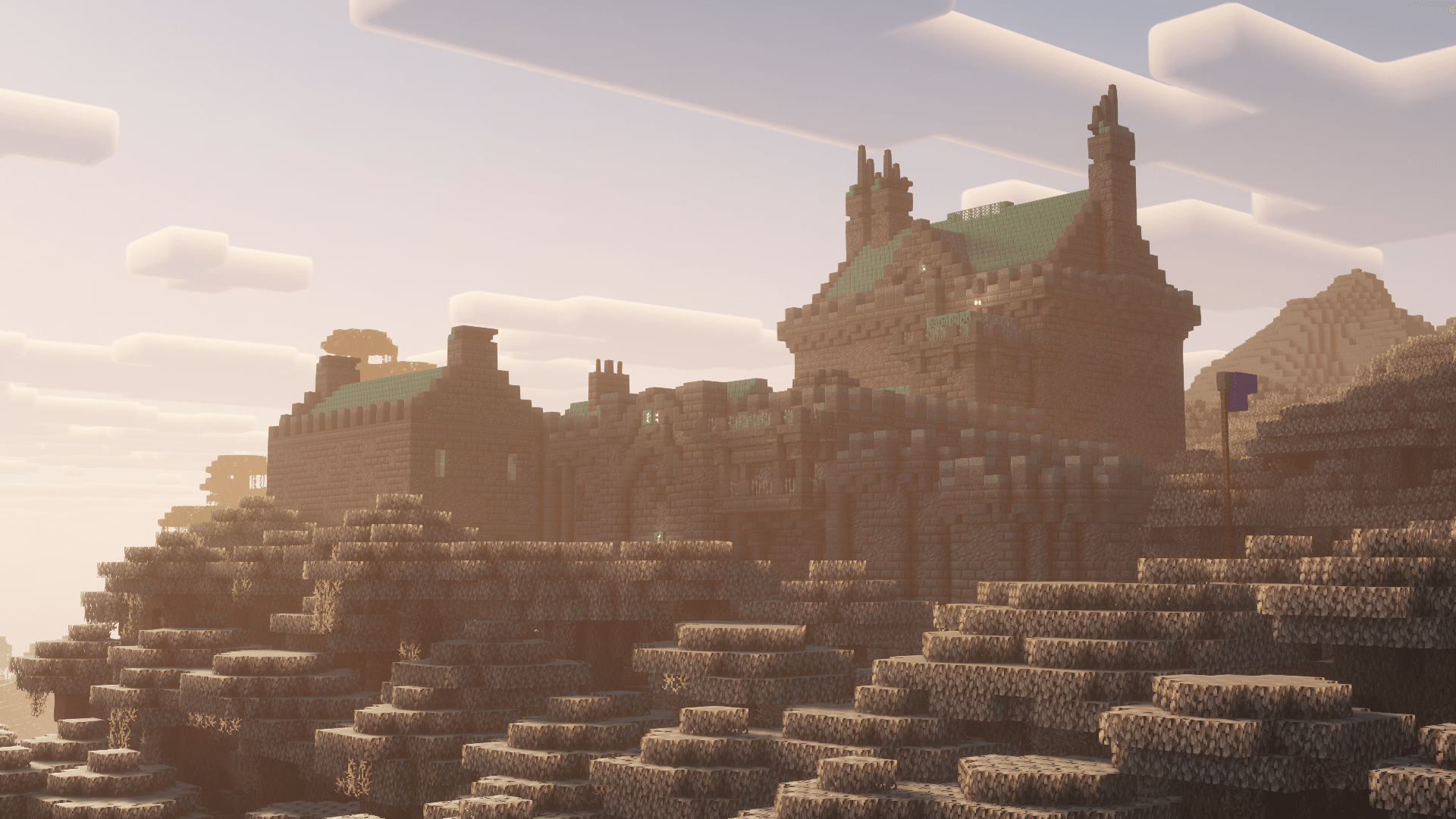
So sieht Immersive VR Essentials aus


Bilder: Immersive VR Essentials auf Modrinth, vom Projektteam veröffentlicht.
Einrichtung
In vier Schritten zum Immersive VR Essentials Server
Prüfe bei Fehlern zuerst Startprotokoll, Java-Version, Loader und Abhängigkeiten. Erhöhe RAM nur bei Hinweisen auf Speichermangel. Behalte vor Updates eine Kopie der funktionierenden Installation.
- 01
Konfigurieren
8 GB RAM sind vorausgewählt und Immersive VR Essentials ist im Konfigurator vorgemerkt. Laufzeit und Add-ons wählst du selbst.
- 02
Bezahlen
Per Kreditkarte oder PayPal. Der Server ist in der Regel unter 60 Sekunden bereit.
- 03
Pack installieren
Öffne den Modpack-Browser im Panel, wähle Modrinth, prüfe die Projekt-ID und installiere die gewünschte Pack-Version. Sichere eine bestehende Welt vorher.
- 04
Verbinden
Alle Spieler installieren dieselbe Pack-Version in einem kompatiblen Launcher und verbinden sich über die Serveradresse aus dem Panel.
Modrinth-Projekt-ID: UWfvfipD
Das Panel
Pack installieren, Fehler finden.
Echte Screenshots aus dem Mado Panel. Beides ist bei jedem Minecraft Server enthalten.
Modpack-Browser
Modrinth und CurseForge direkt im Panel.
Pack suchen, Version wählen, installieren. Loader und Serverdateien musst du nicht von Hand hochladen.

KI-Crash-Analyse
Wenn ein Mod crasht, liest die Analyse das Log.
Große Modpacks scheitern oft an einer einzelnen Mod, Java-Version oder fehlenden Abhängigkeit. Die Analyse nennt eine wahrscheinliche Ursache und einen Lösungsvorschlag.

Versionen
Veröffentlichte Pack-Versionen
Server und Spieler brauchen dieselbe Pack-Version. Wähle sie im Modpack-Browser passend zu den Clients deiner Gruppe.
Immersive VR Essentials · ModrinthOriginalbeschreibung des Projektautors
A ModPack created Specifically for VR to be as realistic and Immersive as possible
Features
3D Inventory and Fullbody Tracking
This uses ImmersiveMC and Vivecraft, all menus and crafting are done in a 3D space in VR, Take a look at the Wiki for help on how to use it.
Vivecraft is also now Fullbody Tracking Compadable!
HAPTIC Feedback
If you have a Haptic Feedback Suit (bhaptics etc), you can feel rain on your body, getting punched by mobs, you'll feel every chop of a tree and every block you mine.
Textures and Resource Packs
The Primary Resource Pack in here is Patrix (edited so it works better with VR)
I included faithful x64 if you want a more classic look, so feel free to switch it out with that if you don't like the realistic feel of Patrix
There is also an optional lower quality version of Faithful included if you need more performance
Shaders
Primary shader in here is Sildurs on medium settings with it customized to look better in VR
I have Chopotic shaders on Low and Lite as options in the shader menu, feel free to switch it out with that as they run quite a bit better (there is a minor texture glitch on blocks with them though.. but your FPS will go up a ton if you're struggleing to run this at a stable fps)
Landscape, Structures, Biomes and Mobs
This has quite a bit more variety the vanilla game, You'll see better landscapes, more structures, more biomes, better dungeons ect. This is all done with vanilla blocks and doesn't have any annoying bloat or complicated crafting involved! It's just more variety and prettier views
In Game Voice Chat
Voice Chat is already pre installed. You can customize it in game using the B Button on your Controller (then go to voice chat Menu) So if you want to run this on a server you can already talk in game
No Complex crafting, No added Blocks
This Modpack is made to be Immersive and relaxing, not some complicated system where you have to craft a million things.
There are a few QOL Mods in here like waypoints, but no added blocks and all the crafting is the same as Vanilla
WORKS on Desktop(Flatscreen)
Although this is intended to be played in VR, it does work on flatscreen minecraft as well, so if you want to play with your friends on a server and they don't have VR, they can use this to see peoples Fullbody movement etc. Game is fully playable without a Headset, but you'll be missing out on some intended features.
Performance
This is going to largely depend on your System Specs..I do not lag at all.. but I have a fairly beefy system.
Specs:
RTX 4090
AMD 9950x
64GB 6000mhz RAM
I also use a Vive Pro eye with the Wireless adapter.. which tends to run better on PCVR apps then using a Quest over wifi. I have not tested this modpack with my Quest 3 yet, it should not make a huge difference as long as you have a decent system though.
Minimum System Requrements
I have no way to test this, It might work with lower system specs then this, but at a minimum I'm guessing you'll need:
RTX 3080
i9 or newier AMD Chip
32 GB RAM
This modpack needs at least 8GB Ram Dedicated to it.
Why no Distent Horizons?
The shader and landscape mods I'm using do not play well with Distent Horizon so thats why it's not included. You won't really notice it because of the fog and volumentirc lighting with the shader/landscape mods generating huge mountains and vistas, also Distent Horizons sort of wrecks preformance in VR
Installation
Download the modrinth App, download This this, then double click to install. Should be pretty strightforward
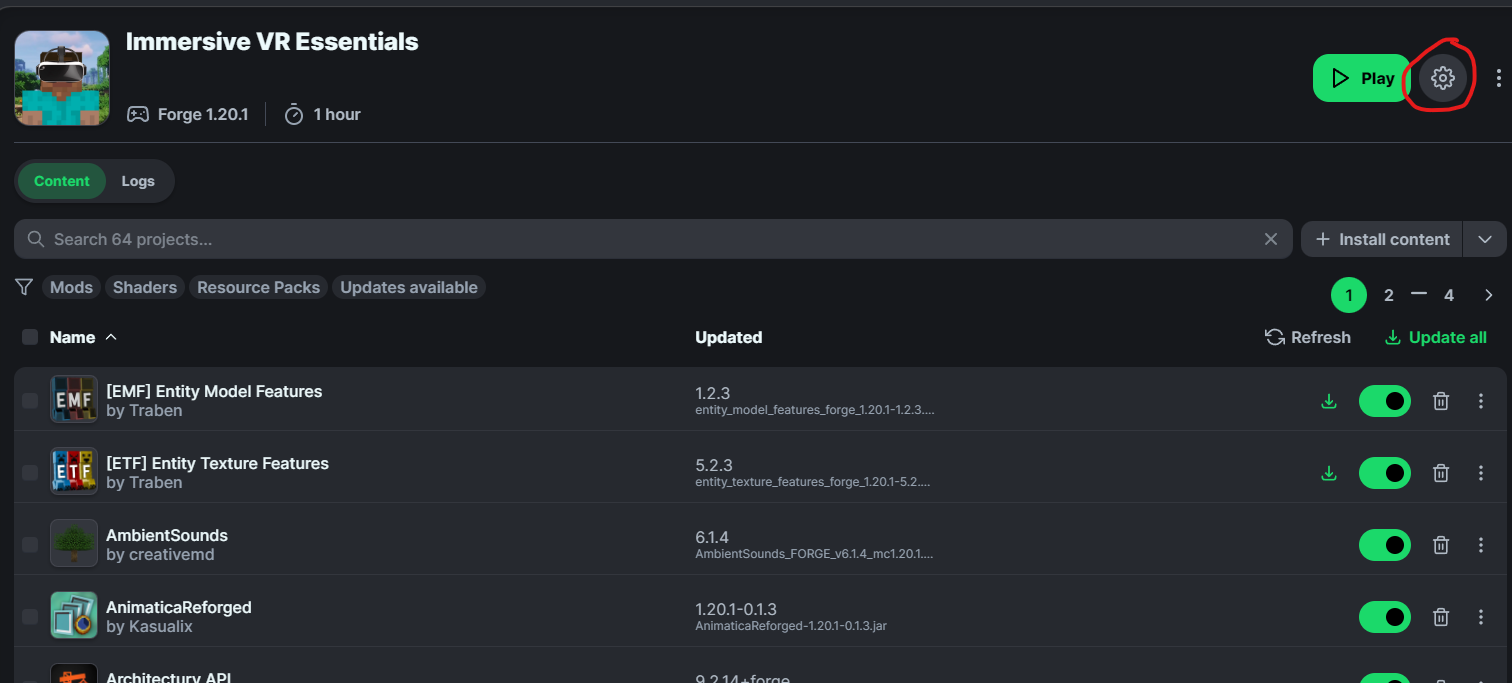
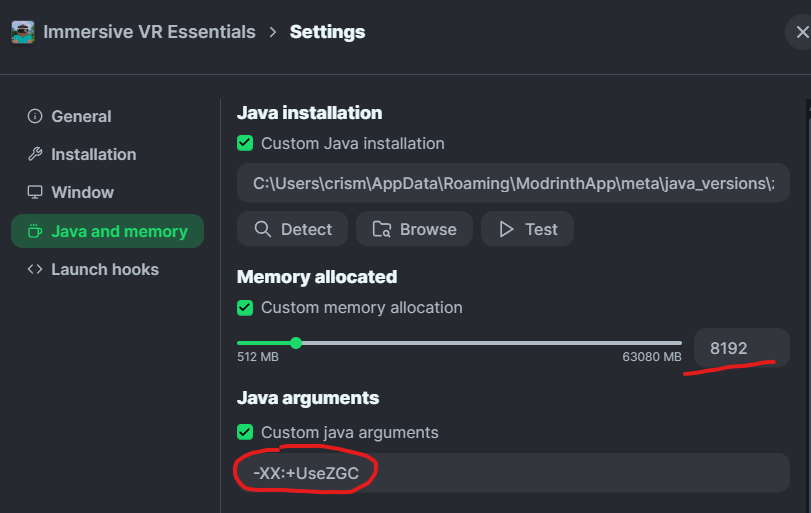
Important BEFORE you play, Make sure to set memory correctly. Go to the gear icon in the corner then Click on Java and Memory
Check on custom java Installation, custom Memory Allocation and **Set it to a minimum of 8192 **(you can also use more)
Click on Java arguments then Add this Line
-XX:+UseZGC
You should now be good to play this in VR
DO NOT UPDATE MODS IN THIS, YOUR GAME WILL BREAK
If there is an update out for a particular mod.. I'll update the pack, otherwise do not update individual mods. I'm using a couple of older versions of mods either because it didn't work well in VR.. or they were crashing with vivecraft.
Customization
To Customize Vivecraft settings you can find that in the VR Settings menu
To Customize Immersive MC (Change type of backpack, turn off features/bring back vanilla inventory etc) go to the mods Menu, then find ImmersiveMC and click on config, you can change and mess around with any settings here that you want
To customize the Waypoints Mod, go the mod menu, find waypoints and click on config, then find client
Voice Chat
To change voice chat settings, press the B button on your right controller, set your Mic and speakers to whatever (prob want to set speakers to your headset speakers and then mic to either headset or an external one if you're using that)
I would also recommend putting 3D Audio on Reduced otherwise you might notice it glitching out when close to other players as vivecraft already includes 3D audio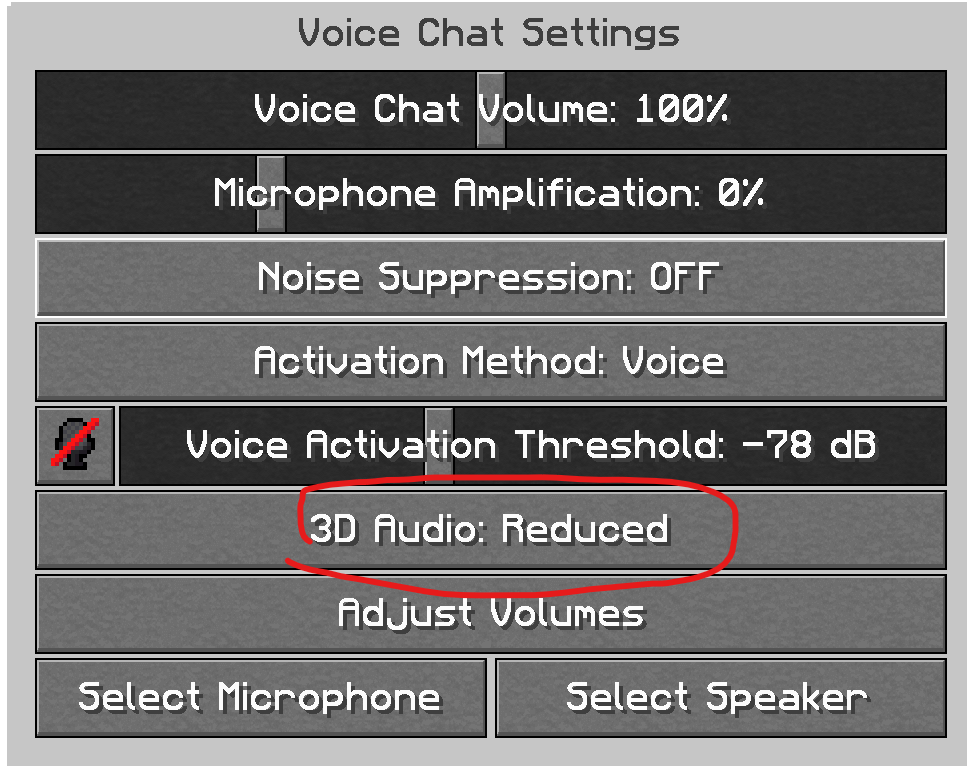
Time Control
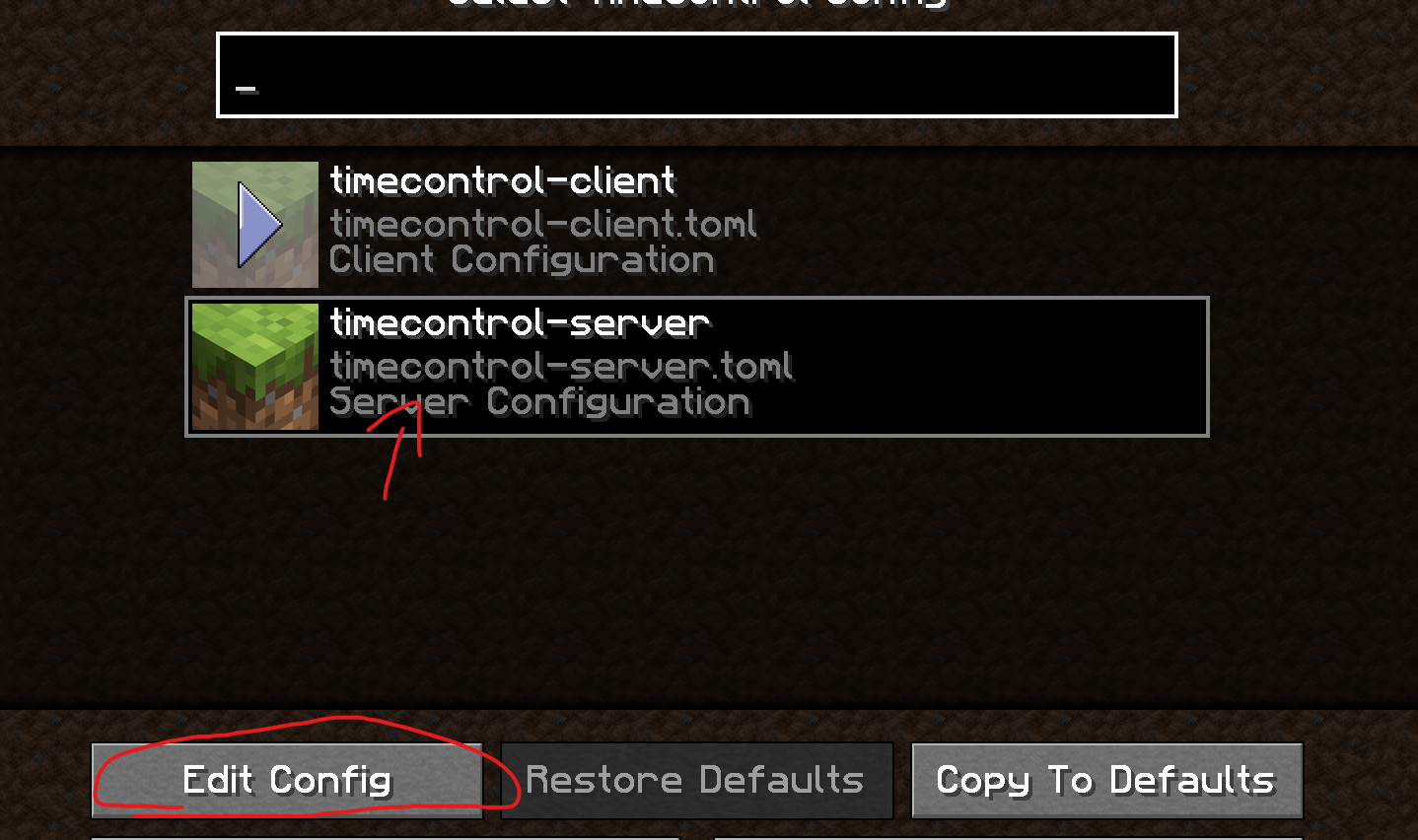
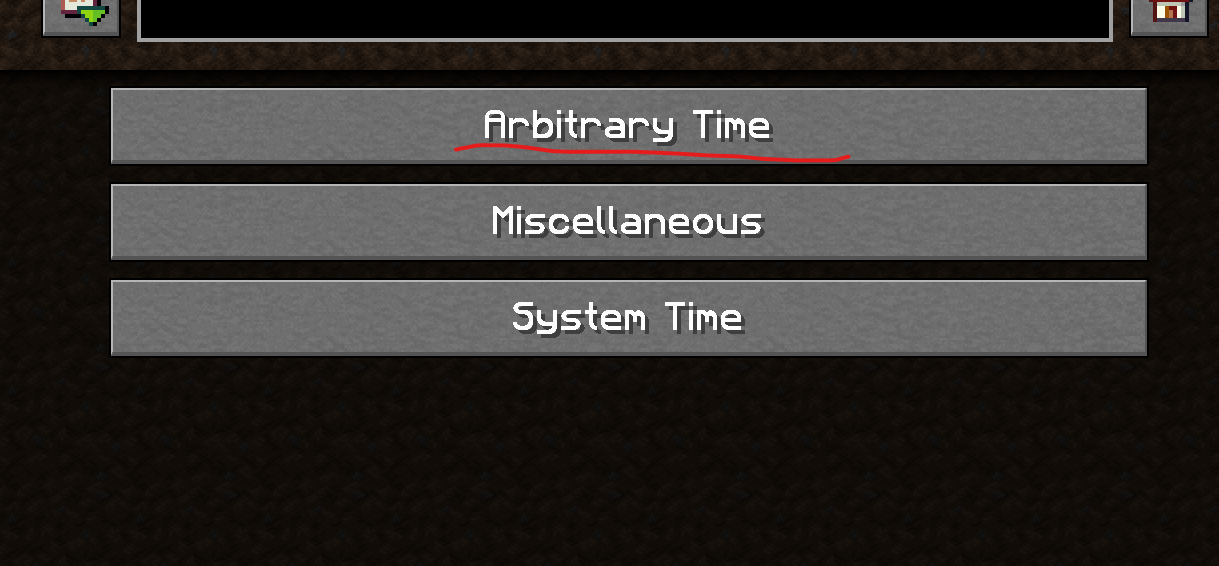
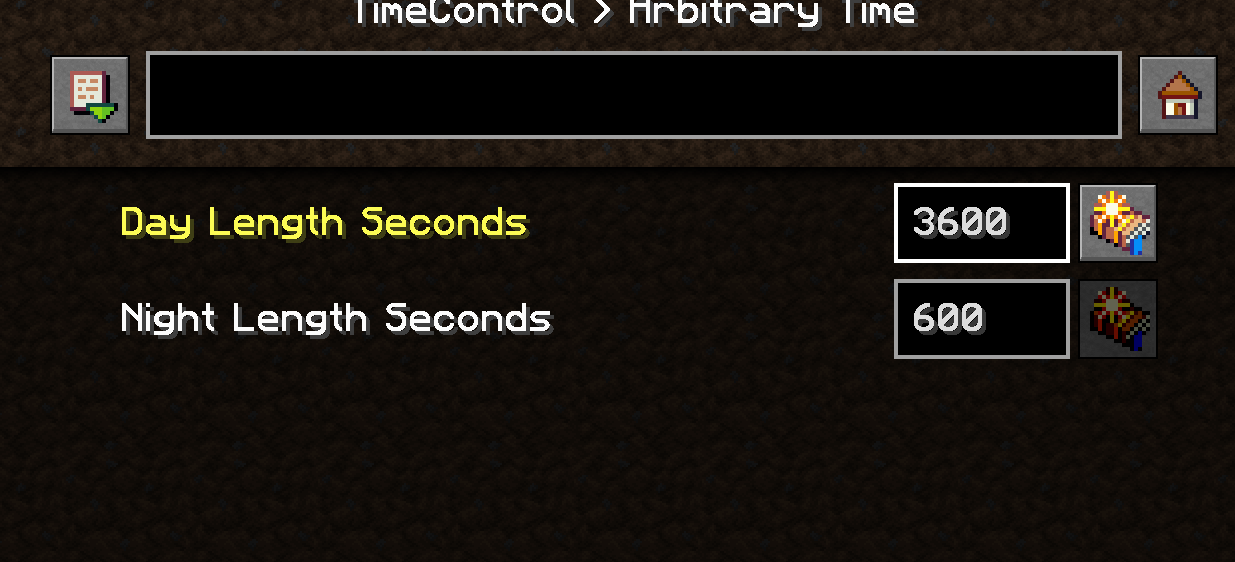
If you want to change How long the Day and Nights are, you need to make a new world, then go to the mods menu and find the time control mod, click on config, then go to server settings, you can change the amound of time in seconds each is.
I recommend putting day at 3600 (1 Hour IRL Time for Day) the Default value for each is 600 (10 Minute day 10 Minute Night) but feel free to customize this to whatever
Adding Mods
Feel free to add whatever you want, just keep in mind not every mod is going to work great in VR.
This is using Minecraft Forge 1.20.1 I AM using Sinytra Connector in this, so most fabric mods can also be installed.. but not every one will work.. if you're adding fabric mods just do some trial and error
FAQ
I'm not sure how to access the Backpack or setup Fullbody tracking on VR
Take a look at the help section for Vivecraft and ImmersiveMC
Does this work in Multiplayer?
Yes! This should be fully compadable with servers, it already includes voice chat, just add the modpack to any server you want to use. Clients will need to have this installed as well for this to work though.
In fact I recently launched a VR Only server! Find it in the server menu!
Why 1.20.1? Why not newier versions of Minecraft?
Some of the mods in here ONLY work on 1.20.1 or older.. so thats the main reason. At some point I may look into making an alternative version of this for newier versions of minecraft if there is enough interest.
Why are you using Forge and not Fabric/NeoForge
A large percentage of mods (and VR Specific Mods) in this are Forge Only. I'm using Sinytra connector in this so tons of Fabric Mods DO work. The connector ONLY works on forge... not the other way around. Until Fabric/NeoForge modding becomes more advanced, In my honest opnion there isn't a huge benefit to switching, you'll just be loosing out on the ability to use tons of mods for a tiny performance gain. If the mods that I'm using in this gets converted to Fabric or better alternatives become available, I'll consider switching.
Until then, Forge+Sinytra connector is currently the Best way to mod Minecraft IMHO, you're getting the ability to Install basically ANY mod for minecraft without having to worry about different loaders.
I'm having trouble getting this to work
This should work with other modloaders not just modrinth, but if you really can't get it to work properly, I have the loose files here. Just drop them into your .minecraft folder
https://drive.google.com/drive/u/1/folders/1eFAk8lgzWQ0AxxR8686FSMsOYb7IFbOE
Social Links
Ähnliche Packs
Weitere server-fähige Modpacks
 Server-fähig

Better MC [FABRIC] - BMC2
von SHXRKIE
Version 1.20 | A Proper Vanilla+ Modpack | Don't play Vanilla play this!
 Server-fähig

Better MC [FORGE] - BMC4
von SHXRKIE
Version 1.20.1 | A Proper Vanilla+ Modpack | Don't play Vanilla play this!
 Server-fähig

Pokemon Elysium
von Chubblezap
Modpack originally made for the Pokemon Elysium server, a Cobblemon-focused pack with hints of low-tech steampunk.
 Server-fähig
Re-Console
von omo50
A continued Legacy Console Edition experience, expanded upon with modern Java Edition content and QoL! (An Official Legacy4J Project)
Bereit für deinen Immersive VR Essentials Server?
8 GB RAM ab 16,00 € im Monat. 35 % auf den 1. Monat mit MADO35.