
Kami Chan Optimized
A modpack built around optimizing the client without adding any unnecessary mods.
Screenshots
Über dieses Modpack
A Fabric-based modpack built around optimizing your Minecraft client without adding extra bloat.
Performance
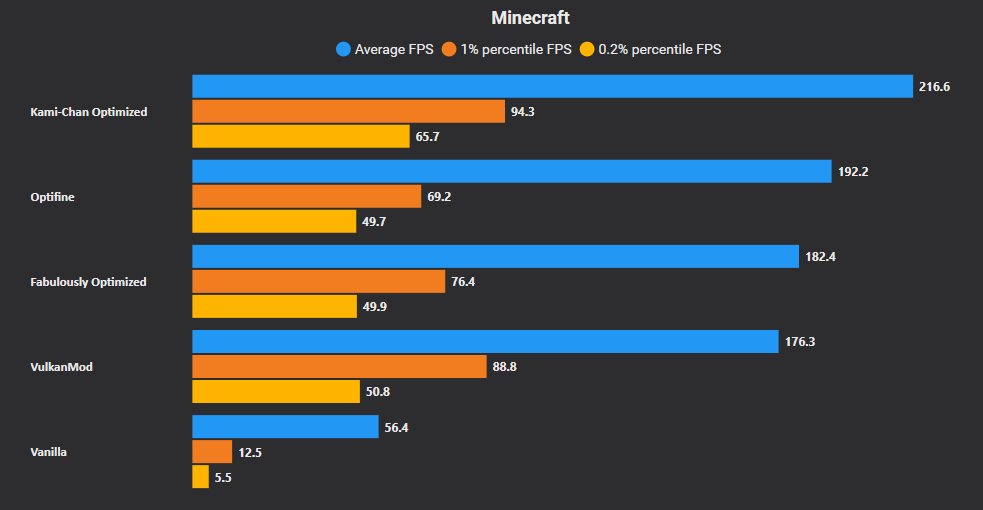
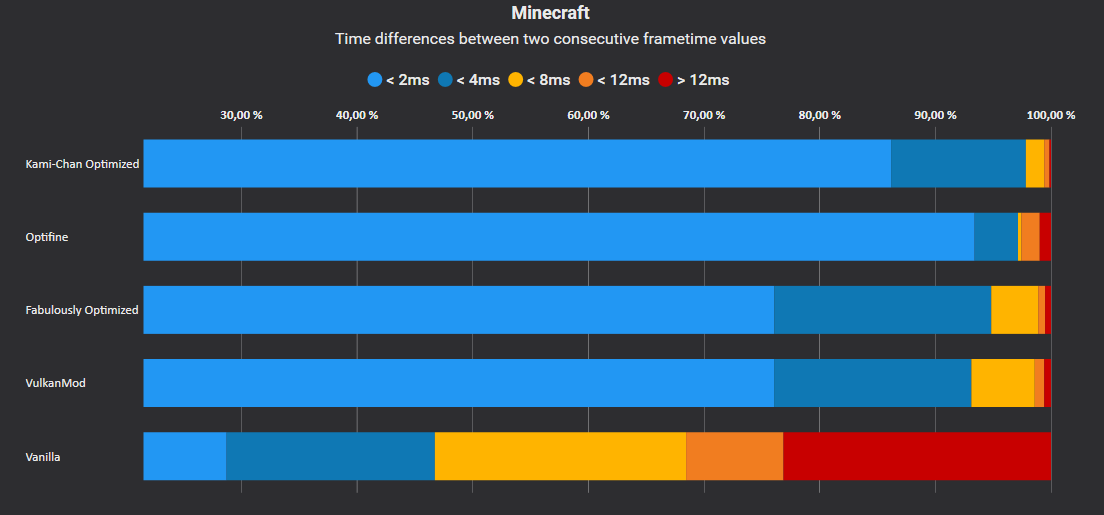
Kami Chan Optimized uses commonly installed Fabric performance mods to turn your client up to 11. Some of these mods include Sodium, Lithium, and Starlight.
Vanilla Parity
Since we don't add any content mods the Kami Chan Optimized modpack will work in any world and on any server.
Open source
We're a completely open source modpack. You can view our source code here. Feel free to open issues or even make a PR to improve on the pack!
FAQ
- Q: Why did you create yet another optimization modpack?
- A: We found it odd that other modpacks were including mods that really didn't need to be in an optimization modpack. We believe that the pack should be as bare bones as possible and only include what is needed.
- Q: I ran into a bug! Where can I get it fixed?
- A: Feel free to submit an issue on our GitHub here. We'll look into what is causing the bug.
- Q: I enjoy what you're doing, how can I help out?
- A: We appreciate that you're enjoying the modpack! Just using it is enough to help out but if you want to go above and beyond there are a few things that can be done!
- Share the modpack with your friends! The more people who use it the more it'll be suggested.
- Disable your ad blocker on Modrinth! Modrinth kicks back some of the ad revenue to creators on the platform.
- A: We appreciate that you're enjoying the modpack! Just using it is enough to help out but if you want to go above and beyond there are a few things that can be done!
Versioning
We employ a somewhat normal versioning scheme. The current format is w.x.y.z.
W will increment each new Minecraft release. For instance, version 1 is 1.19.3 and 2 would be 1.19.4.X will increment with any changes to the list of mods. For instance, adding/removing a mod would increment that number.Y will increment with any updates to any mods in the list.Z will increment with any hotfixes to the modpack.
Disclaimer
Kami Chan Optimized is not affiliated with the PaperMC project. Please do not go to their Discord for support. Instead use the Discord link listed in this project's links.
 Note: I do not make any money off this link. It's fully non-monetized.
Verfügbare Versionen
Kami Chan Optimized Server einrichten
Server bestellen
Wähle mindestens 4 GB RAM (6 GB empfohlen für Kami Chan Optimized). Je nach Spieleranzahl: +1 GB pro 8 Spieler.
Modpack im Dashboard installieren
Öffne den Modpack-Browser im Dashboard, suche nach "Kami Chan Optimized" und klicke "Installieren". Der fabric-Loader und Minecraft 26.3 werden automatisch konfiguriert.
Server starten & spielen
Starte den Server – alle Mods werden automatisch geladen. Teile die Server-IP mit Freunden und spielt zusammen!
Häufige Fragen
Kami Chan Optimized Server crasht oder startet nicht – was tun?
Häufigste Ursachen: zu wenig RAM oder falscher fabric-Loader. Prüfe latest.log auf "OutOfMemoryError" → erhöhe RAM auf mindestens 6 GB. Bei "Mixin" oder "ClassNotFoundException": Modpack-Version und Loader stimmen nicht überein. Bei Mado Hosting werden Loader und Minecraft-Version beim Modpack-Install automatisch konfiguriert – das verhindert die meisten Startprobleme.
Wie viel RAM braucht ein Kami Chan Optimized Server wirklich?
Minimum 4 GB, empfohlen 6 GB für stabile Performance. +1 GB pro 8 Spieler. Wichtig: Minecraft-Modpacks brauchen mehr RAM als Vanilla – plane pro zusätzlichem Spieler extra ein. Bei Mado Hosting kannst du den RAM jederzeit live hochskalieren, ohne Datenverlust (ab €5.2/Monat).
Kann ich eigene Mods zu Kami Chan Optimized hinzufügen, ohne Konflikte?
Ja, aber achte auf die Kompatibilität: Nutze nur Mods für den gleichen Loader (fabric) und die gleiche Minecraft-Version (26.3). Häufige Probleme: ID-Konflikte bei Rezept-Mods und inkompatible Coremod-Versionen. Im Mado Dashboard zeigt der Mod-Browser nur kompatible Mods an und warnt bei bekannten Konflikten.
Kami Chan Optimized Server laggt – Performance-Tipps
1) RAM auf 6 GB+ erhöhen. 2) Server-View-Distance auf 8 reduzieren (server.properties). 3) Pre-Generiere Chunks mit dem "Chunky" Plugin. 4) Prüfe mit /spark profiler welche Mods die meiste Tick-Time verbrauchen. Bei Mado Hosting laufen alle Server auf NVMe-SSDs mit dedizierten CPU-Kernen – das eliminiert Hardware als Engpass.
Ähnliche Modpacks

![Cobblemon Official Modpack [Fabric]](https://cdn.modrinth.com/data/5FFgwNNP/e7f9ee2e9d361623847853fe2ddce42f519ee64f.png)
![COBBLEVERSE - Pokemon Adventure [Cobblemon]](https://cdn.modrinth.com/data/Jkb29YJU/581ecf54530972afb18a04660afd820f2f24f6c7.png)
![Better MC [FABRIC] - BMC2](https://cdn.modrinth.com/data/shFhR8Vx/a19c2bcb51d38f32f138d3607e91cb2b7b8e387f_96.webp)


Kami Chan Optimized Server mieten
Starte deinen eigenen Server mit automatischer Modpack-Installation.
Details
- Lizenz
- Apache License 2.0
- Server-seitig
- Nicht unterstützt
- Client-seitig
- Erforderlich
Unterstützte Versionen
Starte deinen Kami Chan Optimized Server jetzt
Ab €5.20/Monat; für die beste Performance werden 6 GB RAM empfohlen.
Server konfigurieren →