
Kami Chan Optimized
A modpack built around optimizing the client without adding any unnecessary mods.
Screenshots
About this Modpack
A Fabric-based modpack built around optimizing your Minecraft client without adding extra bloat.
Performance
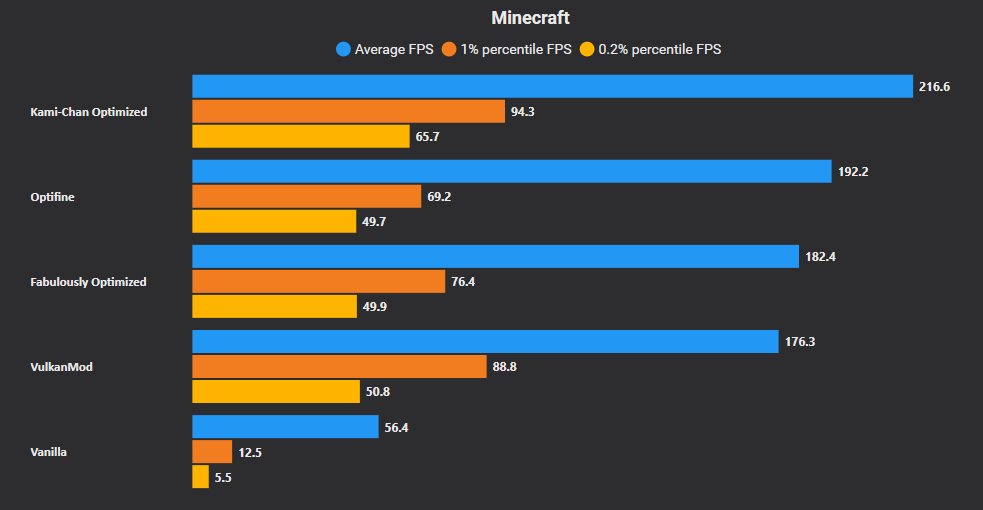
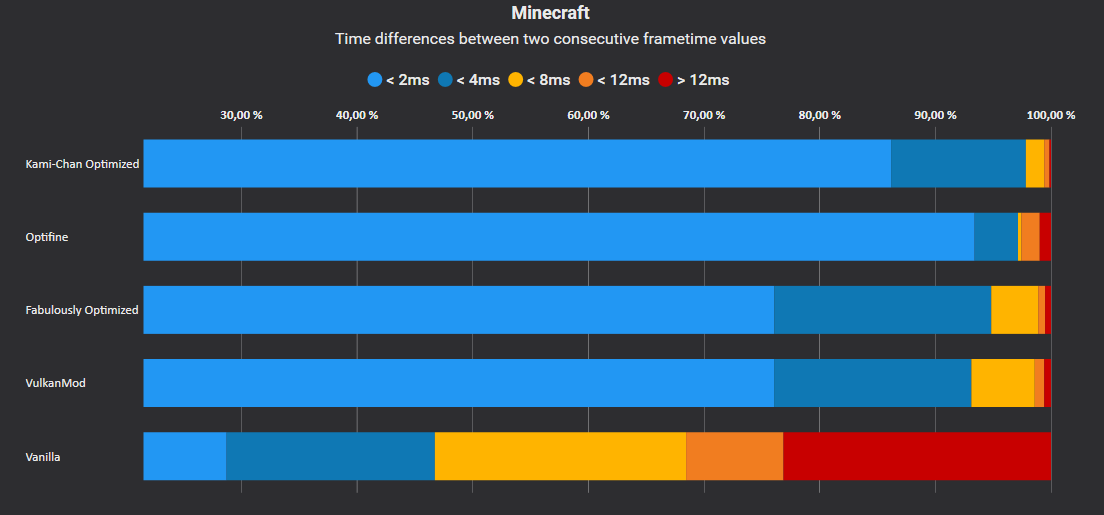
Kami Chan Optimized uses commonly installed Fabric performance mods to turn your client up to 11. Some of these mods include Sodium, Lithium, and Starlight.
Vanilla Parity
Since we don't add any content mods the Kami Chan Optimized modpack will work in any world and on any server.
Open source
We're a completely open source modpack. You can view our source code here. Feel free to open issues or even make a PR to improve on the pack!
FAQ
- Q: Why did you create yet another optimization modpack?
- A: We found it odd that other modpacks were including mods that really didn't need to be in an optimization modpack. We believe that the pack should be as bare bones as possible and only include what is needed.
- Q: I ran into a bug! Where can I get it fixed?
- A: Feel free to submit an issue on our GitHub here. We'll look into what is causing the bug.
- Q: I enjoy what you're doing, how can I help out?
- A: We appreciate that you're enjoying the modpack! Just using it is enough to help out but if you want to go above and beyond there are a few things that can be done!
- Share the modpack with your friends! The more people who use it the more it'll be suggested.
- Disable your ad blocker on Modrinth! Modrinth kicks back some of the ad revenue to creators on the platform.
- A: We appreciate that you're enjoying the modpack! Just using it is enough to help out but if you want to go above and beyond there are a few things that can be done!
Versioning
We employ a somewhat normal versioning scheme. The current format is w.x.y.z.
W will increment each new Minecraft release. For instance, version 1 is 1.19.3 and 2 would be 1.19.4.X will increment with any changes to the list of mods. For instance, adding/removing a mod would increment that number.Y will increment with any updates to any mods in the list.Z will increment with any hotfixes to the modpack.
Disclaimer
Kami Chan Optimized is not affiliated with the PaperMC project. Please do not go to their Discord for support. Instead use the Discord link listed in this project's links.
 Note: I do not make any money off this link. It's fully non-monetized.
Available Versions
How to Set Up a Kami Chan Optimized Server
Order Server
Choose at least 4 GB RAM (6 GB recommended for Kami Chan Optimized). Based on player count: per 8 players.
Install Modpack in Dashboard
Open the modpack browser in the dashboard, search for "Kami Chan Optimized" and click "Install". The fabric loader and Minecraft 26.3 are configured automatically.
Start Server & Play
Start the server – all mods are loaded automatically. Share the server IP with friends and play together!
Frequently Asked Questions
Kami Chan Optimized server crashes or won't start – what to do?
Most common causes: insufficient RAM or wrong fabric loader. Check latest.log for "OutOfMemoryError" → increase RAM to at least 6 GB. For "Mixin" or "ClassNotFoundException" errors: modpack version and loader don't match. With Mado Hosting, loader and Minecraft version are auto-configured on modpack install – preventing most startup issues.
How much RAM does a Kami Chan Optimized server really need?
Minimum 4 GB, recommended 6 GB for stable performance. per 8 players. Important: Minecraft modpacks need more RAM than vanilla – plan extra per additional player. With Mado Hosting, you can scale RAM up live at any time without data loss (from €5.2/month).
Can I add custom mods to Kami Chan Optimized without conflicts?
Yes, but check compatibility: only use mods for the same loader (fabric) and same Minecraft version (26.3). Common issues: ID conflicts with recipe mods and incompatible coremod versions. The Mado dashboard mod browser only shows compatible mods and warns about known conflicts.
Kami Chan Optimized server lagging – performance tips
1) Increase RAM to 6 GB+. 2) Reduce server view-distance to 8 (server.properties). 3) Pre-generate chunks with the "Chunky" plugin. 4) Use /spark profiler to check which mods consume the most tick time. With Mado Hosting, all servers run on NVMe SSDs with dedicated CPU cores – eliminating hardware as a bottleneck.
Similar Modpacks

![Cobblemon Official Modpack [Fabric]](https://cdn.modrinth.com/data/5FFgwNNP/e7f9ee2e9d361623847853fe2ddce42f519ee64f.png)
![COBBLEVERSE - Pokemon Adventure [Cobblemon]](https://cdn.modrinth.com/data/Jkb29YJU/581ecf54530972afb18a04660afd820f2f24f6c7.png)
![Better MC [FABRIC] - BMC2](https://cdn.modrinth.com/data/shFhR8Vx/a19c2bcb51d38f32f138d3607e91cb2b7b8e387f_96.webp)


Rent Kami Chan Optimized Server
Start your own server with automatic modpack installation.
Supported Versions
Start your Kami Chan Optimized Server now
From €5.20/month; 6 GB RAM is recommended for best performance.
Configure Server →