
KO Client
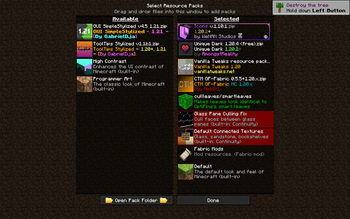
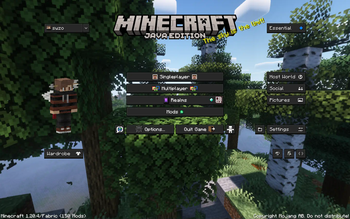
A Minecraft modpack emphasizing peak performance and convenience. Featuring mods like Sodium and Litematica for smooth gameplay and streamlined building. Enhanced visuals from shader packs. Perfect for builders, explorers, and adventurers
Screenshots
Über dieses Modpack
KO Client: Optimize, Enhance, Conquer!
Welcome to KO Client, your ultimate Minecraft modpack designed to optimize performance, enhance convenience, and empower your gaming experience like never before. Crafted for both casual players, dedicated adventurers, and professional builders. KO Client brings together a suite of mods tailored to supercharge your gameplay.
New Additions:
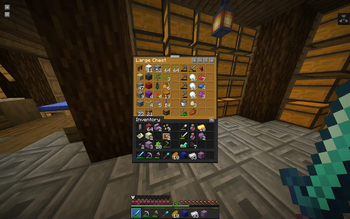
- Inventory Profiles Next: Seamlessly organize and manage your inventory with customizable profiles tailored to your every adventure.
- 3D Skin Layers: Immerse yourself in a world of depth and detail with layered skins that bring your character to life like never before.
- Bobby: A Minecraft mod which allows for render distances greater than the server's view-distance setting.
- Chat Heads: Stay connected with friends and foes alike through dynamic chat heads, enhancing communication in-game with style and convenience.
- Concurrent Chunk Management Engine: Experience optimized performance like never before with streamlined chunk loading and rendering, ensuring smooth gameplay in any environment.
- ESSENTIAL Mod: A Minecraft mod which allows for render distances greater than the server's view-distance setting.
- LazyDFU: An optimization mod for Minecraft that defers unnecessary initialization work so that it is only performed if required.
- Litematica: Unleash your creativity with this powerful schematic mod, allowing you to visualize and replicate intricate builds with ease.
- MiniHUD: Stay informed with a compact heads-up display providing essential information at a glance, without cluttering your screen.
- Tweakeroo: Fine-tune your gameplay experience with a plethora of configurable tweaks and optimizations tailored to your preferences.
- MaLiLib: Lay the foundation for a more immersive gameplay experience with this library mod, providing essential resources for mod compatibility and performance enhancements.
- Shulker Box Tooltip: Allows you to see a preview window of a shulker box contents when hovering above it in an inventory.
Removed Mods (From Fabulously Optimised):
- Zoomify
- Main Menu Credits
- Controlify
Experience the Optifine-like Performance on Fabric:
KO Client now incorporates all the mods from Fabulously Optimized, bringing you as close to the Optifine experience on Fabric as possible. Dive into your Minecraft adventures with enhanced visuals, optimized performance, and a suite of new features designed to elevate your gameplay to new heights.
Embark on Your Ultimate Minecraft Journey:
With KO Client Modpack, embark on your ultimate Minecraft journey with confidence. Whether you're exploring vast landscapes, building intricate structures, or engaging in epic battles, KO Client is your trusted companion, delivering an unparalleled gaming experience with every step you take.
Verfügbare Versionen
KO Client Server einrichten
Server bestellen
Wähle mindestens 6 GB RAM (8 GB empfohlen für KO Client). Je nach Spieleranzahl: +1 GB pro 5 Spieler.
Modpack im Dashboard installieren
Öffne den Modpack-Browser im Dashboard, suche nach "KO Client" und klicke "Installieren". Der fabric-Loader und Minecraft 1.20.4 werden automatisch konfiguriert.
Server starten & spielen
Starte den Server – alle Mods werden automatisch geladen. Teile die Server-IP mit Freunden und spielt zusammen!
Häufige Fragen
KO Client Server crasht oder startet nicht – was tun?
Häufigste Ursachen: zu wenig RAM oder falscher fabric-Loader. Prüfe latest.log auf "OutOfMemoryError" → erhöhe RAM auf mindestens 8 GB. Bei "Mixin" oder "ClassNotFoundException": Modpack-Version und Loader stimmen nicht überein. Bei Mado Hosting werden Loader und Minecraft-Version beim Modpack-Install automatisch konfiguriert – das verhindert die meisten Startprobleme.
Wie viel RAM braucht ein KO Client Server wirklich?
Minimum 6 GB, empfohlen 8 GB für stabile Performance. +1 GB pro 5 Spieler. Wichtig: Minecraft-Modpacks brauchen mehr RAM als Vanilla – plane pro zusätzlichem Spieler extra ein. Bei Mado Hosting kannst du den RAM jederzeit live hochskalieren, ohne Datenverlust (ab €7.800000000000001/Monat).
Kann ich eigene Mods zu KO Client hinzufügen, ohne Konflikte?
Ja, aber achte auf die Kompatibilität: Nutze nur Mods für den gleichen Loader (fabric) und die gleiche Minecraft-Version (1.20.4). Häufige Probleme: ID-Konflikte bei Rezept-Mods und inkompatible Coremod-Versionen. Im Mado Dashboard zeigt der Mod-Browser nur kompatible Mods an und warnt bei bekannten Konflikten.
KO Client Server laggt – Performance-Tipps
1) RAM auf 8 GB+ erhöhen. 2) Server-View-Distance auf 8 reduzieren (server.properties). 3) Pre-Generiere Chunks mit dem "Chunky" Plugin. 4) Prüfe mit /spark profiler welche Mods die meiste Tick-Time verbrauchen. Bei Mado Hosting laufen alle Server auf NVMe-SSDs mit dedizierten CPU-Kernen – das eliminiert Hardware als Engpass.
Ähnliche Modpacks

![Cobblemon Official Modpack [Fabric]](https://cdn.modrinth.com/data/5FFgwNNP/e7f9ee2e9d361623847853fe2ddce42f519ee64f.png)
![COBBLEVERSE - Pokemon Adventure [Cobblemon]](https://cdn.modrinth.com/data/Jkb29YJU/581ecf54530972afb18a04660afd820f2f24f6c7.png)
![Better MC [FABRIC] - BMC2](https://cdn.modrinth.com/data/shFhR8Vx/a19c2bcb51d38f32f138d3607e91cb2b7b8e387f_96.webp)


KO Client Server mieten
Starte deinen eigenen Server mit automatischer Modpack-Installation.
Details
- Lizenz
- LicenseRef-All-Rights-Reserved
- Server-seitig
- Nicht unterstützt
- Client-seitig
- Erforderlich
Unterstützte Versionen
Starte deinen KO Client Server jetzt
Ab €7.80/Monat; für die beste Performance werden 8 GB RAM empfohlen.
Server konfigurieren →