
Lite Legacy
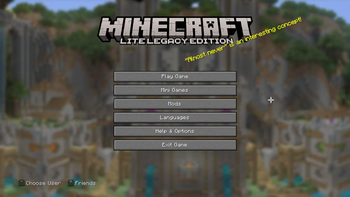
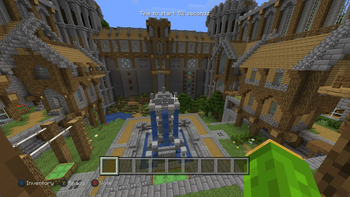
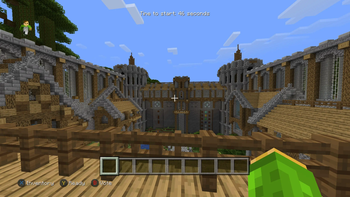
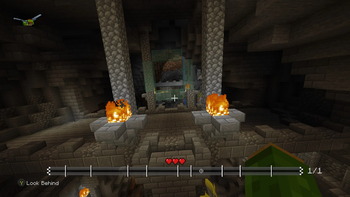
A Performance friendly alternative to other Legacy4J based modpacks. Relive the LCE experience in a way that prioritizes performance!
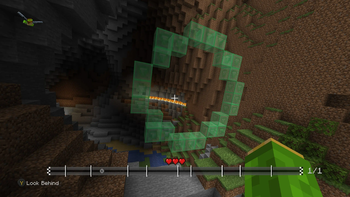
Screenshots

Über dieses Modpack
Lite Legacy

Lite Legacy leverages the power of Legacy4J and other mods to faithfully recreate the classic Minecraft Console Edition experience in a performance friendly enviornment.

Modrinth Launcher (Recommended)
For the simplest and fastest installation, we recommend using the Modrinth Launcher. It’s lightweight, user-friendly, and quick to set up. Once installed, just head to the Modpacks section and search for Lite-Legacy to install it with a few clicks.
Prism Launcher
If you prefer more control over your setup, you can use Prism Launcher. While it offers greater flexibility and more features, its interface isn’t as polished. To install Lite-Legacy, create a new instance and search for it in the Modrinth section.
ATLauncher
It's just like Prism Launcher but it provides much more features and a much cleaner user interface, head to the Packs section, go to the Modrinth category, then search up “Lite Legacy”, then click on the Install, once it's done, head over to the Instances section, and then open the instance by clicking Play, and then you're ready to play the modpack.

Lite Legacy includes:
- Improved Performance
- Built in Minigames
- Free Multiplayer
- Mash-Up Worlds
- Legacy Resource Packs
- Discord Rich Presence Integration
- All Tutorial Worlds
- An official server in-game (JSS^2)
Lite Legacy features and utilizes various mods that offers the same features that OptiFine does while also being modular so that you can remove features you don't want or features that are incompatible with other mods. This includes major resource pack features

Currently not sponsored, join our Discord and contact one of the higher ups if you want to sponsor us.

Credits
Developers
- JacksTheGreat - Owner
- Dashtiss - Maintainer
Assistants and Playtesters
- FigureThyCorpse - Playtester
- lone_wolf805 - Playtester
- TwentyFour711 - Playtester
- xXLegacyMasterXx - Playtester
Special Thanks

- Re-Console + by omo50 and Lasting Legacy
- Simply Legacy by omo50 and Lasting Legacy
- 2000s Edition by NicSonic and Lasting Legacy
- Project4J by cixon
- Console-idated by S_N00B (Has LEM compatibility)
Verfügbare Versionen
Lite Legacy Server einrichten
Server bestellen
Wähle mindestens 4 GB RAM (6 GB empfohlen für Lite Legacy). Je nach Spieleranzahl: +1 GB pro 8 Spieler.
Modpack im Dashboard installieren
Öffne den Modpack-Browser im Dashboard, suche nach "Lite Legacy" und klicke "Installieren". Der fabric-Loader und Minecraft 1.21.10 werden automatisch konfiguriert.
Server starten & spielen
Starte den Server – alle Mods werden automatisch geladen. Teile die Server-IP mit Freunden und spielt zusammen!
Häufige Fragen
Lite Legacy Server crasht oder startet nicht – was tun?
Häufigste Ursachen: zu wenig RAM oder falscher fabric-Loader. Prüfe latest.log auf "OutOfMemoryError" → erhöhe RAM auf mindestens 6 GB. Bei "Mixin" oder "ClassNotFoundException": Modpack-Version und Loader stimmen nicht überein. Bei Mado Hosting werden Loader und Minecraft-Version beim Modpack-Install automatisch konfiguriert – das verhindert die meisten Startprobleme.
Wie viel RAM braucht ein Lite Legacy Server wirklich?
Minimum 4 GB, empfohlen 6 GB für stabile Performance. +1 GB pro 8 Spieler. Wichtig: Minecraft-Modpacks brauchen mehr RAM als Vanilla – plane pro zusätzlichem Spieler extra ein. Bei Mado Hosting kannst du den RAM jederzeit live hochskalieren, ohne Datenverlust (ab €5.2/Monat).
Kann ich eigene Mods zu Lite Legacy hinzufügen, ohne Konflikte?
Ja, aber achte auf die Kompatibilität: Nutze nur Mods für den gleichen Loader (fabric) und die gleiche Minecraft-Version (1.21.10). Häufige Probleme: ID-Konflikte bei Rezept-Mods und inkompatible Coremod-Versionen. Im Mado Dashboard zeigt der Mod-Browser nur kompatible Mods an und warnt bei bekannten Konflikten.
Lite Legacy Server laggt – Performance-Tipps
1) RAM auf 6 GB+ erhöhen. 2) Server-View-Distance auf 8 reduzieren (server.properties). 3) Pre-Generiere Chunks mit dem "Chunky" Plugin. 4) Prüfe mit /spark profiler welche Mods die meiste Tick-Time verbrauchen. Bei Mado Hosting laufen alle Server auf NVMe-SSDs mit dedizierten CPU-Kernen – das eliminiert Hardware als Engpass.
Ähnliche Modpacks

![Cobblemon Official Modpack [Fabric]](https://cdn.modrinth.com/data/5FFgwNNP/e7f9ee2e9d361623847853fe2ddce42f519ee64f.png)
![COBBLEVERSE - Pokemon Adventure [Cobblemon]](https://cdn.modrinth.com/data/Jkb29YJU/581ecf54530972afb18a04660afd820f2f24f6c7.png)
![Better MC [FABRIC] - BMC2](https://cdn.modrinth.com/data/shFhR8Vx/a19c2bcb51d38f32f138d3607e91cb2b7b8e387f_96.webp)


Lite Legacy Server mieten
Starte deinen eigenen Server mit automatischer Modpack-Installation.
Unterstützte Versionen
Starte deinen Lite Legacy Server jetzt
Ab €5.20/Monat; für die beste Performance werden 6 GB RAM empfohlen.
Server konfigurieren →