![The Monster Spawned Official Pack [Vanilla Edition]](https://cdn.modrinth.com/data/bZTl2BXX/65d70fd0156d68ed1c017cedb32ab5c0b39d7d41_96.webp)
The Monster Spawned Official Pack [Vanilla Edition]
The official Monster Spawned modpack for the vanilla side of things...
Screenshots
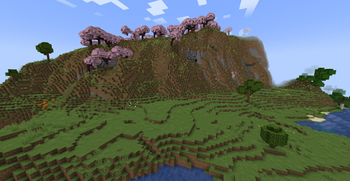
Über dieses Modpack
Monster Spawned [Vanilla Edition]
What It Is
This is the official modpack for the Monster Spawned: Minecraft [Vanilla Edition] server. In conjunction with the Modrinth App (or a similar client), you will be able to download, update, and load the necessary mods needed to play the server and still be able to enjoy Minecraft as in its days of glory.
This pack features some QOL (quality of life) tweaks, gameplay stability improvements, as well as various tweaks and fixes to make the game more enjoyable and stable.
Who It's For
This pack was designed with the ease of distribution for the players of the Monster Spawned server in mind, in addition being able to comply with not uploading and redistributing mods in a manner that was against the mod author's and mod platform's permission.
It aims to provide a sense of fill for the nostalgic player that misses the golden age of Minecraft, yet still wants to play casually and not be overly competitive in a world driven mad by the competitive nature of eSports.
It is completely optional to use, and was made with the intent to not mess with the Minecraft multiplayer mode in any game-changing fashion, outside of disabling chat reporting (for the good of all players).
Mod/Resource Pack List
The modpack is built using the mods, resource packs, and other data found on the latest version of the "Dependency" list, found at this page: link. The above-mentioned link will always contain the latest version of the pack's dependencies and data included.
Plans/To-Do:
- Do performance profiling job on the pack and see how it can be improved (in terms of performance)
- Add a custom mod to help with various aspects of the project (update notifications, in-game news, etc.)
Contact
If you have any questions, please feel free to contact me via my website's contact page here. I am also on Discord at: TheModdersDen (Please mention the pack when reaching out on this platform).
I will do my best to respond in a reasonable time. :)
Verfügbare Versionen
The Monster Spawned Official Pack [Vanilla Edition] Server einrichten
Server bestellen
Wähle mindestens 6 GB RAM (8 GB empfohlen für The Monster Spawned Official Pack [Vanilla Edition]). Je nach Spieleranzahl: +1 GB pro 5 Spieler.
Modpack im Dashboard installieren
Öffne den Modpack-Browser im Dashboard, suche nach "The Monster Spawned Official Pack [Vanilla Edition]" und klicke "Installieren". Der fabric-Loader und Minecraft 1.21.8 werden automatisch konfiguriert.
Server starten & spielen
Starte den Server – alle Mods werden automatisch geladen. Teile die Server-IP mit Freunden und spielt zusammen!
Häufige Fragen
The Monster Spawned Official Pack [Vanilla Edition] Server crasht oder startet nicht – was tun?
Häufigste Ursachen: zu wenig RAM oder falscher fabric-Loader. Prüfe latest.log auf "OutOfMemoryError" → erhöhe RAM auf mindestens 8 GB. Bei "Mixin" oder "ClassNotFoundException": Modpack-Version und Loader stimmen nicht überein. Bei Mado Hosting werden Loader und Minecraft-Version beim Modpack-Install automatisch konfiguriert – das verhindert die meisten Startprobleme.
Wie viel RAM braucht ein The Monster Spawned Official Pack [Vanilla Edition] Server wirklich?
Minimum 6 GB, empfohlen 8 GB für stabile Performance. +1 GB pro 5 Spieler. Wichtig: Minecraft-Modpacks brauchen mehr RAM als Vanilla – plane pro zusätzlichem Spieler extra ein. Bei Mado Hosting kannst du den RAM jederzeit live hochskalieren, ohne Datenverlust (ab €7.800000000000001/Monat).
Kann ich eigene Mods zu The Monster Spawned Official Pack [Vanilla Edition] hinzufügen, ohne Konflikte?
Ja, aber achte auf die Kompatibilität: Nutze nur Mods für den gleichen Loader (fabric) und die gleiche Minecraft-Version (1.21.8). Häufige Probleme: ID-Konflikte bei Rezept-Mods und inkompatible Coremod-Versionen. Im Mado Dashboard zeigt der Mod-Browser nur kompatible Mods an und warnt bei bekannten Konflikten.
The Monster Spawned Official Pack [Vanilla Edition] Server laggt – Performance-Tipps
1) RAM auf 8 GB+ erhöhen. 2) Server-View-Distance auf 8 reduzieren (server.properties). 3) Pre-Generiere Chunks mit dem "Chunky" Plugin. 4) Prüfe mit /spark profiler welche Mods die meiste Tick-Time verbrauchen. Bei Mado Hosting laufen alle Server auf NVMe-SSDs mit dedizierten CPU-Kernen – das eliminiert Hardware als Engpass.
Ähnliche Modpacks


![Better MC [FABRIC] - BMC2](https://cdn.modrinth.com/data/shFhR8Vx/a19c2bcb51d38f32f138d3607e91cb2b7b8e387f_96.webp)
![Better MC [FORGE] - BMC4](https://cdn.modrinth.com/data/4BV47HRn/7f5ef7cc61b2593609aabef3ed07a866a4f11b73_96.webp)


The Monster Spawned Official Pack [Vanilla Edition] Server mieten
Starte deinen eigenen Server mit automatischer Modpack-Installation.
Unterstützte Versionen
Starte deinen The Monster Spawned Official Pack [Vanilla Edition] Server jetzt
Ab €7.80/Monat; für die beste Performance werden 8 GB RAM empfohlen.
Server konfigurieren →