
NEEPMeat Official Modpack
A small modpack providing a working installation of NEEPMeat with some opinionated extras. Can be played on its own, or used as a base for a larger modpack.
Screenshots
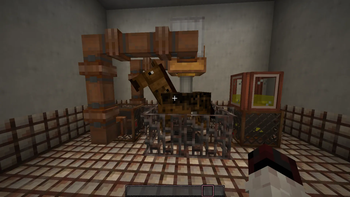
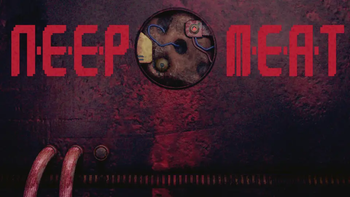
Über dieses Modpack
NEEPMeat Official Modpack
This is a small modpack focusing on NEEPMeat. Unlike other modpacks that include NEEPMeat, this one is created with the goal of not breaking any NEEPMeat features. It can be used if you just want a NEEPMeat installation without having to manually deal with the dependencies, or as a base to add more content mods to.
It provides:
- A working installation of NEEPMeat.
- Consistent theming of menus and screens.
- Some texture and data pack alterations.
Extra Features
- Pre-1.17 ore textures.
- A more miserable-looking deepslate texture.
- A lovely custom title screen.
- Estrogen recipes using NEEPMeat machines.
- Minecarts are actually useful for transport thanks to Audaki Cart Engine.
- Optional Iris/Colorwheel for shader use.
Maybe at some point I'll make an full soundtrack for the pack.
For Linux Users
If your game fails to start, and you get a message in the log saying A fatal error has been detected by the Java Runtime Environment ... Problematic frame: C [libopenal.so+0x9fb4d] ..., try explicitly speficying the location of your OpenAL library in your launcher's JVM options:
-Dorg.lwjgl.openal.libname=<path to your openal.so>
This is probably -Dorg.lwjgl.openal.libname=/usr/lib/libopenal.so
Alternatively, you could just disable Sound Filters in the mod list.
Licensing
- Music: CC-BY-SA-NC
- Everything else (excluding mods): MIT
QNA (Questions Nobody Asked)
Why is it called 'NEEPMeat Official Modpack?
- I couldn't think of a better name.
Verfügbare Versionen
NEEPMeat Official Modpack Server einrichten
Server bestellen
Wähle mindestens 6 GB RAM (8 GB empfohlen für NEEPMeat Official Modpack). Je nach Spieleranzahl: +1 GB pro 5 Spieler.
Modpack im Dashboard installieren
Öffne den Modpack-Browser im Dashboard, suche nach "NEEPMeat Official Modpack" und klicke "Installieren". Der fabric-Loader und Minecraft 1.20.1 werden automatisch konfiguriert.
Server starten & spielen
Starte den Server – alle Mods werden automatisch geladen. Teile die Server-IP mit Freunden und spielt zusammen!
Häufige Fragen
NEEPMeat Official Modpack Server crasht oder startet nicht – was tun?
Häufigste Ursachen: zu wenig RAM oder falscher fabric-Loader. Prüfe latest.log auf "OutOfMemoryError" → erhöhe RAM auf mindestens 8 GB. Bei "Mixin" oder "ClassNotFoundException": Modpack-Version und Loader stimmen nicht überein. Bei Mado Hosting werden Loader und Minecraft-Version beim Modpack-Install automatisch konfiguriert – das verhindert die meisten Startprobleme.
Wie viel RAM braucht ein NEEPMeat Official Modpack Server wirklich?
Minimum 6 GB, empfohlen 8 GB für stabile Performance. +1 GB pro 5 Spieler. Wichtig: Minecraft-Modpacks brauchen mehr RAM als Vanilla – plane pro zusätzlichem Spieler extra ein. Bei Mado Hosting kannst du den RAM jederzeit live hochskalieren, ohne Datenverlust (ab €7.800000000000001/Monat).
Kann ich eigene Mods zu NEEPMeat Official Modpack hinzufügen, ohne Konflikte?
Ja, aber achte auf die Kompatibilität: Nutze nur Mods für den gleichen Loader (fabric) und die gleiche Minecraft-Version (1.20.1). Häufige Probleme: ID-Konflikte bei Rezept-Mods und inkompatible Coremod-Versionen. Im Mado Dashboard zeigt der Mod-Browser nur kompatible Mods an und warnt bei bekannten Konflikten.
NEEPMeat Official Modpack Server laggt – Performance-Tipps
1) RAM auf 8 GB+ erhöhen. 2) Server-View-Distance auf 8 reduzieren (server.properties). 3) Pre-Generiere Chunks mit dem "Chunky" Plugin. 4) Prüfe mit /spark profiler welche Mods die meiste Tick-Time verbrauchen. Bei Mado Hosting laufen alle Server auf NVMe-SSDs mit dedizierten CPU-Kernen – das eliminiert Hardware als Engpass.
Ähnliche Modpacks

![Cobblemon Official Modpack [Fabric]](https://cdn.modrinth.com/data/5FFgwNNP/e7f9ee2e9d361623847853fe2ddce42f519ee64f.png)
![COBBLEVERSE - Pokemon Adventure [Cobblemon]](https://cdn.modrinth.com/data/Jkb29YJU/581ecf54530972afb18a04660afd820f2f24f6c7.png)
![Better MC [FABRIC] - BMC2](https://cdn.modrinth.com/data/shFhR8Vx/a19c2bcb51d38f32f138d3607e91cb2b7b8e387f_96.webp)


NEEPMeat Official Modpack Server mieten
Starte deinen eigenen Server mit automatischer Modpack-Installation.
Details
- Lizenz
- LicenseRef-MIT-for-content-CC-BY-SA-NC-for-music
- Server-seitig
- Erforderlich
- Client-seitig
- Erforderlich
Unterstützte Versionen
Starte deinen NEEPMeat Official Modpack Server jetzt
Ab €7.80/Monat; für die beste Performance werden 8 GB RAM empfohlen.
Server konfigurieren →