
Nvidia Optimized
A performance modpack made for Nvidia GPUs
Screenshots
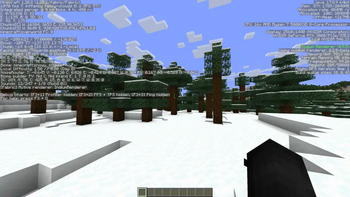
Über dieses Modpack
A Performance Modpack exclusively for Nvidia GPUs

This modpack gave us a 300fps increase over Fabulously Optimized...
Juicy Performance
Blazing fast performance for no good reason. Seriously, just download it and watch your framerate climb
Modern Standards
Now on Minecraft 26.2. It supports everything you want except shaders, due to limitations of Nvidium (the life and soul of this modpack)
Mostly Bug Free
Testing hasn't revealed any weird issues and glitches with this modpack, many of these mods are tried and true not to fry your game, but keep in mind Nvidium is still in Beta
Flex Your GPU
Flex your #TeamGreen status on those team blue and red plebs lol
Now with voxy!
Distant Horizons is out, voxy is in. Same idea, absurd render distance, except voxy is by cortex, the same dev who makes Nvidium, and both mods target the exact same Sodium build instead of fighting each other over the renderer. No separate beta download this time either, it's in the main pack.
⚠️ voxy is not free performance. It builds and streams LOD terrain far past your normal render distance, which costs VRAM and CPU time on top of everything Nvidium is already doing. On a low-end card, a small VRAM budget, or a weak CPU, it can cost you more frames than it gains, and it's worst while you're exploring fresh chunks. It also needs OpenGL 4.6. If your FPS tanks after updating, turn voxy's render distance down or switch it off in the mod menu before you blame Nvidium.
⚠️ Do not update Sodium
Nvidium pins Sodium to exactly 0.9.1. If your launcher offers to bump Sodium to 0.9.2 or anything newer, say no. Nvidium will refuse to load and you'll be sitting on vanilla rendering wondering where your frames went.
Verfügbare Versionen
Nvidia Optimized Server einrichten
Server bestellen
Wähle mindestens 4 GB RAM (6 GB empfohlen für Nvidia Optimized). Je nach Spieleranzahl: +1 GB pro 8 Spieler.
Modpack im Dashboard installieren
Öffne den Modpack-Browser im Dashboard, suche nach "Nvidia Optimized" und klicke "Installieren". Der fabric-Loader und Minecraft 26.2 werden automatisch konfiguriert.
Server starten & spielen
Starte den Server – alle Mods werden automatisch geladen. Teile die Server-IP mit Freunden und spielt zusammen!
Häufige Fragen
Nvidia Optimized Server crasht oder startet nicht – was tun?
Häufigste Ursachen: zu wenig RAM oder falscher fabric-Loader. Prüfe latest.log auf "OutOfMemoryError" → erhöhe RAM auf mindestens 6 GB. Bei "Mixin" oder "ClassNotFoundException": Modpack-Version und Loader stimmen nicht überein. Bei Mado Hosting werden Loader und Minecraft-Version beim Modpack-Install automatisch konfiguriert – das verhindert die meisten Startprobleme.
Wie viel RAM braucht ein Nvidia Optimized Server wirklich?
Minimum 4 GB, empfohlen 6 GB für stabile Performance. +1 GB pro 8 Spieler. Wichtig: Minecraft-Modpacks brauchen mehr RAM als Vanilla – plane pro zusätzlichem Spieler extra ein. Bei Mado Hosting kannst du den RAM jederzeit live hochskalieren, ohne Datenverlust (ab €5.2/Monat).
Kann ich eigene Mods zu Nvidia Optimized hinzufügen, ohne Konflikte?
Ja, aber achte auf die Kompatibilität: Nutze nur Mods für den gleichen Loader (fabric) und die gleiche Minecraft-Version (26.2). Häufige Probleme: ID-Konflikte bei Rezept-Mods und inkompatible Coremod-Versionen. Im Mado Dashboard zeigt der Mod-Browser nur kompatible Mods an und warnt bei bekannten Konflikten.
Nvidia Optimized Server laggt – Performance-Tipps
1) RAM auf 6 GB+ erhöhen. 2) Server-View-Distance auf 8 reduzieren (server.properties). 3) Pre-Generiere Chunks mit dem "Chunky" Plugin. 4) Prüfe mit /spark profiler welche Mods die meiste Tick-Time verbrauchen. Bei Mado Hosting laufen alle Server auf NVMe-SSDs mit dedizierten CPU-Kernen – das eliminiert Hardware als Engpass.
Ähnliche Modpacks

![Cobblemon Official Modpack [Fabric]](https://cdn.modrinth.com/data/5FFgwNNP/e7f9ee2e9d361623847853fe2ddce42f519ee64f.png)
![COBBLEVERSE - Pokemon Adventure [Cobblemon]](https://cdn.modrinth.com/data/Jkb29YJU/581ecf54530972afb18a04660afd820f2f24f6c7.png)
![Better MC [FABRIC] - BMC2](https://cdn.modrinth.com/data/shFhR8Vx/a19c2bcb51d38f32f138d3607e91cb2b7b8e387f_96.webp)


Nvidia Optimized Server mieten
Starte deinen eigenen Server mit automatischer Modpack-Installation.
Details
- Lizenz
- LicenseRef-All-Rights-Reserved
- Server-seitig
- Nicht unterstützt
- Client-seitig
- Erforderlich
Unterstützte Versionen
Starte deinen Nvidia Optimized Server jetzt
Ab €5.20/Monat; für die beste Performance werden 6 GB RAM empfohlen.
Server konfigurieren →