
Nvidia Optimized
A performance modpack made for Nvidia GPUs
Screenshots

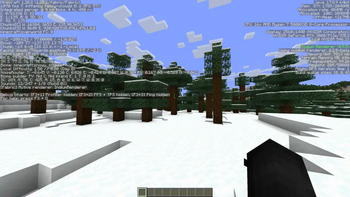
About this Modpack
A Performance Modpack exclusively for Nvidia GPUs

This modpack gave us a 300fps increase over Fabulously Optimized...
Juicy Performance
Blazing fast performance for no good reason. Seriously, just download it and watch your framerate climb
Modern Standards
Now on Minecraft 26.2. It supports everything you want except shaders, due to limitations of Nvidium (the life and soul of this modpack)
Mostly Bug Free
Testing hasn't revealed any weird issues and glitches with this modpack, many of these mods are tried and true not to fry your game, but keep in mind Nvidium is still in Beta
Flex Your GPU
Flex your #TeamGreen status on those team blue and red plebs lol
Now with voxy!
Distant Horizons is out, voxy is in. Same idea, absurd render distance, except voxy is by cortex, the same dev who makes Nvidium, and both mods target the exact same Sodium build instead of fighting each other over the renderer. No separate beta download this time either, it's in the main pack.
⚠️ voxy is not free performance. It builds and streams LOD terrain far past your normal render distance, which costs VRAM and CPU time on top of everything Nvidium is already doing. On a low-end card, a small VRAM budget, or a weak CPU, it can cost you more frames than it gains, and it's worst while you're exploring fresh chunks. It also needs OpenGL 4.6. If your FPS tanks after updating, turn voxy's render distance down or switch it off in the mod menu before you blame Nvidium.
⚠️ Do not update Sodium
Nvidium pins Sodium to exactly 0.9.1. If your launcher offers to bump Sodium to 0.9.2 or anything newer, say no. Nvidium will refuse to load and you'll be sitting on vanilla rendering wondering where your frames went.
Available Versions
How to Set Up a Nvidia Optimized Server
Order Server
Choose at least 4 GB RAM (6 GB recommended for Nvidia Optimized). Based on player count: per 8 players.
Install Modpack in Dashboard
Open the modpack browser in the dashboard, search for "Nvidia Optimized" and click "Install". The fabric loader and Minecraft 26.2 are configured automatically.
Start Server & Play
Start the server – all mods are loaded automatically. Share the server IP with friends and play together!
Frequently Asked Questions
Nvidia Optimized server crashes or won't start – what to do?
Most common causes: insufficient RAM or wrong fabric loader. Check latest.log for "OutOfMemoryError" → increase RAM to at least 6 GB. For "Mixin" or "ClassNotFoundException" errors: modpack version and loader don't match. With Mado Hosting, loader and Minecraft version are auto-configured on modpack install – preventing most startup issues.
How much RAM does a Nvidia Optimized server really need?
Minimum 4 GB, recommended 6 GB for stable performance. per 8 players. Important: Minecraft modpacks need more RAM than vanilla – plan extra per additional player. With Mado Hosting, you can scale RAM up live at any time without data loss (from €5.2/month).
Can I add custom mods to Nvidia Optimized without conflicts?
Yes, but check compatibility: only use mods for the same loader (fabric) and same Minecraft version (26.2). Common issues: ID conflicts with recipe mods and incompatible coremod versions. The Mado dashboard mod browser only shows compatible mods and warns about known conflicts.
Nvidia Optimized server lagging – performance tips
1) Increase RAM to 6 GB+. 2) Reduce server view-distance to 8 (server.properties). 3) Pre-generate chunks with the "Chunky" plugin. 4) Use /spark profiler to check which mods consume the most tick time. With Mado Hosting, all servers run on NVMe SSDs with dedicated CPU cores – eliminating hardware as a bottleneck.
Similar Modpacks

![Cobblemon Official Modpack [Fabric]](https://cdn.modrinth.com/data/5FFgwNNP/e7f9ee2e9d361623847853fe2ddce42f519ee64f.png)
![COBBLEVERSE - Pokemon Adventure [Cobblemon]](https://cdn.modrinth.com/data/Jkb29YJU/581ecf54530972afb18a04660afd820f2f24f6c7.png)
![Better MC [FABRIC] - BMC2](https://cdn.modrinth.com/data/shFhR8Vx/a19c2bcb51d38f32f138d3607e91cb2b7b8e387f_96.webp)


Rent Nvidia Optimized Server
Start your own server with automatic modpack installation.
Supported Versions
Start your Nvidia Optimized Server now
From €5.20/month; 6 GB RAM is recommended for best performance.
Configure Server →