OptiFine for Fabric
OptiFine features for Fabric — powered by Fabric optimization and modern Minecraft performance mods. High FPS even on low‑end systems. Shaders! 26.3: Wilderness Bound alpha!
Screenshots
Über dieses Modpack



OptiFine for Fabric v5 is in alpha testing!
OptiFine for Fabric v5 brings many exciting new features to the pack. During the alpha stage, v4 will continue to be supported and updated to the newest versions, rather than v5. Please report any bugs you find!
Looking for a modpack that has all the features OptiFine does? You're in the right place!
OptiFine for Fabric is a Fabric optimization modpack designed to being OptiFine-style features to Fabric, powered by modern Minecraft performance mods like Sodium, Iris Shaders, Lithium, and more. Perfect for players searching for modern OptiFine alternatives.
⚡ Insane Performance Boost
- 🧠 Lightweight optimization for smoother gameplay
- 🖥️ Runs great even on low-end systems thanks to the optimized Fabric loader
- ⚡ 8x FPS compared to Vanilla
- 💻 No stuttering frames
- 📶 Less lag
🎨 Graphics Enhancements
- 🌈 HD textures and resource pack support
- 🔍 Built-in zoom functionality (just like OptiFine - but with more customibility!)
- 🧊 Connected textures for seamless visuals
- 🧥 Support for capes and custom models
- 🔦 Dynamic lighting and shader compatibility
- 🧪 Includes block & entity model enhancements
- 🧵 Smooth animations and visual polish
✅ Better Than OptiFine
- 🧩 Fabric compatibility
- 🧠 More reliable and modular
- 🧪 Actively maintained and updated for latest Minecraft versions
🛠️ Modding Flexibility
- 🔧 Compatible with additional mods for custom setups
- 🧭 Working on Lunar Client compatibility
FPS Comparison Chart
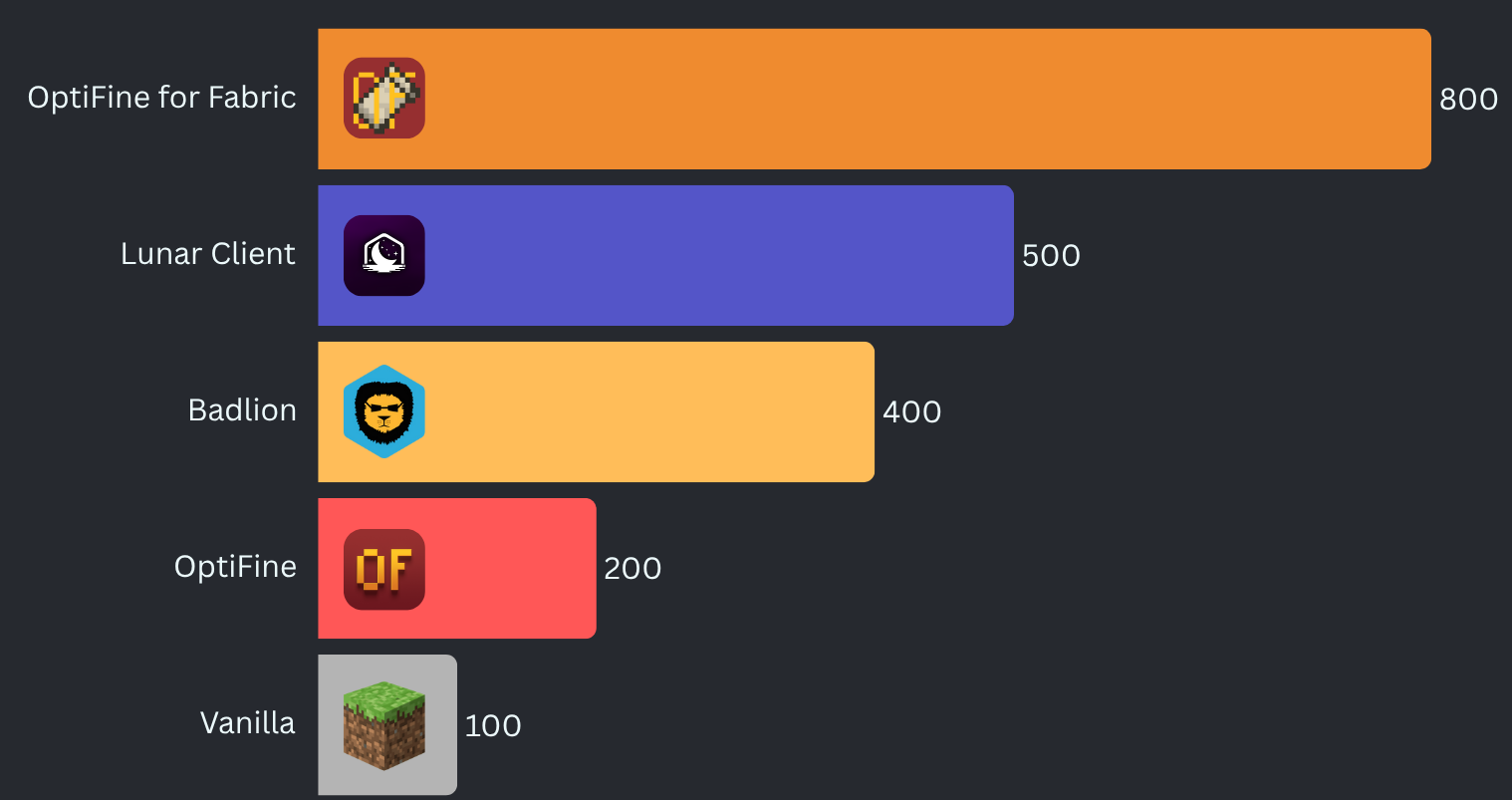
Benchmarked on a mid-range desktop computer.
What version should I use?
To get the correct version of OptiFine for Fabric for your setup:
- Open the Download page: optifineforfabric.com/download
- Choose your Minecraft version from the dropdown.
- Select the latest stable release shown for that Minecraft version.
- Stable releases have no suffix (no
-alpha,-beta,-dev). - The selector automatically filters versions so you don’t need to interpret compatibility badges.
- Stable releases have no suffix (no
How to compare versions:
Pick the version with the highest numbers from left to right.
Examples:
3.4.1is newer than2.5.33.5.2is newer than3.4.1
If no stable releases exist for your Minecraft version, you may use an alpha, beta, or dev build. These appear clearly labeled in the selector.
Detailed Version Guide
OptiFine for Fabric uses a structured versioning system. Every release follows this format:
<major>[.<minor>[.<build>]][-channel[.<channelBuild>]]
Examples:
2.5— stable2.5.1— hotfix for2.52.6-alpha.1— first alpha release for a seperate Minecraft version
The version number describes the pack itself, not the Minecraft version. Minecraft compatibility is shown separately on Modrinth.
Version Number Breakdown
Major — <major>
Large updates to the pack.
This number only increases when the pack undergoes a significant redesign or major feature shift.
Minor — <minor>
Normal updates within a major version.
This increases when the pack receives meaningful improvements, mod additions, compatibility changes, etc.
Build — <build>
A patch‑level counter within the same Minecraft version.
This number increases when the pack receives bug fixes or small adjustments for that specific Minecraft version.
This number resets when Minecraft updates, because each Minecraft version starts its own patch sequence.
Examples:
2.5→ Minecraft 1.21.1 (stable release)2.5.1→ Minecraft 1.21.1 (first patch)j2.5-alpha.1→ Minecraft 1.21.2 (first alpha build)2.5-beta.2→ Minecraft 1.20.1 (second beta build)
Build numbers simply indicate bug fixes and other minor changes tied to Minecraft versions.
Release Channels
Channels appear after a dash.
-dev— Experimental development builds. Unstable and incomplete, highly likely to not even work.-alpha— Early testing builds. Features may be missing or broken.-beta— Feature‑complete testing builds. Mostly stable.- No suffix — Stable release and/or hotfix. Fully tested and recommended.
Recency is shown by the dot and the number.
- A channel followed by
.<number>indicates the senority of the build. For example:-alpha.1indicates the first alpha build-dev.3indicates the third dev build-beta.4indicates the fourth beta build
Choosing the Right Version
- Use the latest stable version for your Minecraft version.
- Only use alpha, beta, or dev builds if you need early access or want to help test.
Minecraft compatibility is shown on Modrinth, while the version number reflects the evolution of the pack itself.
Verfügbare Versionen
OptiFine for Fabric Server einrichten
Server bestellen
Wähle mindestens 4 GB RAM (6 GB empfohlen für OptiFine for Fabric). Je nach Spieleranzahl: +1 GB pro 8 Spieler.
Modpack im Dashboard installieren
Öffne den Modpack-Browser im Dashboard, suche nach "OptiFine for Fabric" und klicke "Installieren". Der fabric-Loader und Minecraft 26.3 werden automatisch konfiguriert.
Server starten & spielen
Starte den Server – alle Mods werden automatisch geladen. Teile die Server-IP mit Freunden und spielt zusammen!
Häufige Fragen
OptiFine for Fabric Server crasht oder startet nicht – was tun?
Häufigste Ursachen: zu wenig RAM oder falscher fabric-Loader. Prüfe latest.log auf "OutOfMemoryError" → erhöhe RAM auf mindestens 6 GB. Bei "Mixin" oder "ClassNotFoundException": Modpack-Version und Loader stimmen nicht überein. Bei Mado Hosting werden Loader und Minecraft-Version beim Modpack-Install automatisch konfiguriert – das verhindert die meisten Startprobleme.
Wie viel RAM braucht ein OptiFine for Fabric Server wirklich?
Minimum 4 GB, empfohlen 6 GB für stabile Performance. +1 GB pro 8 Spieler. Wichtig: Minecraft-Modpacks brauchen mehr RAM als Vanilla – plane pro zusätzlichem Spieler extra ein. Bei Mado Hosting kannst du den RAM jederzeit live hochskalieren, ohne Datenverlust (ab €5.2/Monat).
Kann ich eigene Mods zu OptiFine for Fabric hinzufügen, ohne Konflikte?
Ja, aber achte auf die Kompatibilität: Nutze nur Mods für den gleichen Loader (fabric) und die gleiche Minecraft-Version (26.3). Häufige Probleme: ID-Konflikte bei Rezept-Mods und inkompatible Coremod-Versionen. Im Mado Dashboard zeigt der Mod-Browser nur kompatible Mods an und warnt bei bekannten Konflikten.
OptiFine for Fabric Server laggt – Performance-Tipps
1) RAM auf 6 GB+ erhöhen. 2) Server-View-Distance auf 8 reduzieren (server.properties). 3) Pre-Generiere Chunks mit dem "Chunky" Plugin. 4) Prüfe mit /spark profiler welche Mods die meiste Tick-Time verbrauchen. Bei Mado Hosting laufen alle Server auf NVMe-SSDs mit dedizierten CPU-Kernen – das eliminiert Hardware als Engpass.
Ähnliche Modpacks

![Cobblemon Official Modpack [Fabric]](https://cdn.modrinth.com/data/5FFgwNNP/e7f9ee2e9d361623847853fe2ddce42f519ee64f.png)
![COBBLEVERSE - Pokemon Adventure [Cobblemon]](https://cdn.modrinth.com/data/Jkb29YJU/581ecf54530972afb18a04660afd820f2f24f6c7.png)
![Better MC [FABRIC] - BMC2](https://cdn.modrinth.com/data/shFhR8Vx/a19c2bcb51d38f32f138d3607e91cb2b7b8e387f_96.webp)


OptiFine for Fabric Server mieten
Starte deinen eigenen Server mit automatischer Modpack-Installation.
Details
- Lizenz
- GNU General Public License v3.0 or later
- Server-seitig
- Optional
- Client-seitig
- Erforderlich
Unterstützte Versionen
Starte deinen OptiFine for Fabric Server jetzt
Ab €5.20/Monat; für die beste Performance werden 6 GB RAM empfohlen.
Server konfigurieren →