OptiFine for Fabric
OptiFine features for Fabric — powered by Fabric optimization and modern Minecraft performance mods. High FPS even on low‑end systems. Shaders! 26.3: Wilderness Bound alpha!
Screenshots
About this Modpack




OptiFine for Fabric v5 is in alpha testing!
OptiFine for Fabric v5 brings many exciting new features to the pack. During the alpha stage, v4 will continue to be supported and updated to the newest versions, rather than v5. Please report any bugs you find!
Looking for a modpack that has all the features OptiFine does? You're in the right place!
OptiFine for Fabric is a Fabric optimization modpack designed to being OptiFine-style features to Fabric, powered by modern Minecraft performance mods like Sodium, Iris Shaders, Lithium, and more. Perfect for players searching for modern OptiFine alternatives.
⚡ Insane Performance Boost
- 🧠 Lightweight optimization for smoother gameplay
- 🖥️ Runs great even on low-end systems thanks to the optimized Fabric loader
- ⚡ 8x FPS compared to Vanilla
- 💻 No stuttering frames
- 📶 Less lag
🎨 Graphics Enhancements
- 🌈 HD textures and resource pack support
- 🔍 Built-in zoom functionality (just like OptiFine - but with more customibility!)
- 🧊 Connected textures for seamless visuals
- 🧥 Support for capes and custom models
- 🔦 Dynamic lighting and shader compatibility
- 🧪 Includes block & entity model enhancements
- 🧵 Smooth animations and visual polish
✅ Better Than OptiFine
- 🧩 Fabric compatibility
- 🧠 More reliable and modular
- 🧪 Actively maintained and updated for latest Minecraft versions
🛠️ Modding Flexibility
- 🔧 Compatible with additional mods for custom setups
- 🧭 Working on Lunar Client compatibility
FPS Comparison Chart
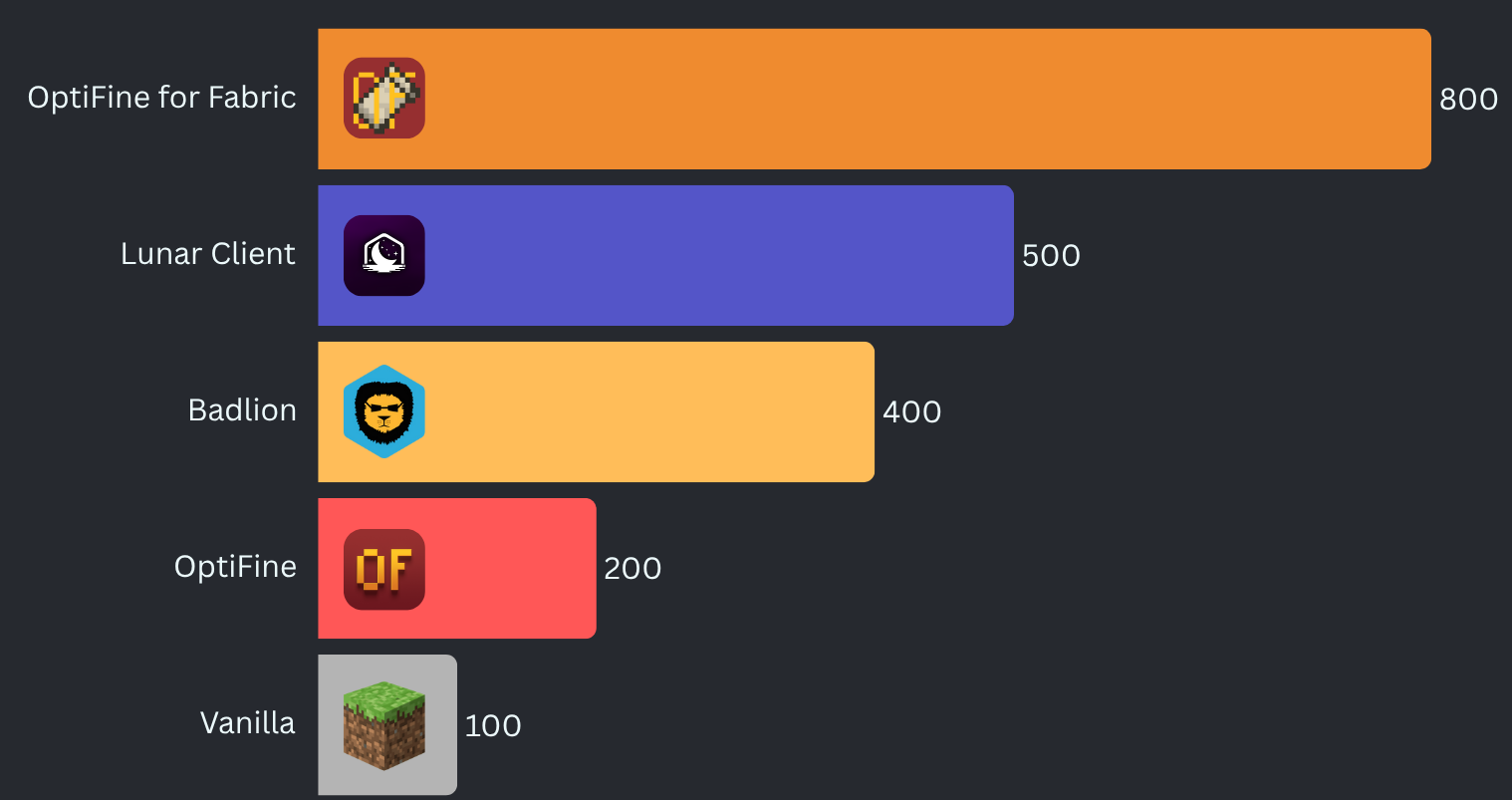
Benchmarked on a mid-range desktop computer.
What version should I use?
To get the correct version of OptiFine for Fabric for your setup:
- Open the Download page: optifineforfabric.com/download
- Choose your Minecraft version from the dropdown.
- Select the latest stable release shown for that Minecraft version.
- Stable releases have no suffix (no
-alpha,-beta,-dev). - The selector automatically filters versions so you don’t need to interpret compatibility badges.
- Stable releases have no suffix (no
How to compare versions:
Pick the version with the highest numbers from left to right.
Examples:
3.4.1is newer than2.5.33.5.2is newer than3.4.1
If no stable releases exist for your Minecraft version, you may use an alpha, beta, or dev build. These appear clearly labeled in the selector.
Detailed Version Guide
OptiFine for Fabric uses a structured versioning system. Every release follows this format:
<major>[.<minor>[.<build>]][-channel[.<channelBuild>]]
Examples:
2.5— stable2.5.1— hotfix for2.52.6-alpha.1— first alpha release for a seperate Minecraft version
The version number describes the pack itself, not the Minecraft version. Minecraft compatibility is shown separately on Modrinth.
Version Number Breakdown
Major — <major>
Large updates to the pack.
This number only increases when the pack undergoes a significant redesign or major feature shift.
Minor — <minor>
Normal updates within a major version.
This increases when the pack receives meaningful improvements, mod additions, compatibility changes, etc.
Build — <build>
A patch‑level counter within the same Minecraft version.
This number increases when the pack receives bug fixes or small adjustments for that specific Minecraft version.
This number resets when Minecraft updates, because each Minecraft version starts its own patch sequence.
Examples:
2.5→ Minecraft 1.21.1 (stable release)2.5.1→ Minecraft 1.21.1 (first patch)j2.5-alpha.1→ Minecraft 1.21.2 (first alpha build)2.5-beta.2→ Minecraft 1.20.1 (second beta build)
Build numbers simply indicate bug fixes and other minor changes tied to Minecraft versions.
Release Channels
Channels appear after a dash.
-dev— Experimental development builds. Unstable and incomplete, highly likely to not even work.-alpha— Early testing builds. Features may be missing or broken.-beta— Feature‑complete testing builds. Mostly stable.- No suffix — Stable release and/or hotfix. Fully tested and recommended.
Recency is shown by the dot and the number.
- A channel followed by
.<number>indicates the senority of the build. For example:-alpha.1indicates the first alpha build-dev.3indicates the third dev build-beta.4indicates the fourth beta build
Choosing the Right Version
- Use the latest stable version for your Minecraft version.
- Only use alpha, beta, or dev builds if you need early access or want to help test.
Minecraft compatibility is shown on Modrinth, while the version number reflects the evolution of the pack itself.
Available Versions
How to Set Up a OptiFine for Fabric Server
Order Server
Choose at least 4 GB RAM (6 GB recommended for OptiFine for Fabric). Based on player count: per 8 players.
Install Modpack in Dashboard
Open the modpack browser in the dashboard, search for "OptiFine for Fabric" and click "Install". The fabric loader and Minecraft 26.3 are configured automatically.
Start Server & Play
Start the server – all mods are loaded automatically. Share the server IP with friends and play together!
Frequently Asked Questions
OptiFine for Fabric server crashes or won't start – what to do?
Most common causes: insufficient RAM or wrong fabric loader. Check latest.log for "OutOfMemoryError" → increase RAM to at least 6 GB. For "Mixin" or "ClassNotFoundException" errors: modpack version and loader don't match. With Mado Hosting, loader and Minecraft version are auto-configured on modpack install – preventing most startup issues.
How much RAM does a OptiFine for Fabric server really need?
Minimum 4 GB, recommended 6 GB for stable performance. per 8 players. Important: Minecraft modpacks need more RAM than vanilla – plan extra per additional player. With Mado Hosting, you can scale RAM up live at any time without data loss (from €5.2/month).
Can I add custom mods to OptiFine for Fabric without conflicts?
Yes, but check compatibility: only use mods for the same loader (fabric) and same Minecraft version (26.3). Common issues: ID conflicts with recipe mods and incompatible coremod versions. The Mado dashboard mod browser only shows compatible mods and warns about known conflicts.
OptiFine for Fabric server lagging – performance tips
1) Increase RAM to 6 GB+. 2) Reduce server view-distance to 8 (server.properties). 3) Pre-generate chunks with the "Chunky" plugin. 4) Use /spark profiler to check which mods consume the most tick time. With Mado Hosting, all servers run on NVMe SSDs with dedicated CPU cores – eliminating hardware as a bottleneck.
Similar Modpacks

![Cobblemon Official Modpack [Fabric]](https://cdn.modrinth.com/data/5FFgwNNP/e7f9ee2e9d361623847853fe2ddce42f519ee64f.png)
![COBBLEVERSE - Pokemon Adventure [Cobblemon]](https://cdn.modrinth.com/data/Jkb29YJU/581ecf54530972afb18a04660afd820f2f24f6c7.png)
![Better MC [FABRIC] - BMC2](https://cdn.modrinth.com/data/shFhR8Vx/a19c2bcb51d38f32f138d3607e91cb2b7b8e387f_96.webp)


Rent OptiFine for Fabric Server
Start your own server with automatic modpack installation.
Details
- License
- GNU General Public License v3.0 or later
- Server-side
- Optional
- Client-side
- Required
Supported Versions
Start your OptiFine for Fabric Server now
From €5.20/month; 6 GB RAM is recommended for best performance.
Configure Server →