
OptiNa Legacy
The Original OptiNa Modpack. created using HTML. after ported for Modrinth
Screenshots

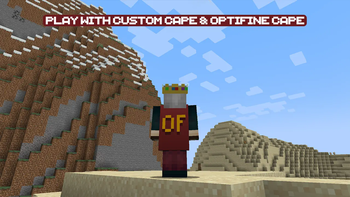
Über dieses Modpack
Maintenance Status
OptiNa Legacy is not currently maintained due to a lack of available time,resources & mainly damaged config files As of Minecraft Newer Versions, The Original OptiNa Modpack is Now called OptiNa Legacy. we are happy to announce that we forked the project and fixed all issues with a new modpack entry called OptiNa Reborn,
we fixed major issues on OptiNa Reborn like damaged config files & crashes.
we bring Lightweight new configs. that significantly improve game perfomance & graphics
(This page continues as it was historically written.)


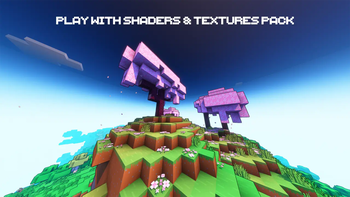
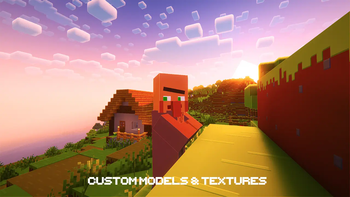
The modpack aims to recreates the features of the popular OptiFine mod in Fabric using Sodium. OptiFine features such as HD Textures, Custom Models, CIT models, OptiFine cape and Cloaks, Shaders, OptiFine zoom, Model Gap Fix,Dynamic Lights and more are supported,The modpack is compatible with Minecraft: Java Edition (Fabric) and is faster than Vanilla/OptiFine, thanks to the modern mods like Lithium, Sodium, Dynamic FPS, Memory Leak Fix, and Spark,OptiNa is lightweight and One bonus feature of OptiNa is that it updates faster than OptiFine with new versions
Supported Version
Minecraft: Java Edition (Fabric)





Performance

Differences Between Legacy & Reborn Version
| Features | Legacy | Reborn |
|---|---|---|
| Configs Files improved | ✖ | ✓ |
| compatible with other mods | ✓ | ✓ |
| Potato PC Settings | ✖ | ✓ |
| Updates can Receive | ✖ | ✓ |
| Classic Zoom Style (OptiFine Style Zoom) | ✓ | ✓ |
| Fancy Zooom Style (Zoomify Mod) | ✖ | ✓ |
| Ray Tracing | ✖ | ✓ |
OptiFine parity
OptiNa Supported All OptiFine Features Like OptiFine Zoom,HD Textures,Custom Models,OptiFine Cape,OptiFine Holiday Cloaks,FPS Boost and more, one bonus feature OptiNa Updates Faster Than OptiFine With New Versions
Modrinth In-Game
you can Download/Update Shaders,Texture Packs and Data Packs In-Game
using Resourcify (Mod) By DeDimandPro
Available at


📥How to Install
Downlaod Modrinth App than go to Modrinth App and Search OptiNa (Fabric) than hit Install Button. All Done Now Enjoy OptiNa Modpack!🔬Mod-List/Resource Pack-List/Shader Pack-List
Sodium (Mod) By jellysquid3Lithium (Mod) By jellysquid3
Reese's Sodium Options (Mod) By FlashyReese
Balm (Mod) By BlayTheNinth
ReplayMod (Mod) By Johni0702
FerriteCore (Mod) By malte0811
Your Options Shall Be Respected (YOSBR) (Mod) By shedaniel
Mouse Tweaks (Mod) By YaLTeR
MixinTrace (Mod) By comp500
Debugify (Mod) By isxander
Animatica (Mod) By FoundationGames
Sodium Extra (Mod) By FlashyReese
Memory Leak Fix (Mod) By FX
Iris Shaders (Mod) By coderbot
Controlify (Mod) By isxander
Language Reload (Mod) By Jerozgen
FabricSkyBoxes Interop (Mod) By FlashyReese
Starlight (Fabric) (Mod) By spottedleaf
Remove Reloading Screen (Mod) By dima_dencep
MoreCulling (Mod) By FX
Main Menu Credits (Mod) By isxander
Paginated Advancements & Custom Frames (Mod) By DaFuqs
Fabric Language Kotlin (Mod) By modmuss50
Fabric API (Mod) By modmuss50
Chat Reporting Helper (Resource Pack) By robotkoer
Fast Better Grass (Resource Pack) By robotkoer
YetAnotherConfigLib (Mod) By isxander
[ETF] Entity Texture Features (Mod) By Traben
Entity Culling (Mod) By tr7zw
spark (Mod) By lucko
No Telemetry (Mod) By kb1000
Complementary Shaders - Reimagined (Shader Pack) By EminGT
Forge Config API Port (Mod) By Fuzs
Indium (Mod) By comp500
LazyDFU (Mod) By astei
Cloth Config API (Mod) By shedaniel
Nvidium (Mod) By cortex
Concurrent Chunk Management Engine (Fabric) (Mod) By ishland
Translations for Sodium (Resource Pack) By robotkoer
Dynamic Lights (Mod/Datapack) By Tschipcraft
ModernFix (Mod) By embeddedt
More Chat History (Mod) By JackFred2
[EMF] Entity Model Features (Mod) By Traben
Krypton (Mod) By astei
Continuity (Mod) By PepperCode1
Very Many Players (Fabric) (Mod) By ishland
OptiGUI (Fabric) (Mod) By opekope2
Capes (Mod) By caelthecolher
Mod Menu (Mod) By Prospector
Better Mount HUD (Mod) By Lortseam
Resourcify (Mod) By DeDiamondPro
Dynamic FPS (Mod) By juliand665
FabricSkyboxes (Mod) By AMereBagatelle
Puzzle (Mod) By Motschen
Enhanced Block Entities (Mod) By FoundationGames
Unique Dark (Resource Pack) By AmongstReality
AntiGhost (Mod) By Giselbaer
Architectury API (Mod) By shedaniel
Model Gap Fix (Mod) By MehVahdJukaar
Logical Zoom (Mod) By LogicalGeekBoy
Fabrishot (Mod) By ramidzkh
Sodium Shadowy Path Blocks (Mod) By Rynnavinx
Noisium (Mod) By Steveplays
ThreadTweak (Mod) By getchoo
No Chat Reports (Mod) By Aizistral
External Links

Donations
Curesarcoma if you donate half of Dollar its pretty valuables for thousands of lifes.
Verfügbare Versionen
OptiNa Legacy Server einrichten
Server bestellen
Wähle mindestens 6 GB RAM (8 GB empfohlen für OptiNa Legacy). Je nach Spieleranzahl: +1 GB pro 5 Spieler.
Modpack im Dashboard installieren
Öffne den Modpack-Browser im Dashboard, suche nach "OptiNa Legacy" und klicke "Installieren". Der fabric-Loader und Minecraft 1.20.4 werden automatisch konfiguriert.
Server starten & spielen
Starte den Server – alle Mods werden automatisch geladen. Teile die Server-IP mit Freunden und spielt zusammen!
Häufige Fragen
OptiNa Legacy Server crasht oder startet nicht – was tun?
Häufigste Ursachen: zu wenig RAM oder falscher fabric-Loader. Prüfe latest.log auf "OutOfMemoryError" → erhöhe RAM auf mindestens 8 GB. Bei "Mixin" oder "ClassNotFoundException": Modpack-Version und Loader stimmen nicht überein. Bei Mado Hosting werden Loader und Minecraft-Version beim Modpack-Install automatisch konfiguriert – das verhindert die meisten Startprobleme.
Wie viel RAM braucht ein OptiNa Legacy Server wirklich?
Minimum 6 GB, empfohlen 8 GB für stabile Performance. +1 GB pro 5 Spieler. Wichtig: Minecraft-Modpacks brauchen mehr RAM als Vanilla – plane pro zusätzlichem Spieler extra ein. Bei Mado Hosting kannst du den RAM jederzeit live hochskalieren, ohne Datenverlust (ab €7.800000000000001/Monat).
Kann ich eigene Mods zu OptiNa Legacy hinzufügen, ohne Konflikte?
Ja, aber achte auf die Kompatibilität: Nutze nur Mods für den gleichen Loader (fabric) und die gleiche Minecraft-Version (1.20.4). Häufige Probleme: ID-Konflikte bei Rezept-Mods und inkompatible Coremod-Versionen. Im Mado Dashboard zeigt der Mod-Browser nur kompatible Mods an und warnt bei bekannten Konflikten.
OptiNa Legacy Server laggt – Performance-Tipps
1) RAM auf 8 GB+ erhöhen. 2) Server-View-Distance auf 8 reduzieren (server.properties). 3) Pre-Generiere Chunks mit dem "Chunky" Plugin. 4) Prüfe mit /spark profiler welche Mods die meiste Tick-Time verbrauchen. Bei Mado Hosting laufen alle Server auf NVMe-SSDs mit dedizierten CPU-Kernen – das eliminiert Hardware als Engpass.
Ähnliche Modpacks

![Cobblemon Official Modpack [Fabric]](https://cdn.modrinth.com/data/5FFgwNNP/e7f9ee2e9d361623847853fe2ddce42f519ee64f.png)
![COBBLEVERSE - Pokemon Adventure [Cobblemon]](https://cdn.modrinth.com/data/Jkb29YJU/581ecf54530972afb18a04660afd820f2f24f6c7.png)
![Better MC [FABRIC] - BMC2](https://cdn.modrinth.com/data/shFhR8Vx/a19c2bcb51d38f32f138d3607e91cb2b7b8e387f_96.webp)


OptiNa Legacy Server mieten
Starte deinen eigenen Server mit automatischer Modpack-Installation.
Details
- Lizenz
- GNU General Public License v3.0 only
- Server-seitig
- Nicht unterstützt
- Client-seitig
- Erforderlich
Unterstützte Versionen
Starte deinen OptiNa Legacy Server jetzt
Ab €7.80/Monat; für die beste Performance werden 8 GB RAM empfohlen.
Server konfigurieren →