
Performance modpack (Extreme FPS)
Ultimate FPS Boost Modpack The Ultimate FPS Boost modpack is perfect for players looking to optimize Minecraft's performance on a wide range of systems, from low-end laptops to high-end PCs. This pack includes a curated selection of the most effective opt
Screenshots
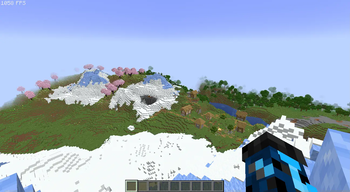
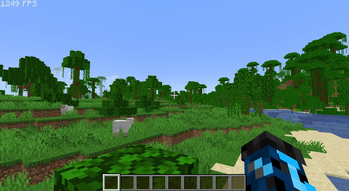
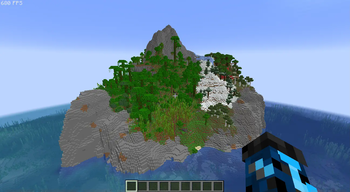
Über dieses Modpack
Ultimate FPS Boost Modpack
The Ultimate FPS Boost modpack is perfect for players looking to optimize Minecraft's performance on a wide range of systems, from low-end laptops to high-end PCs. This pack includes a curated selection of the most effective optimization mods, ensuring you can achieve significantly higher frame rates (FPS) without compromising the vanilla Minecraft experience.
By focusing solely on performance enhancements, this modpack avoids changing the core gameplay, visuals, or features of the game. Users can expect smoother gameplay, reduced lag, and overall better performance, making it ideal for those who want to enjoy Minecraft on systems with lower specs or those looking to push their high-performance systems to the limit.
Key features:
- Includes lightweight, FPS-boosting mods like Sodium, Lithium, and FerriteCore.
- Minimal setup required—just install and enjoy the performance boost.
- Compatible with the latest Minecraft versions and updated frequently to ensure optimal performance with the newest game features.
- Does not include any visual or quality-of-life mods, allowing you to add your own preferred mods without conflict.
Whether you’re playing on a modest laptop or a powerful desktop, the Ultimate FPS Boost modpack will enhance your gameplay experience by maximizing your FPS. Perfect for players who want a seamless vanilla experience but with significantly improved performance!
Mods:
Architectury API by architectury
BetterF3 by TreyRuffy
Cloth Config API by shedaniel
Clumps by jaredlll08
Default Dark Mode by nebulr
Dynamic FPS by juliand665
Entity Culling by tr7zw
FPS - Display by Grayray75
Fabric API by modmuss50
FastQuit by contaria
FerriteCore by malte0811
ImmediatelyFast by RaphiMC
Indium by comp500
Iris Shaders by coderbot
Lithium by jellysquid3
Mod Menu by Terraformers
ModernFix by embeddedt
Sodium by jellysquid3
Sodium Extra by FlashyReese
Text Placeholder API by Patbox
Verfügbare Versionen
Performance modpack (Extreme FPS) Server einrichten
Server bestellen
Wähle mindestens 6 GB RAM (8 GB empfohlen für Performance modpack (Extreme FPS)). Je nach Spieleranzahl: +1 GB pro 5 Spieler.
Modpack im Dashboard installieren
Öffne den Modpack-Browser im Dashboard, suche nach "Performance modpack (Extreme FPS)" und klicke "Installieren". Der fabric-Loader und Minecraft 1.21.10 werden automatisch konfiguriert.
Server starten & spielen
Starte den Server – alle Mods werden automatisch geladen. Teile die Server-IP mit Freunden und spielt zusammen!
Häufige Fragen
Performance modpack (Extreme FPS) Server crasht oder startet nicht – was tun?
Häufigste Ursachen: zu wenig RAM oder falscher fabric-Loader. Prüfe latest.log auf "OutOfMemoryError" → erhöhe RAM auf mindestens 8 GB. Bei "Mixin" oder "ClassNotFoundException": Modpack-Version und Loader stimmen nicht überein. Bei Mado Hosting werden Loader und Minecraft-Version beim Modpack-Install automatisch konfiguriert – das verhindert die meisten Startprobleme.
Wie viel RAM braucht ein Performance modpack (Extreme FPS) Server wirklich?
Minimum 6 GB, empfohlen 8 GB für stabile Performance. +1 GB pro 5 Spieler. Wichtig: Minecraft-Modpacks brauchen mehr RAM als Vanilla – plane pro zusätzlichem Spieler extra ein. Bei Mado Hosting kannst du den RAM jederzeit live hochskalieren, ohne Datenverlust (ab €7.800000000000001/Monat).
Kann ich eigene Mods zu Performance modpack (Extreme FPS) hinzufügen, ohne Konflikte?
Ja, aber achte auf die Kompatibilität: Nutze nur Mods für den gleichen Loader (fabric) und die gleiche Minecraft-Version (1.21.10). Häufige Probleme: ID-Konflikte bei Rezept-Mods und inkompatible Coremod-Versionen. Im Mado Dashboard zeigt der Mod-Browser nur kompatible Mods an und warnt bei bekannten Konflikten.
Performance modpack (Extreme FPS) Server laggt – Performance-Tipps
1) RAM auf 8 GB+ erhöhen. 2) Server-View-Distance auf 8 reduzieren (server.properties). 3) Pre-Generiere Chunks mit dem "Chunky" Plugin. 4) Prüfe mit /spark profiler welche Mods die meiste Tick-Time verbrauchen. Bei Mado Hosting laufen alle Server auf NVMe-SSDs mit dedizierten CPU-Kernen – das eliminiert Hardware als Engpass.
Ähnliche Modpacks

![Cobblemon Official Modpack [Fabric]](https://cdn.modrinth.com/data/5FFgwNNP/e7f9ee2e9d361623847853fe2ddce42f519ee64f.png)
![COBBLEVERSE - Pokemon Adventure [Cobblemon]](https://cdn.modrinth.com/data/Jkb29YJU/581ecf54530972afb18a04660afd820f2f24f6c7.png)
![Better MC [FABRIC] - BMC2](https://cdn.modrinth.com/data/shFhR8Vx/a19c2bcb51d38f32f138d3607e91cb2b7b8e387f_96.webp)


Performance modpack (Extreme FPS) Server mieten
Starte deinen eigenen Server mit automatischer Modpack-Installation.
Unterstützte Versionen
Starte deinen Performance modpack (Extreme FPS) Server jetzt
Ab €7.80/Monat; für die beste Performance werden 8 GB RAM empfohlen.
Server konfigurieren →