
Redstone Utilities
Redstone Utilities provides the best mods for technical Minecraft players while simultaneously providing the best possible performance.
Screenshots
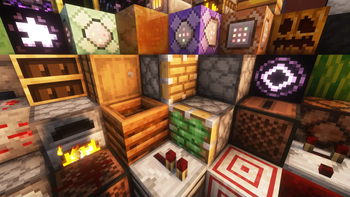
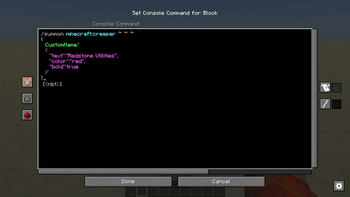
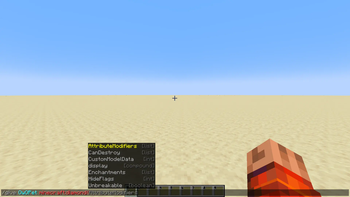
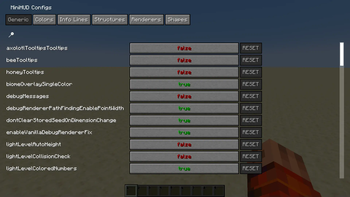
Über dieses Modpack

What is Redstone Utilities?
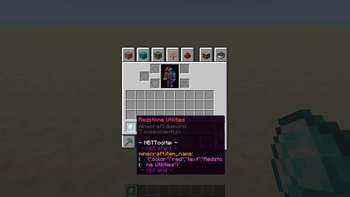
Redstone Utilities is a modpack designed to improve redstone building and technical gameplay in Minecraft. It includes a range of small, helpful mods that make working with commands, NBT data, and redstone systems easier and more efficient. Features like better command input, improved command block interfaces, and detailed tooltips help streamline complex builds and reduce the time spent on technical setup. The modpack focuses on quality-of-life improvements for players who work with redstone and commands regularly.
Mods
Technical Mods (13)
- Better Command Block UI by Tec
- Carpet* by altrisi (Original gnembon)
- Carpet Extra* by altrisi (Original gnembon)
- Carpet TIS Addition* by fallen-breath
- Litematica by
masady- Litemoretica** by earthcomputer
- MiniHUD by masady
- NBT Autocomplete by mt1006
- NBT Tooltip by zabi94
- TweakerMore by fallen-breath
- WorldEdit by me4502
- Pistorder by fallen-breath
- G4mespeed by G4me4u
Performance Mods (14)
- Sodium by jellysquid3
- Sodium Extra by FlashyReese
- Reese's Sodium Options by FlashyReese
- Lithium by jellysquid3
jellysquid3 - Indium by comp500
- Concurrent Chunk Management Engine (Fabric) by ishland
- ScalableLux by ishland
- Dynamic FPS by juliand665
- Entity Culling by tr7zw
- FerriteCore by malte0811
- ImmediatelyFast by RaphiMC
- ModernFix** by embeddedt
- More Culling by FX
- Very Many Players (Fabric) by ishland
Other Mods (4)
- Mod Menu by Prospector
- Ping View by karlsson1000
- Chat Heads by dzwdz
- FancyMenu by keksuccino
Library Mods (5)
- Fabric API by modmuss50
- Cloth Config API by shedaniel
- Konkrete by keksuccino
- MaLiLib by masa
- Melody by keksuccino
Resource Packs (2)
- Redstone Tweaks by RexxStone
- XK Redstone Display by XeKr
* Note, these mods are intended for single-player use only. If you wish to play on a server, you'll need to install the Carpet Mod on the server.
** Note, these mods are currently disabled as the author of those mods didn't update them to the current Minecraft version.
Verfügbare Versionen
Redstone Utilities Server einrichten
Server bestellen
Wähle mindestens 6 GB RAM (8 GB empfohlen für Redstone Utilities). Je nach Spieleranzahl: +1 GB pro 5 Spieler.
Modpack im Dashboard installieren
Öffne den Modpack-Browser im Dashboard, suche nach "Redstone Utilities" und klicke "Installieren". Der fabric-Loader und Minecraft 1.21.7 werden automatisch konfiguriert.
Server starten & spielen
Starte den Server – alle Mods werden automatisch geladen. Teile die Server-IP mit Freunden und spielt zusammen!
Häufige Fragen
Redstone Utilities Server crasht oder startet nicht – was tun?
Häufigste Ursachen: zu wenig RAM oder falscher fabric-Loader. Prüfe latest.log auf "OutOfMemoryError" → erhöhe RAM auf mindestens 8 GB. Bei "Mixin" oder "ClassNotFoundException": Modpack-Version und Loader stimmen nicht überein. Bei Mado Hosting werden Loader und Minecraft-Version beim Modpack-Install automatisch konfiguriert – das verhindert die meisten Startprobleme.
Wie viel RAM braucht ein Redstone Utilities Server wirklich?
Minimum 6 GB, empfohlen 8 GB für stabile Performance. +1 GB pro 5 Spieler. Wichtig: Minecraft-Modpacks brauchen mehr RAM als Vanilla – plane pro zusätzlichem Spieler extra ein. Bei Mado Hosting kannst du den RAM jederzeit live hochskalieren, ohne Datenverlust (ab €7.800000000000001/Monat).
Kann ich eigene Mods zu Redstone Utilities hinzufügen, ohne Konflikte?
Ja, aber achte auf die Kompatibilität: Nutze nur Mods für den gleichen Loader (fabric) und die gleiche Minecraft-Version (1.21.7). Häufige Probleme: ID-Konflikte bei Rezept-Mods und inkompatible Coremod-Versionen. Im Mado Dashboard zeigt der Mod-Browser nur kompatible Mods an und warnt bei bekannten Konflikten.
Redstone Utilities Server laggt – Performance-Tipps
1) RAM auf 8 GB+ erhöhen. 2) Server-View-Distance auf 8 reduzieren (server.properties). 3) Pre-Generiere Chunks mit dem "Chunky" Plugin. 4) Prüfe mit /spark profiler welche Mods die meiste Tick-Time verbrauchen. Bei Mado Hosting laufen alle Server auf NVMe-SSDs mit dedizierten CPU-Kernen – das eliminiert Hardware als Engpass.
Ähnliche Modpacks

![Cobblemon Official Modpack [Fabric]](https://cdn.modrinth.com/data/5FFgwNNP/e7f9ee2e9d361623847853fe2ddce42f519ee64f.png)
![COBBLEVERSE - Pokemon Adventure [Cobblemon]](https://cdn.modrinth.com/data/Jkb29YJU/581ecf54530972afb18a04660afd820f2f24f6c7.png)
![Better MC [FABRIC] - BMC2](https://cdn.modrinth.com/data/shFhR8Vx/a19c2bcb51d38f32f138d3607e91cb2b7b8e387f_96.webp)


Redstone Utilities Server mieten
Starte deinen eigenen Server mit automatischer Modpack-Installation.
Unterstützte Versionen
Starte deinen Redstone Utilities Server jetzt
Ab €7.80/Monat; für die beste Performance werden 8 GB RAM empfohlen.
Server konfigurieren →