
Shaders & Optimization
A modpack balanced between beauty and performance: realistic shaders, visual improvements, and advanced optimizations for a smooth and stable experience.
Screenshots


Über dieses Modpack
Shaders & Optimization is a mod pack designed for players looking for a visually spectacular Minecraft experience without sacrificing performance.
It combines the best realistic shaders, graphical enhancements, and optimization mods to achieve a perfect balance between aesthetics and fluidity, allowing you to enjoy vibrant worlds, dynamic lighting, and stable gameplay on low-end, mid-end, and high-end systems.

💡 Improved Visuals
Realistic shaders (BSL, Complementary, and YoFPS) with** Iris** and Sodium support.
Natural lighting, reflections, soft shadows, and balanced colorimetry.
Support for connected and emissive textures using Continuity.
Visually richer biomes and environments, with animated leaves, volumetric clouds, and realistic water.
🚀 Full Optimization
Sodium, Lithium, and FerriteCore improve rendering, physics, and memory performance.
Indium ensures full compatibility between Sodium and other visual mods.
Immediately Fast speeds up the interface and reduces lag in menus and inventory.
Dynamic FPS saves resources when the game is in the background.
Presets for different computer types (low, medium, high).
🧩 Quality of Life and Usability
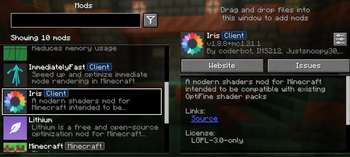
ModMenu allows easy management of mods from within the game.
AppleSkin displays useful hunger and saturation information.
Smooth and modern interface, without sacrificing the classic Minecraft style.
Intuitive setup, ideal for both casual players and content creators.
🧠 Adaptive Performance
Shaders & Optimization includes three levels of settings depending on your system:
Level Recommended Features
Low-end: YoFPS or BSL Lite Shader, 8–12 render distance, minimal particles, “Fast” graphics.
Mid-end: Complementary Shader, 16–24 render, soft shadows, normal particles, moderate effects.
High-end: BSL Ultra Shader, 32+ render, volumetric clouds, advanced reflections, dynamic shadows, depth of field.
🖥️ Compatibility
Version: Minecraft 1.21+
Loader: Fabric Loader (recommended)
Included Libraries: Fabric API, Indium, Architecture (if needed)
Operating Systems: Windows, macOS, and Linux
Compatible with most standard textures and datapacks.
Verfügbare Versionen
Shaders & Optimization Server einrichten
Server bestellen
Wähle mindestens 4 GB RAM (6 GB empfohlen für Shaders & Optimization). Je nach Spieleranzahl: +1 GB pro 8 Spieler.
Modpack im Dashboard installieren
Öffne den Modpack-Browser im Dashboard, suche nach "Shaders & Optimization" und klicke "Installieren". Der fabric-Loader und Minecraft 1.21.1 werden automatisch konfiguriert.
Server starten & spielen
Starte den Server – alle Mods werden automatisch geladen. Teile die Server-IP mit Freunden und spielt zusammen!
Häufige Fragen
Shaders & Optimization Server crasht oder startet nicht – was tun?
Häufigste Ursachen: zu wenig RAM oder falscher fabric-Loader. Prüfe latest.log auf "OutOfMemoryError" → erhöhe RAM auf mindestens 6 GB. Bei "Mixin" oder "ClassNotFoundException": Modpack-Version und Loader stimmen nicht überein. Bei Mado Hosting werden Loader und Minecraft-Version beim Modpack-Install automatisch konfiguriert – das verhindert die meisten Startprobleme.
Wie viel RAM braucht ein Shaders & Optimization Server wirklich?
Minimum 4 GB, empfohlen 6 GB für stabile Performance. +1 GB pro 8 Spieler. Wichtig: Minecraft-Modpacks brauchen mehr RAM als Vanilla – plane pro zusätzlichem Spieler extra ein. Bei Mado Hosting kannst du den RAM jederzeit live hochskalieren, ohne Datenverlust (ab €5.2/Monat).
Kann ich eigene Mods zu Shaders & Optimization hinzufügen, ohne Konflikte?
Ja, aber achte auf die Kompatibilität: Nutze nur Mods für den gleichen Loader (fabric) und die gleiche Minecraft-Version (1.21.1). Häufige Probleme: ID-Konflikte bei Rezept-Mods und inkompatible Coremod-Versionen. Im Mado Dashboard zeigt der Mod-Browser nur kompatible Mods an und warnt bei bekannten Konflikten.
Shaders & Optimization Server laggt – Performance-Tipps
1) RAM auf 6 GB+ erhöhen. 2) Server-View-Distance auf 8 reduzieren (server.properties). 3) Pre-Generiere Chunks mit dem "Chunky" Plugin. 4) Prüfe mit /spark profiler welche Mods die meiste Tick-Time verbrauchen. Bei Mado Hosting laufen alle Server auf NVMe-SSDs mit dedizierten CPU-Kernen – das eliminiert Hardware als Engpass.
Ähnliche Modpacks

![Cobblemon Official Modpack [Fabric]](https://cdn.modrinth.com/data/5FFgwNNP/e7f9ee2e9d361623847853fe2ddce42f519ee64f.png)
![COBBLEVERSE - Pokemon Adventure [Cobblemon]](https://cdn.modrinth.com/data/Jkb29YJU/581ecf54530972afb18a04660afd820f2f24f6c7.png)

![Better MC [FABRIC] - BMC2](https://cdn.modrinth.com/data/shFhR8Vx/a19c2bcb51d38f32f138d3607e91cb2b7b8e387f_96.webp)

Shaders & Optimization Server mieten
Starte deinen eigenen Server mit automatischer Modpack-Installation.
Details
- Lizenz
- LicenseRef-All-Rights-Reserved
- Server-seitig
- Erforderlich
- Client-seitig
- Erforderlich
Unterstützte Versionen
Starte deinen Shaders & Optimization Server jetzt
Ab €5.20/Monat; für die beste Performance werden 6 GB RAM empfohlen.
Server konfigurieren →