
Shaders & Optimization
A modpack balanced between beauty and performance: realistic shaders, visual improvements, and advanced optimizations for a smooth and stable experience.
Screenshots


About this Modpack
Shaders & Optimization is a mod pack designed for players looking for a visually spectacular Minecraft experience without sacrificing performance.
It combines the best realistic shaders, graphical enhancements, and optimization mods to achieve a perfect balance between aesthetics and fluidity, allowing you to enjoy vibrant worlds, dynamic lighting, and stable gameplay on low-end, mid-end, and high-end systems.

💡 Improved Visuals
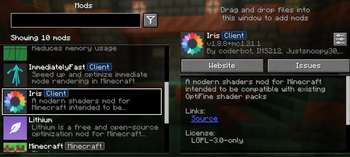
Realistic shaders (BSL, Complementary, and YoFPS) with** Iris** and Sodium support.
Natural lighting, reflections, soft shadows, and balanced colorimetry.
Support for connected and emissive textures using Continuity.
Visually richer biomes and environments, with animated leaves, volumetric clouds, and realistic water.
🚀 Full Optimization
Sodium, Lithium, and FerriteCore improve rendering, physics, and memory performance.
Indium ensures full compatibility between Sodium and other visual mods.
Immediately Fast speeds up the interface and reduces lag in menus and inventory.
Dynamic FPS saves resources when the game is in the background.
Presets for different computer types (low, medium, high).
🧩 Quality of Life and Usability
ModMenu allows easy management of mods from within the game.
AppleSkin displays useful hunger and saturation information.
Smooth and modern interface, without sacrificing the classic Minecraft style.
Intuitive setup, ideal for both casual players and content creators.
🧠 Adaptive Performance
Shaders & Optimization includes three levels of settings depending on your system:
Level Recommended Features
Low-end: YoFPS or BSL Lite Shader, 8–12 render distance, minimal particles, “Fast” graphics.
Mid-end: Complementary Shader, 16–24 render, soft shadows, normal particles, moderate effects.
High-end: BSL Ultra Shader, 32+ render, volumetric clouds, advanced reflections, dynamic shadows, depth of field.
🖥️ Compatibility
Version: Minecraft 1.21+
Loader: Fabric Loader (recommended)
Included Libraries: Fabric API, Indium, Architecture (if needed)
Operating Systems: Windows, macOS, and Linux
Compatible with most standard textures and datapacks.
Available Versions
How to Set Up a Shaders & Optimization Server
Order Server
Choose at least 4 GB RAM (6 GB recommended for Shaders & Optimization). Based on player count: per 8 players.
Install Modpack in Dashboard
Open the modpack browser in the dashboard, search for "Shaders & Optimization" and click "Install". The fabric loader and Minecraft 1.21.1 are configured automatically.
Start Server & Play
Start the server – all mods are loaded automatically. Share the server IP with friends and play together!
Frequently Asked Questions
Shaders & Optimization server crashes or won't start – what to do?
Most common causes: insufficient RAM or wrong fabric loader. Check latest.log for "OutOfMemoryError" → increase RAM to at least 6 GB. For "Mixin" or "ClassNotFoundException" errors: modpack version and loader don't match. With Mado Hosting, loader and Minecraft version are auto-configured on modpack install – preventing most startup issues.
How much RAM does a Shaders & Optimization server really need?
Minimum 4 GB, recommended 6 GB for stable performance. per 8 players. Important: Minecraft modpacks need more RAM than vanilla – plan extra per additional player. With Mado Hosting, you can scale RAM up live at any time without data loss (from €5.2/month).
Can I add custom mods to Shaders & Optimization without conflicts?
Yes, but check compatibility: only use mods for the same loader (fabric) and same Minecraft version (1.21.1). Common issues: ID conflicts with recipe mods and incompatible coremod versions. The Mado dashboard mod browser only shows compatible mods and warns about known conflicts.
Shaders & Optimization server lagging – performance tips
1) Increase RAM to 6 GB+. 2) Reduce server view-distance to 8 (server.properties). 3) Pre-generate chunks with the "Chunky" plugin. 4) Use /spark profiler to check which mods consume the most tick time. With Mado Hosting, all servers run on NVMe SSDs with dedicated CPU cores – eliminating hardware as a bottleneck.
Similar Modpacks

![Cobblemon Official Modpack [Fabric]](https://cdn.modrinth.com/data/5FFgwNNP/e7f9ee2e9d361623847853fe2ddce42f519ee64f.png)
![COBBLEVERSE - Pokemon Adventure [Cobblemon]](https://cdn.modrinth.com/data/Jkb29YJU/581ecf54530972afb18a04660afd820f2f24f6c7.png)

![Better MC [FABRIC] - BMC2](https://cdn.modrinth.com/data/shFhR8Vx/a19c2bcb51d38f32f138d3607e91cb2b7b8e387f_96.webp)

Rent Shaders & Optimization Server
Start your own server with automatic modpack installation.
Supported Versions
Start your Shaders & Optimization Server now
From €5.20/month; 6 GB RAM is recommended for best performance.
Configure Server →