
Sparkle
Pure performance. Pure immersion. ✨
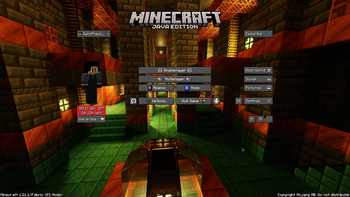
Screenshots
Über dieses Modpack




📝 Description
Sparkle is a modpack that offers many improvements over vanilla Minecraft. This includes performance mods, such as Sodium, Lithium, etc. and also some vanilla-friendly QoL changes that just make the overall experience way better.
Why use Sparkle over vanilla?
⚡ Performance
Sparkle provides smooth gaming thanks to optimization mods such as Sodium, Lithium, Nvidium and others. The mods that were selected are all carefully selected to ensure a smooth and safe experience.
📦 Features
Sparkle adds quality of life mods to the game, that make the game better without a non-vanilla feeling. These include optifine features, shader support, free singleplayer server hosting and more.
🔄️ Up to Date
Sparkle ensures that you are getting the latest version of Minecraft, with quick updates. Updating Sparkle is easy, worry-free thanks to the Modrinth app.
🤔 Common Questions
Q: How do I install the modpack?
A: Download and install the Modrinth app on https://modrinth.com/app, then click "Download" at the top of the page and click "Install with Modrinth App".
Q: Is this secure & can I get banned on servers for using this?
A: Sparkle is completly safe and all mods were carefully reviewed for any potential malware. Your chances of getting banned on a Minecraft server for using our modpack is almost impossible, however please make sure the server's rules do not state you cannot use client-sided mods.
Q: Is there a download for the Curseforge app?
A: No, there isn't since many mods included in Sparkle aren't on Curseforge. We have also decided to stay away from Curseforge.
Q: Does this support mobile?
A: No, Sparkle doesn't support mobile as it's only avaiable on java edition. PojavLauncher and other similar projects are also not supported due to incompatibilities between certain mods and PojavLauncher.
Verfügbare Versionen
Sparkle Server einrichten
Server bestellen
Wähle mindestens 4 GB RAM (6 GB empfohlen für Sparkle). Je nach Spieleranzahl: +1 GB pro 8 Spieler.
Modpack im Dashboard installieren
Öffne den Modpack-Browser im Dashboard, suche nach "Sparkle" und klicke "Installieren". Der fabric-Loader und Minecraft 1.21.5 werden automatisch konfiguriert.
Server starten & spielen
Starte den Server – alle Mods werden automatisch geladen. Teile die Server-IP mit Freunden und spielt zusammen!
Häufige Fragen
Sparkle Server crasht oder startet nicht – was tun?
Häufigste Ursachen: zu wenig RAM oder falscher fabric-Loader. Prüfe latest.log auf "OutOfMemoryError" → erhöhe RAM auf mindestens 6 GB. Bei "Mixin" oder "ClassNotFoundException": Modpack-Version und Loader stimmen nicht überein. Bei Mado Hosting werden Loader und Minecraft-Version beim Modpack-Install automatisch konfiguriert – das verhindert die meisten Startprobleme.
Wie viel RAM braucht ein Sparkle Server wirklich?
Minimum 4 GB, empfohlen 6 GB für stabile Performance. +1 GB pro 8 Spieler. Wichtig: Minecraft-Modpacks brauchen mehr RAM als Vanilla – plane pro zusätzlichem Spieler extra ein. Bei Mado Hosting kannst du den RAM jederzeit live hochskalieren, ohne Datenverlust (ab €5.2/Monat).
Kann ich eigene Mods zu Sparkle hinzufügen, ohne Konflikte?
Ja, aber achte auf die Kompatibilität: Nutze nur Mods für den gleichen Loader (fabric) und die gleiche Minecraft-Version (1.21.5). Häufige Probleme: ID-Konflikte bei Rezept-Mods und inkompatible Coremod-Versionen. Im Mado Dashboard zeigt der Mod-Browser nur kompatible Mods an und warnt bei bekannten Konflikten.
Sparkle Server laggt – Performance-Tipps
1) RAM auf 6 GB+ erhöhen. 2) Server-View-Distance auf 8 reduzieren (server.properties). 3) Pre-Generiere Chunks mit dem "Chunky" Plugin. 4) Prüfe mit /spark profiler welche Mods die meiste Tick-Time verbrauchen. Bei Mado Hosting laufen alle Server auf NVMe-SSDs mit dedizierten CPU-Kernen – das eliminiert Hardware als Engpass.
Ähnliche Modpacks

![Cobblemon Official Modpack [Fabric]](https://cdn.modrinth.com/data/5FFgwNNP/e7f9ee2e9d361623847853fe2ddce42f519ee64f.png)
![COBBLEVERSE - Pokemon Adventure [Cobblemon]](https://cdn.modrinth.com/data/Jkb29YJU/581ecf54530972afb18a04660afd820f2f24f6c7.png)
![Better MC [FABRIC] - BMC2](https://cdn.modrinth.com/data/shFhR8Vx/a19c2bcb51d38f32f138d3607e91cb2b7b8e387f_96.webp)


Sparkle Server mieten
Starte deinen eigenen Server mit automatischer Modpack-Installation.
Details
- Lizenz
- BSD 3-Clause "New" or "Revised" License
- Server-seitig
- Nicht unterstützt
- Client-seitig
- Erforderlich
Unterstützte Versionen
Starte deinen Sparkle Server jetzt
Ab €5.20/Monat; für die beste Performance werden 6 GB RAM empfohlen.
Server konfigurieren →