
Sugar Optimization
🍬 Vanilla Minecraft modification package aimed at 🔥 Optimization with a sprinkling of 🚀 User Experience Improvements.
Screenshots
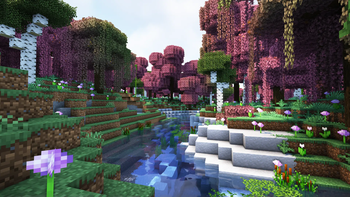
Über dieses Modpack
🍭 Sugar

Or you can download the package in CurseForge format from the official project page
🍬 Vanilla Minecraft modification package aimed at 🔥 Optimization with a sprinkling of 🚀 User Experience Improvements.
✨ This is a modpack that will make your game much more enjoyable and comfortable than you are used to.
🪄 This modpack gives you great performance on different configurations of personal computers, while allowing you to keep all the things you are so used to: CTM, CIT, Capes, CEM, Zoom and etc from Optifine.
🎀 We strive to make your Minecraft game more immersive by keeping and adhering to the ideas of the game itself without changing the internal mechanics and systems.
Try to make the modpack accessible to everyone by optimizing game systems with well-known and popular modifications.
🎉 And all this is already available and ready to play, you only need to install modpack and enjoy your gameplay!
Thank you 💖 for being there and have a nice game!
To improve performance, try custom JVM arguments:
Set minimum memory allocation equal to maximum memory allocation:
-XX:+UseG1GC -Dsun.rmi.dgc.server.gcInterval=2147483646 -XX:+UnlockExperimentalVMOptions -XX:G1NewSizePercent=20 -XX:G1ReservePercent=20 -XX:MaxGCPauseMillis=50 -XX:G1HeapRegionSize=32M
or for >8GB RAM:
-XX:+UseShenandoahGC -XX:+UnlockExperimentalVMOptions -XX:+AlwaysPreTouch -XX:+UseStringDeduplication -Dfml.ignorePatchDiscrepancies=true -Dfml.ignoreInvalidMinecraftCertificates=true -XX:-OmitStackTraceInFastThrow -XX:+OptimizeStringConcat -Dfml.readTimeout=180
4GB RAM is recommended for 12 chunks, more requires more memory!
📦 Optional Resources
* resources that you can install in the modpack, the settings for these resources are already provided.
Mods
- *AppleSkin
- *First-person Model
- *3D Skin Layers
- *Smooth Swapping
- *Sound Physics Remastered
- *Xaero's World Map
- *Xaero's Minimap
Shader packs
📦 Resources
To use the supplied shader settings, use the Iris tools to import them:
ComplementaryShaders_v4.7.2_NS.zip.txt,Sildur's+Enhanced+Default+v1.15+Fancy.zip.txt
Mods
- Animatica
- AntiGhost
- Blur
- Borderless Mining
- C^2M
- Fabric Capes
- Custom Entity Models
- CITResewn
- Cloth Config API (requires a mod)
- Continuity
- CustomHUD
- Dark Loading Screen
- Don't Clear Chat History
- Debugify
- Dynamic FPS
Enhanced Searchability(wait updates)- EntityCulling
- Entity Texture Features
Exordium(wait updates)- FabricSkyboxes
- Falling Leaves
- ImmediatelyFast
- Indium
- Iris
- Krypton
- LambDynamicLights
- Language Reload
- LazyDFU
- Lithium
- Memory Leak Fix
- Mod Menu
- MoreChatHistory
- More Culling
- Not Enough Animations
- Ok Zoomer
- Presence Footsteps
- Quilt Kotlin Libraries
- Quilt Standard Libraries
- Reese's Sodium Options
- Smooth Boot
- Sodium Extra
- Sodium
- Starlight
- YetAnotherConfigLib
- YOSBR
Resource packs
- Default Dark Mode
- xali's Enhanced Biomes: River & Pond
- xali's Enchanted Books
- xali's Enhanced Jungle Wood
- xali's Enhanced Vanilla
- xali's Potions
Shader packs
Verfügbare Versionen
Sugar Optimization Server einrichten
Server bestellen
Wähle mindestens 4 GB RAM (6 GB empfohlen für Sugar Optimization). Je nach Spieleranzahl: +1 GB pro 8 Spieler.
Modpack im Dashboard installieren
Öffne den Modpack-Browser im Dashboard, suche nach "Sugar Optimization" und klicke "Installieren". Der quilt-Loader und Minecraft 1.20.1 werden automatisch konfiguriert.
Server starten & spielen
Starte den Server – alle Mods werden automatisch geladen. Teile die Server-IP mit Freunden und spielt zusammen!
Häufige Fragen
Sugar Optimization Server crasht oder startet nicht – was tun?
Häufigste Ursachen: zu wenig RAM oder falscher quilt-Loader. Prüfe latest.log auf "OutOfMemoryError" → erhöhe RAM auf mindestens 6 GB. Bei "Mixin" oder "ClassNotFoundException": Modpack-Version und Loader stimmen nicht überein. Bei Mado Hosting werden Loader und Minecraft-Version beim Modpack-Install automatisch konfiguriert – das verhindert die meisten Startprobleme.
Wie viel RAM braucht ein Sugar Optimization Server wirklich?
Minimum 4 GB, empfohlen 6 GB für stabile Performance. +1 GB pro 8 Spieler. Wichtig: Minecraft-Modpacks brauchen mehr RAM als Vanilla – plane pro zusätzlichem Spieler extra ein. Bei Mado Hosting kannst du den RAM jederzeit live hochskalieren, ohne Datenverlust (ab €5.2/Monat).
Kann ich eigene Mods zu Sugar Optimization hinzufügen, ohne Konflikte?
Ja, aber achte auf die Kompatibilität: Nutze nur Mods für den gleichen Loader (quilt) und die gleiche Minecraft-Version (1.20.1). Häufige Probleme: ID-Konflikte bei Rezept-Mods und inkompatible Coremod-Versionen. Im Mado Dashboard zeigt der Mod-Browser nur kompatible Mods an und warnt bei bekannten Konflikten.
Sugar Optimization Server laggt – Performance-Tipps
1) RAM auf 6 GB+ erhöhen. 2) Server-View-Distance auf 8 reduzieren (server.properties). 3) Pre-Generiere Chunks mit dem "Chunky" Plugin. 4) Prüfe mit /spark profiler welche Mods die meiste Tick-Time verbrauchen. Bei Mado Hosting laufen alle Server auf NVMe-SSDs mit dedizierten CPU-Kernen – das eliminiert Hardware als Engpass.
Ähnliche Modpacks

![Cobblemon Official Modpack [Fabric]](https://cdn.modrinth.com/data/5FFgwNNP/e7f9ee2e9d361623847853fe2ddce42f519ee64f.png)
![COBBLEVERSE - Pokemon Adventure [Cobblemon]](https://cdn.modrinth.com/data/Jkb29YJU/581ecf54530972afb18a04660afd820f2f24f6c7.png)
![Better MC [FABRIC] - BMC2](https://cdn.modrinth.com/data/shFhR8Vx/a19c2bcb51d38f32f138d3607e91cb2b7b8e387f_96.webp)


Sugar Optimization Server mieten
Starte deinen eigenen Server mit automatischer Modpack-Installation.
Details
- Lizenz
- Creative Commons Attribution 4.0 International
- Server-seitig
- Nicht unterstützt
- Client-seitig
- Erforderlich
Unterstützte Versionen
Starte deinen Sugar Optimization Server jetzt
Ab €5.20/Monat; für die beste Performance werden 6 GB RAM empfohlen.
Server konfigurieren →