
Survive the Winter
A lightweight Fabric modpack where you (with a custom map included) will have to survive the brutal cold after your train crashes in Siberia.
Screenshots
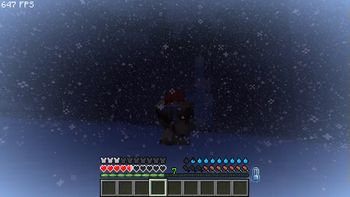
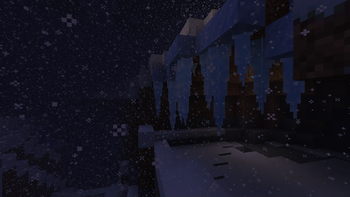
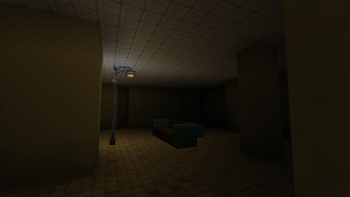
Über dieses Modpack
Version 2.0 is out!
Survive the Winter is a relatively hard survival modpack focused on realism. You spawn in an infinite snowy region, where all biomes, once lush and green, are nothing but white, frozen over. You must survive with the tools that you have--and the heat that you have. Heat is an integral function of this modpack. If you let your temperature lower too far, you will eventually succumb to the frost. Raise it too much and you will overheat, ending the same way. The challenge will not be easy and you will most definitely be forced to make tough decisions in your bid to survive, but it is not impossible. Woolen outfits, ice skates and certain tools provide the warmth and security you will need to face the harsh reality of the frost, but how long will those last? At the end of the day, your objective through all of this is quite simple: survive the winter or die trying.
Warning: The modpack is designed to work with a server side set up, which will be downloadable soon!
Custom Map:
https://www.planetminecraft.com/project/frostpunk-stw-map-v1/ - Made for Version 1.8.7.1
https://www.planetminecraft.com/project/frostpunk-stw-v2-1/ - Made for Version 2.1
Credits to all the mod developers who made this modpack possible:

https://modrinth.com/mod/3dskinlayers
https://modrinth.com/mod/ambientsounds
https://modrinth.com/mod/animatica
https://modrinth.com/mod/anthropophagy
https://modrinth.com/mod/architectury-api
https://modrinth.com/mod/brewery
https://modrinth.com/mod/bl4cks-sit
https://modrinth.com/mod/capes
https://modrinth.com/mod/cit-resewn
https://modrinth.com/mod/clumps
https://modrinth.com/mod/completeconfig
https://www.complementary.dev/shaders/
https://modrinth.com/mod/configurable-extra-mob-drops
https://modrinth.com/mod/continuity
https://modrinth.com/mod/controlling
https://modrinth.com/mod/creativecore
https://modrinth.com/mod/debugify
https://modrinth.com/mod/dehydration
https://modrinth.com/mod/dripsounds-fabric
https://modrinth.com/mod/dynamic-fps
https://modrinth.com/mod/ebe
https://modrinth.com/mod/entity-model-features
https://modrinth.com/mod/entitytexturefeatures
https://modrinth.com/mod/entityculling
https://modrinth.com/mod/fabric-api
https://modrinth.com/mod/fabric-language-kotlin
https://modrinth.com/mod/ferrite-core
https://modrinth.com/mod/frostiful
https://modrinth.com/mod/immediatelyfast
https://modrinth.com/mod/indium
https://modrinth.com/mod/iris
https://modrinth.com/mod/jei
https://modrinth.com/mod/krypton
https://modrinth.com/mod/lambdynamiclights
https://modrinth.com/mod/language-reload
https://modrinth.com/mod/lazydfu
https://modrinth.com/mod/lithium
https://modrinth.com/mod/localized-chat
https://modrinth.com/mod/make_bubbles_pop
https://modrinth.com/mod/memoryleakfix
https://modrinth.com/mod/modelfix
https://modrinth.com/mod/modernfix
https://modrinth.com/mod/modmenu
https://modrinth.com/mod/moonlight
https://modrinth.com/mod/morechathistory
https://modrinth.com/mod/mru
https://modrinth.com/mod/not-enough-animations
https://modrinth.com/mod/presence-footsteps
https://modrinth.com/mod/primal-winter
https://modrinth.com/mod/reciperemover
https://modrinth.com/mod/reeses-sodium-options
https://modrinth.com/mod/replaymod
https://modrinth.com/mod/replay-voice-chat
https://modrinth.com/mod/searchables
https://modrinth.com/mod/sodium
https://modrinth.com/mod/sodium-extra
https://modrinth.com/mod/sodium-shadowy-path-blocks
https://modrinth.com/mod/soundphysics
https://modrinth.com/mod/thermite
https://modrinth.com/mod/thermoo
https://modrinth.com/mod/trinkets
https://modrinth.com/plugin/simple-voice-chat
https://modrinth.com/mod/simple-voice-chat-radio
https://modrinth.com/mod/snow-under-trees-remastered
https://modrinth.com/mod/spark
https://modrinth.com/mod/vmp-fabric
https://modrinth.com/mod/wakes
https://modrinth.com/mod/walkie-talkie
https://modrinth.com/mod/wavey-capes
https://modrinth.com/mod/winterly
https://modrinth.com/mod/wiretap
https://modrinth.com/mod/wi-zoom
https://modrinth.com/plugin/worldedit
https://modrinth.com/mod/yacl
https://modrinth.com/mod/tmp
https://modrinth.com/mod/searchables
https://modrinth.com/mod/controlling
https://modrinth.com/mod/dynamiccrosshair
https://modrinth.com/mod/crafttweaker
https://modrinth.com/shader/insanity-shader
https://modrinth.com/resourcepack/tras-fresh-player
https://modrinth.com/mod/rideablepolarbears
https://modrinth.com/mod/controlling
https://modrinth.com/mod/searchables
https://modrinth.com/mod/presence-footsteps
Verfügbare Versionen
Survive the Winter Server einrichten
Server bestellen
Wähle mindestens 6 GB RAM (8 GB empfohlen für Survive the Winter). Je nach Spieleranzahl: +1 GB pro 5 Spieler.
Modpack im Dashboard installieren
Öffne den Modpack-Browser im Dashboard, suche nach "Survive the Winter" und klicke "Installieren". Der fabric-Loader und Minecraft 1.20.1 werden automatisch konfiguriert.
Server starten & spielen
Starte den Server – alle Mods werden automatisch geladen. Teile die Server-IP mit Freunden und spielt zusammen!
Häufige Fragen
Survive the Winter Server crasht oder startet nicht – was tun?
Häufigste Ursachen: zu wenig RAM oder falscher fabric-Loader. Prüfe latest.log auf "OutOfMemoryError" → erhöhe RAM auf mindestens 8 GB. Bei "Mixin" oder "ClassNotFoundException": Modpack-Version und Loader stimmen nicht überein. Bei Mado Hosting werden Loader und Minecraft-Version beim Modpack-Install automatisch konfiguriert – das verhindert die meisten Startprobleme.
Wie viel RAM braucht ein Survive the Winter Server wirklich?
Minimum 6 GB, empfohlen 8 GB für stabile Performance. +1 GB pro 5 Spieler. Wichtig: Minecraft-Modpacks brauchen mehr RAM als Vanilla – plane pro zusätzlichem Spieler extra ein. Bei Mado Hosting kannst du den RAM jederzeit live hochskalieren, ohne Datenverlust (ab €7.800000000000001/Monat).
Kann ich eigene Mods zu Survive the Winter hinzufügen, ohne Konflikte?
Ja, aber achte auf die Kompatibilität: Nutze nur Mods für den gleichen Loader (fabric) und die gleiche Minecraft-Version (1.20.1). Häufige Probleme: ID-Konflikte bei Rezept-Mods und inkompatible Coremod-Versionen. Im Mado Dashboard zeigt der Mod-Browser nur kompatible Mods an und warnt bei bekannten Konflikten.
Survive the Winter Server laggt – Performance-Tipps
1) RAM auf 8 GB+ erhöhen. 2) Server-View-Distance auf 8 reduzieren (server.properties). 3) Pre-Generiere Chunks mit dem "Chunky" Plugin. 4) Prüfe mit /spark profiler welche Mods die meiste Tick-Time verbrauchen. Bei Mado Hosting laufen alle Server auf NVMe-SSDs mit dedizierten CPU-Kernen – das eliminiert Hardware als Engpass.
Ähnliche Modpacks
![Cobblemon Official Modpack [Fabric]](https://cdn.modrinth.com/data/5FFgwNNP/e7f9ee2e9d361623847853fe2ddce42f519ee64f.png)
![COBBLEVERSE - Pokemon Adventure [Cobblemon]](https://cdn.modrinth.com/data/Jkb29YJU/581ecf54530972afb18a04660afd820f2f24f6c7.png)
![Better MC [FABRIC] - BMC2](https://cdn.modrinth.com/data/shFhR8Vx/a19c2bcb51d38f32f138d3607e91cb2b7b8e387f_96.webp)


![Better MC [FORGE] - BMC4](https://cdn.modrinth.com/data/4BV47HRn/7f5ef7cc61b2593609aabef3ed07a866a4f11b73_96.webp)
Survive the Winter Server mieten
Starte deinen eigenen Server mit automatischer Modpack-Installation.
Unterstützte Versionen
Starte deinen Survive the Winter Server jetzt
Ab €7.80/Monat; für die beste Performance werden 8 GB RAM empfohlen.
Server konfigurieren →