
Survive the Winter
A lightweight Fabric modpack where you (with a custom map included) will have to survive the brutal cold after your train crashes in Siberia.
Screenshots
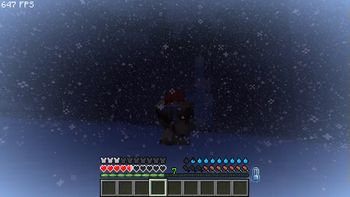
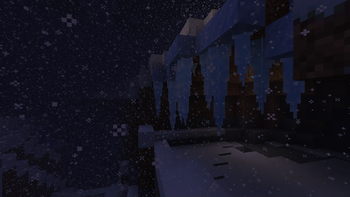
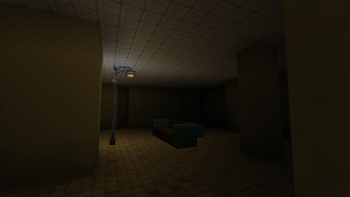
About this Modpack
Version 2.0 is out!
Survive the Winter is a relatively hard survival modpack focused on realism. You spawn in an infinite snowy region, where all biomes, once lush and green, are nothing but white, frozen over. You must survive with the tools that you have--and the heat that you have. Heat is an integral function of this modpack. If you let your temperature lower too far, you will eventually succumb to the frost. Raise it too much and you will overheat, ending the same way. The challenge will not be easy and you will most definitely be forced to make tough decisions in your bid to survive, but it is not impossible. Woolen outfits, ice skates and certain tools provide the warmth and security you will need to face the harsh reality of the frost, but how long will those last? At the end of the day, your objective through all of this is quite simple: survive the winter or die trying.
Warning: The modpack is designed to work with a server side set up, which will be downloadable soon!
Custom Map:
https://www.planetminecraft.com/project/frostpunk-stw-map-v1/ - Made for Version 1.8.7.1
https://www.planetminecraft.com/project/frostpunk-stw-v2-1/ - Made for Version 2.1
Credits to all the mod developers who made this modpack possible:

https://modrinth.com/mod/3dskinlayers
https://modrinth.com/mod/ambientsounds
https://modrinth.com/mod/animatica
https://modrinth.com/mod/anthropophagy
https://modrinth.com/mod/architectury-api
https://modrinth.com/mod/brewery
https://modrinth.com/mod/bl4cks-sit
https://modrinth.com/mod/capes
https://modrinth.com/mod/cit-resewn
https://modrinth.com/mod/clumps
https://modrinth.com/mod/completeconfig
https://www.complementary.dev/shaders/
https://modrinth.com/mod/configurable-extra-mob-drops
https://modrinth.com/mod/continuity
https://modrinth.com/mod/controlling
https://modrinth.com/mod/creativecore
https://modrinth.com/mod/debugify
https://modrinth.com/mod/dehydration
https://modrinth.com/mod/dripsounds-fabric
https://modrinth.com/mod/dynamic-fps
https://modrinth.com/mod/ebe
https://modrinth.com/mod/entity-model-features
https://modrinth.com/mod/entitytexturefeatures
https://modrinth.com/mod/entityculling
https://modrinth.com/mod/fabric-api
https://modrinth.com/mod/fabric-language-kotlin
https://modrinth.com/mod/ferrite-core
https://modrinth.com/mod/frostiful
https://modrinth.com/mod/immediatelyfast
https://modrinth.com/mod/indium
https://modrinth.com/mod/iris
https://modrinth.com/mod/jei
https://modrinth.com/mod/krypton
https://modrinth.com/mod/lambdynamiclights
https://modrinth.com/mod/language-reload
https://modrinth.com/mod/lazydfu
https://modrinth.com/mod/lithium
https://modrinth.com/mod/localized-chat
https://modrinth.com/mod/make_bubbles_pop
https://modrinth.com/mod/memoryleakfix
https://modrinth.com/mod/modelfix
https://modrinth.com/mod/modernfix
https://modrinth.com/mod/modmenu
https://modrinth.com/mod/moonlight
https://modrinth.com/mod/morechathistory
https://modrinth.com/mod/mru
https://modrinth.com/mod/not-enough-animations
https://modrinth.com/mod/presence-footsteps
https://modrinth.com/mod/primal-winter
https://modrinth.com/mod/reciperemover
https://modrinth.com/mod/reeses-sodium-options
https://modrinth.com/mod/replaymod
https://modrinth.com/mod/replay-voice-chat
https://modrinth.com/mod/searchables
https://modrinth.com/mod/sodium
https://modrinth.com/mod/sodium-extra
https://modrinth.com/mod/sodium-shadowy-path-blocks
https://modrinth.com/mod/soundphysics
https://modrinth.com/mod/thermite
https://modrinth.com/mod/thermoo
https://modrinth.com/mod/trinkets
https://modrinth.com/plugin/simple-voice-chat
https://modrinth.com/mod/simple-voice-chat-radio
https://modrinth.com/mod/snow-under-trees-remastered
https://modrinth.com/mod/spark
https://modrinth.com/mod/vmp-fabric
https://modrinth.com/mod/wakes
https://modrinth.com/mod/walkie-talkie
https://modrinth.com/mod/wavey-capes
https://modrinth.com/mod/winterly
https://modrinth.com/mod/wiretap
https://modrinth.com/mod/wi-zoom
https://modrinth.com/plugin/worldedit
https://modrinth.com/mod/yacl
https://modrinth.com/mod/tmp
https://modrinth.com/mod/searchables
https://modrinth.com/mod/controlling
https://modrinth.com/mod/dynamiccrosshair
https://modrinth.com/mod/crafttweaker
https://modrinth.com/shader/insanity-shader
https://modrinth.com/resourcepack/tras-fresh-player
https://modrinth.com/mod/rideablepolarbears
https://modrinth.com/mod/controlling
https://modrinth.com/mod/searchables
https://modrinth.com/mod/presence-footsteps
Available Versions
How to Set Up a Survive the Winter Server
Order Server
Choose at least 6 GB RAM (8 GB recommended for Survive the Winter). Based on player count: per 5 players.
Install Modpack in Dashboard
Open the modpack browser in the dashboard, search for "Survive the Winter" and click "Install". The fabric loader and Minecraft 1.20.1 are configured automatically.
Start Server & Play
Start the server – all mods are loaded automatically. Share the server IP with friends and play together!
Frequently Asked Questions
Survive the Winter server crashes or won't start – what to do?
Most common causes: insufficient RAM or wrong fabric loader. Check latest.log for "OutOfMemoryError" → increase RAM to at least 8 GB. For "Mixin" or "ClassNotFoundException" errors: modpack version and loader don't match. With Mado Hosting, loader and Minecraft version are auto-configured on modpack install – preventing most startup issues.
How much RAM does a Survive the Winter server really need?
Minimum 6 GB, recommended 8 GB for stable performance. per 5 players. Important: Minecraft modpacks need more RAM than vanilla – plan extra per additional player. With Mado Hosting, you can scale RAM up live at any time without data loss (from €7.800000000000001/month).
Can I add custom mods to Survive the Winter without conflicts?
Yes, but check compatibility: only use mods for the same loader (fabric) and same Minecraft version (1.20.1). Common issues: ID conflicts with recipe mods and incompatible coremod versions. The Mado dashboard mod browser only shows compatible mods and warns about known conflicts.
Survive the Winter server lagging – performance tips
1) Increase RAM to 8 GB+. 2) Reduce server view-distance to 8 (server.properties). 3) Pre-generate chunks with the "Chunky" plugin. 4) Use /spark profiler to check which mods consume the most tick time. With Mado Hosting, all servers run on NVMe SSDs with dedicated CPU cores – eliminating hardware as a bottleneck.
Similar Modpacks
![Cobblemon Official Modpack [Fabric]](https://cdn.modrinth.com/data/5FFgwNNP/e7f9ee2e9d361623847853fe2ddce42f519ee64f.png)
![COBBLEVERSE - Pokemon Adventure [Cobblemon]](https://cdn.modrinth.com/data/Jkb29YJU/581ecf54530972afb18a04660afd820f2f24f6c7.png)
![Better MC [FABRIC] - BMC2](https://cdn.modrinth.com/data/shFhR8Vx/a19c2bcb51d38f32f138d3607e91cb2b7b8e387f_96.webp)


![Better MC [FORGE] - BMC4](https://cdn.modrinth.com/data/4BV47HRn/7f5ef7cc61b2593609aabef3ed07a866a4f11b73_96.webp)
Rent Survive the Winter Server
Start your own server with automatic modpack installation.
Supported Versions
Start your Survive the Winter Server now
From €7.80/month; 8 GB RAM is recommended for best performance.
Configure Server →