
Valkaw
Rebranch of Sliwed Optimize, now refreshed and updated to the latest versions with Sodium for OpenGL and VulkanMod for Vulkan API.
Screenshots

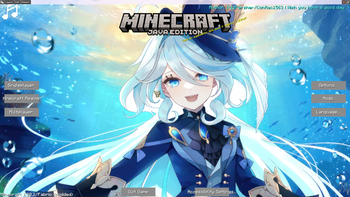
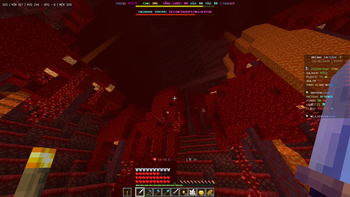
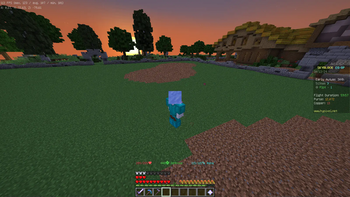
Über dieses Modpack
Valkaw

Maximize your Minecraft performance with the ultimate optimization modpack!



What is Valkaw?
Valkaw is a high-performance modpack forked from Sliwed Optimize. We're constantly updating it to squeeze out better frame rates and fix issues, ensuring the project keeps moving forward smoothly.
Core Features
We've focused on three main upgrades to make your game lighter and faster:
Fastest Performance HUD
Powered by Hudder, FlexHUD, and CustomHUD, this displays the stats you actually need without hogging your resources.
Smart Resource Manager
We use FerriteCore and "Put A Plug In it!" to keep your RAM usage in check. Plus, EntityCulling uses your CPU to calculate what you can see in real-time, skipping the rendering of anything hidden behind blocks.
OptiFine Features
Missing Zoom or Dynamic Lights? No problem. With WI Zoom and LambDynamicLights, you get those familiar features back, now running on the faster Sodium or VulkanMod engines.
Main Optimization Mods
Valkaw offers two different rendering paths depending on your hardware. Choose the version that best suits your system!
1. Sodium Edition (Standard)
The standard, highly compatible optimization route using the OpenGL API. Perfect for most users and supports shaders.
Click to expand the Sodium modlist
- Sodium: The absolute best modern rendering engine for Minecraft.
- Lithium: General-purpose optimization for game physics, AI, and block ticking.
- FerriteCore: Significantly reduces the memory footprint of the game.
- EntityCulling: Skips rendering hidden entities/tiles to boost performance.
- Iris Shaders: Seamless, high-performance shader support (the best OptiFine alternative).
2. VulkanMod Edition (Maximum Raw Performance)
A wildly powerful route that completely replaces OpenGL with the Vulkan API. Incredible for squeezing out the absolute maximum raw FPS. Requires Vulkan API 1.3.
Click to expand the VulkanMod modlist
- VulkanMod: Rewrites Minecraft's renderer to use the Vulkan API, drastically reducing CPU overhead and boosting FPS.
- Lithium: General-purpose optimization for game physics, AI, and block ticking.
- FerriteCore: Significantly reduces the memory footprint of the game.
- EntityCulling: Skips rendering hidden entities/tiles to boost performance.
- Beryl: A mod that provides shaders like Vibrant Visuals, created specifically to improve the realistic gaming experience with VulkanMod.
Verfügbare Versionen
Valkaw Server einrichten
Server bestellen
Wähle mindestens 4 GB RAM (6 GB empfohlen für Valkaw). Je nach Spieleranzahl: +1 GB pro 5 Spieler.
Modpack im Dashboard installieren
Öffne den Modpack-Browser im Dashboard, suche nach "Valkaw" und klicke "Installieren". Der fabric-Loader und Minecraft 26.2 werden automatisch konfiguriert.
Server starten & spielen
Starte den Server – alle Mods werden automatisch geladen. Teile die Server-IP mit Freunden und spielt zusammen!
Häufige Fragen
Valkaw Server crasht oder startet nicht – was tun?
Häufigste Ursachen: zu wenig RAM oder falscher fabric-Loader. Prüfe latest.log auf "OutOfMemoryError" → erhöhe RAM auf mindestens 6 GB. Bei "Mixin" oder "ClassNotFoundException": Modpack-Version und Loader stimmen nicht überein. Bei Mado Hosting werden Loader und Minecraft-Version beim Modpack-Install automatisch konfiguriert – das verhindert die meisten Startprobleme.
Wie viel RAM braucht ein Valkaw Server wirklich?
Minimum 4 GB, empfohlen 6 GB für stabile Performance. +1 GB pro 5 Spieler. Wichtig: Minecraft-Modpacks brauchen mehr RAM als Vanilla – plane pro zusätzlichem Spieler extra ein. Bei Mado Hosting kannst du den RAM jederzeit live hochskalieren, ohne Datenverlust (ab €5.2/Monat).
Kann ich eigene Mods zu Valkaw hinzufügen, ohne Konflikte?
Ja, aber achte auf die Kompatibilität: Nutze nur Mods für den gleichen Loader (fabric) und die gleiche Minecraft-Version (26.2). Häufige Probleme: ID-Konflikte bei Rezept-Mods und inkompatible Coremod-Versionen. Im Mado Dashboard zeigt der Mod-Browser nur kompatible Mods an und warnt bei bekannten Konflikten.
Valkaw Server laggt – Performance-Tipps
1) RAM auf 6 GB+ erhöhen. 2) Server-View-Distance auf 8 reduzieren (server.properties). 3) Pre-Generiere Chunks mit dem "Chunky" Plugin. 4) Prüfe mit /spark profiler welche Mods die meiste Tick-Time verbrauchen. Bei Mado Hosting laufen alle Server auf NVMe-SSDs mit dedizierten CPU-Kernen – das eliminiert Hardware als Engpass.
Ähnliche Modpacks

![Cobblemon Official Modpack [Fabric]](https://cdn.modrinth.com/data/5FFgwNNP/e7f9ee2e9d361623847853fe2ddce42f519ee64f.png)
![COBBLEVERSE - Pokemon Adventure [Cobblemon]](https://cdn.modrinth.com/data/Jkb29YJU/581ecf54530972afb18a04660afd820f2f24f6c7.png)
![Better MC [FABRIC] - BMC2](https://cdn.modrinth.com/data/shFhR8Vx/a19c2bcb51d38f32f138d3607e91cb2b7b8e387f_96.webp)


Valkaw Server mieten
Starte deinen eigenen Server mit automatischer Modpack-Installation.
Details
- Lizenz
- Apache License 2.0
- Server-seitig
- Nicht unterstützt
- Client-seitig
- Erforderlich
Unterstützte Versionen
Starte deinen Valkaw Server jetzt
Ab €5.20/Monat; für die beste Performance werden 6 GB RAM empfohlen.
Server konfigurieren →