
VORTEX Foundations
Modern tech modpack focused on progress, balance and exploration. All in a semi-realistic manner thought up by the utterly deranged.
Screenshots
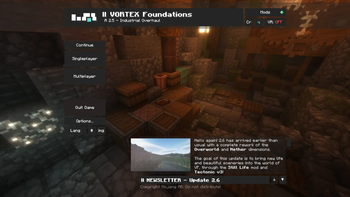
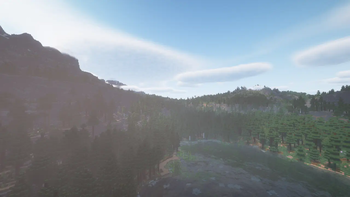
Über dieses Modpack

Welcome to VORTEX Foundations! A heavy technological modpack centered around progressing through the ages and uncovering a multitude of stories fabricated by mod makers and yourself...
Featuring Create and its addons, then Applied Energistics and finally Mekanism... Progress is key, but there's much more than that.
Warning - This modpack, featuring 450+ mods, is very heavy on hardware. Recommended stock config:
16GB of RAM / 12 GB of VRAM ( 7700 XT ) / Radeon 7 7700 X


Through Still Life and Tectonic, the overworld feels grand and full of surprises.
With Amplified Nether, the hellish landscapes soar new heights.
And, along Nullscape... The end of a story is not the end of an adventure.


You will begin your adventure with nothing more than a flint knife and a shield, leather boots and pants, as well as a few books. You will have to work out the steps, or follow the path of quests...
After hunting and gathering, you will be ready for the journey towards the Ancient Foundry. An abandoned structure once used to smelt metals. It will be your goal to exploit its resources, and even repair it if you so choose.
Next up, you will have to go through the industrial age by manufacturing brass and steel with coke and metallurgic equipment in order to progress onwards.
By then, you'd likely have ran into a storage problem. Thankfully Applied Energistics 2 will have you covered, with the ability to connect storage seamlessly into one network, and adding autocrafting servers for whatever you may need.
After all of your hardships, you can finally reach the Mekanism age. Your mission: Antimatter. Work through the modern technologies to reach your goals, and ascend to be the most powerful entity of the three dimensions.
Disclaimer - Quests are still a WIP / Unfinished as of 2.6.

But through it all, the real treasure is your creations. Primitive or complex, as long as you like it, it's all that matters. And bring your friends along, memories are better crafted together. No machine could ever replace it.
This project couldn't have been possible without the help of the beautiful community that formed from this tiny project! I am eternally thankful to them to have pushed this pack way beyond my expectations.
Join us on Discord and maybe even in-game! Your contribution is invaluable. [ Discord - Server Invite ]

I'd put all the mods in here, but there are over 450 of them- So instead, have these informations I am legally obligated to cite, go check these out though they're great.
Show Credits
- Forge CIT by tfarecnim [ CurseForge ]
- SpruceBeyond by tmosiik_ [ CurseForge ]
- Spelunker's Charm II by Lucky Owl [ CurseForge ]
- Cosmetic Armor Reworked by LainMI [ CurseForge ]
- Multimine by atomicstrykergrumpy [ CurseForge ]
- ConnectedTexturesMod by tterrag1098 [ CurseForge ]
- Forgery by unascribed [ CurseForge ]
- Panoramica by Keksuccino [ CurseForge ]
- Alex's Delight by Baisylia [ CurseForge ]
- Never Punching Trees by 96_Leaf [ CurseForge ]
- Creeperheal ported by Lothrazar to forge [ CurseForge ] // Originally modded by EyZox from a Bukkit Plugin by nitnelave

Verfügbare Versionen
VORTEX Foundations Server einrichten
Server bestellen
Wähle mindestens 6 GB RAM (8 GB empfohlen für VORTEX Foundations). Je nach Spieleranzahl: +1 GB pro 5 Spieler.
Modpack im Dashboard installieren
Öffne den Modpack-Browser im Dashboard, suche nach "VORTEX Foundations" und klicke "Installieren". Der forge-Loader und Minecraft 1.21.1 werden automatisch konfiguriert.
Server starten & spielen
Starte den Server – alle Mods werden automatisch geladen. Teile die Server-IP mit Freunden und spielt zusammen!
Häufige Fragen
VORTEX Foundations Server crasht oder startet nicht – was tun?
Häufigste Ursachen: zu wenig RAM oder falscher forge-Loader. Prüfe latest.log auf "OutOfMemoryError" → erhöhe RAM auf mindestens 8 GB. Bei "Mixin" oder "ClassNotFoundException": Modpack-Version und Loader stimmen nicht überein. Bei Mado Hosting werden Loader und Minecraft-Version beim Modpack-Install automatisch konfiguriert – das verhindert die meisten Startprobleme.
Wie viel RAM braucht ein VORTEX Foundations Server wirklich?
Minimum 6 GB, empfohlen 8 GB für stabile Performance. +1 GB pro 5 Spieler. Wichtig: Minecraft-Modpacks brauchen mehr RAM als Vanilla – plane pro zusätzlichem Spieler extra ein. Bei Mado Hosting kannst du den RAM jederzeit live hochskalieren, ohne Datenverlust (ab €7.800000000000001/Monat).
Kann ich eigene Mods zu VORTEX Foundations hinzufügen, ohne Konflikte?
Ja, aber achte auf die Kompatibilität: Nutze nur Mods für den gleichen Loader (forge) und die gleiche Minecraft-Version (1.21.1). Häufige Probleme: ID-Konflikte bei Rezept-Mods und inkompatible Coremod-Versionen. Im Mado Dashboard zeigt der Mod-Browser nur kompatible Mods an und warnt bei bekannten Konflikten.
VORTEX Foundations Server laggt – Performance-Tipps
1) RAM auf 8 GB+ erhöhen. 2) Server-View-Distance auf 8 reduzieren (server.properties). 3) Pre-Generiere Chunks mit dem "Chunky" Plugin. 4) Prüfe mit /spark profiler welche Mods die meiste Tick-Time verbrauchen. Bei Mado Hosting laufen alle Server auf NVMe-SSDs mit dedizierten CPU-Kernen – das eliminiert Hardware als Engpass.
Ähnliche Modpacks


VORTEX Foundations Server mieten
Starte deinen eigenen Server mit automatischer Modpack-Installation.
Details
- Lizenz
- LicenseRef-All-Rights-Reserved
- Server-seitig
- Erforderlich
- Client-seitig
- Erforderlich
Unterstützte Versionen
Starte deinen VORTEX Foundations Server jetzt
Ab €7.80/Monat; für die beste Performance werden 8 GB RAM empfohlen.
Server konfigurieren →