
zOptimized
Modpack that could combine optimization and beauty together / Shader packs, Resourse packs, Settings integrated
Screenshots
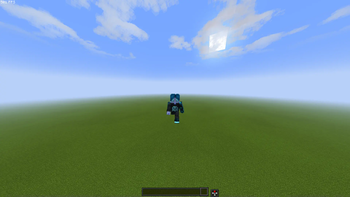

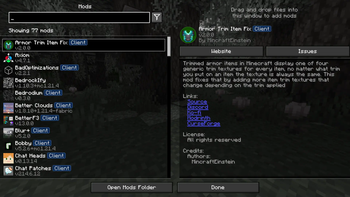
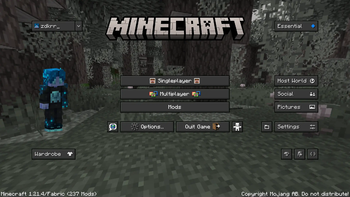
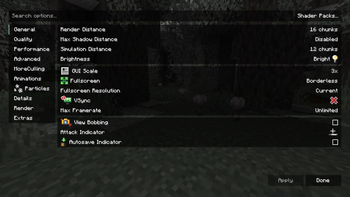

Über dieses Modpack



💬 Description - english
Well optimized with a lot of its own chips fully client modpack. There are mods for beautiful clouds, splashes on the water, and even... for bedrock edition?
You don't have to worry about anything, resource packs, configs and shaders are already in the file.
We update to the latest stable versions and always stay cool. Stable updates and modpack support - yes
Modpack simplifies common processes in Minecraft, such as crafting or moving items
- Item Scroller - allows you to quickly move items from inventory to another inventory
The main purpose of the modpack - is beauty, added a lot of mods that either improve the external component of Minecraft
- Better Clouds - beautiful clouds
- Subtle Effects - beautiful partials in different interactions
- And a lot of other mods for splashes on the water or shine on the armor
📩 How to install?
🟢 Modrinth App
One of the easiest ways to install modpack
- Open the Launcher
- Search for this modpack (Action & Stuff ON JAVA)
- Click download
- Run and play
- ✅
🌍 MultiMC / Prism Launcher and etc.
In these launchers there are 2 ways to install modpack
1:
- Click in the launcher "Add build"
- Select "Modrinth" and search this modpack (Action & Stuff ON JAVA)
- Click download (or OK)
- Run and play
- ✅
2:
- Download the modpack file here
- Click "Add build" in the launcher
- Select "Import from file"
- Import modpack file to launcher
- Run and play
- ✅
2.1:
- Download the modpack file here
- Grab the file with your mouse and move it to the launcher (modpack starts installing)
- Run and play
- ✅
🟤 Official launcher or any other launcher
The hardest way
- Download the modpack file here
- Fabric Loader must be installed (you can find the tutorials on how to download it yourself)
- Convert the modpack from .mrpack to .zip on any website (search mrpack to zip converter)
- All files from .zip file should be moved to the folder with minecraft (.minecraft mostly)
- If you have done everything correctly modpack should start and work correctly
- Run and play
- ✅
💬 Описание - русский
Хорошо оптимизированный с кучей своих фишек полностью клиентский модпак. Есть мод на красивые облака, всплески на воде, и даже… на bedrock edition?
Вам ненадо ни о чем беспокоиться, ресурс паки, конфиги и шейдеры уже находятся в файле
Мы обновляемся на самые последние стабильные версии и всегда остаемся крутыми. Стабильные обновления и поддержка модпака присутствуют
Модпак упрощает обычные процессы в майнкрафте, такие как крафт или перемещения предметов
- Item Scroller - позволяет быстро перемещать предметы из инвентаря в другой инвентарь
Основная цель модпака - это красота, добавлено очень много модов которые как либо улучшают внешнюю состовляющую майнкрафта
- Better Clouds - красивые облака
- Subtle Effects - красивые партиклы при разных взаимодействиях
- И еще очень много других модов на вспески на воде или блеск на броне
📩 Как установить?
🟢 Modrinth App
Один из самых простых способов установки модпака
- Откройте лаунчер
- Найдите этот модпак (Action & Stuff ON JAVA)
- Нажмите
- Запустить и играть
- ✅
🌍 MultiMC / Prism Launcher
В этих лаунчерах есть 2 способа установить модпак
1:
- Нажмите в лаунчере "Добавить экземпляр (Add build)"
- Выберите "Modrinth" и найдите эту сборку (Action & Stuff ON JAVA)
- Нажмите скачать (или ОК)
- Запустить и играть
- ✅
2:
- Скачайте файл модпака здесь
- Нажмите в лаунчере "Добавить экземпляр (Add build)"
- Выберите "Импортировать из файла"
- Импортируйте файл модпака в лаунчер
- Запустить и играть
- ✅
2.1:
- Скачайте файл модпака здесь
- Захватите файл мышью и перенесите его в лаунчер (модпак начнет установливаться)
- Запускай и играй
- ✅
🟤 Официальный лаунчер или любой другой
Самый сложный способ
- Скачайте файл модпака здесь
- Fabric Loader должен быть установлен предварительно (вы можете найти руководство, как скачать его самостоятельно)
- Конвертируйте модпак из .mrpack в .zip на любом сайте (ищите mrpack to zip converter)
- Все файлы из .zip файла необходимо переместить в папку с майнкрафтом (.minecraft обычно)
- Если вы все сделали правильно, модпак должен запуститься и работать корректно
- Запускай и играй
- ✅
Verfügbare Versionen
zOptimized Server einrichten
Server bestellen
Wähle mindestens 4 GB RAM (6 GB empfohlen für zOptimized). Je nach Spieleranzahl: +1 GB pro 8 Spieler.
Modpack im Dashboard installieren
Öffne den Modpack-Browser im Dashboard, suche nach "zOptimized" und klicke "Installieren". Der fabric-Loader und Minecraft 26.3 werden automatisch konfiguriert.
Server starten & spielen
Starte den Server – alle Mods werden automatisch geladen. Teile die Server-IP mit Freunden und spielt zusammen!
Häufige Fragen
zOptimized Server crasht oder startet nicht – was tun?
Häufigste Ursachen: zu wenig RAM oder falscher fabric-Loader. Prüfe latest.log auf "OutOfMemoryError" → erhöhe RAM auf mindestens 6 GB. Bei "Mixin" oder "ClassNotFoundException": Modpack-Version und Loader stimmen nicht überein. Bei Mado Hosting werden Loader und Minecraft-Version beim Modpack-Install automatisch konfiguriert – das verhindert die meisten Startprobleme.
Wie viel RAM braucht ein zOptimized Server wirklich?
Minimum 4 GB, empfohlen 6 GB für stabile Performance. +1 GB pro 8 Spieler. Wichtig: Minecraft-Modpacks brauchen mehr RAM als Vanilla – plane pro zusätzlichem Spieler extra ein. Bei Mado Hosting kannst du den RAM jederzeit live hochskalieren, ohne Datenverlust (ab €5.2/Monat).
Kann ich eigene Mods zu zOptimized hinzufügen, ohne Konflikte?
Ja, aber achte auf die Kompatibilität: Nutze nur Mods für den gleichen Loader (fabric) und die gleiche Minecraft-Version (26.3). Häufige Probleme: ID-Konflikte bei Rezept-Mods und inkompatible Coremod-Versionen. Im Mado Dashboard zeigt der Mod-Browser nur kompatible Mods an und warnt bei bekannten Konflikten.
zOptimized Server laggt – Performance-Tipps
1) RAM auf 6 GB+ erhöhen. 2) Server-View-Distance auf 8 reduzieren (server.properties). 3) Pre-Generiere Chunks mit dem "Chunky" Plugin. 4) Prüfe mit /spark profiler welche Mods die meiste Tick-Time verbrauchen. Bei Mado Hosting laufen alle Server auf NVMe-SSDs mit dedizierten CPU-Kernen – das eliminiert Hardware als Engpass.
Ähnliche Modpacks


![Better MC [FABRIC] - BMC2](https://cdn.modrinth.com/data/shFhR8Vx/a19c2bcb51d38f32f138d3607e91cb2b7b8e387f_96.webp)
![Better MC [FORGE] - BMC4](https://cdn.modrinth.com/data/4BV47HRn/7f5ef7cc61b2593609aabef3ed07a866a4f11b73_96.webp)


zOptimized Server mieten
Starte deinen eigenen Server mit automatischer Modpack-Installation.
Details
- Lizenz
- Creative Commons Attribution Non Commercial Share Alike 4.0 International
- Server-seitig
- Nicht unterstützt
- Client-seitig
- Erforderlich
Unterstützte Versionen
Starte deinen zOptimized Server jetzt
Ab €5.20/Monat; für die beste Performance werden 6 GB RAM empfohlen.
Server konfigurieren →