
zOptimized
Modpack that could combine optimization and beauty together / Shader packs, Resourse packs, Settings integrated
Screenshots


About this Modpack



💬 Description - english
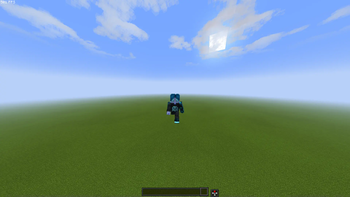
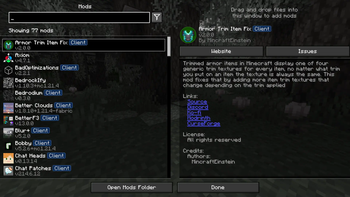
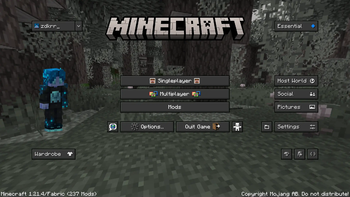
Well optimized with a lot of its own chips fully client modpack. There are mods for beautiful clouds, splashes on the water, and even... for bedrock edition?
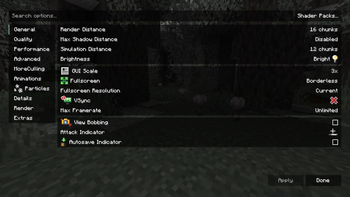
You don't have to worry about anything, resource packs, configs and shaders are already in the file.
We update to the latest stable versions and always stay cool. Stable updates and modpack support - yes
Modpack simplifies common processes in Minecraft, such as crafting or moving items
- Item Scroller - allows you to quickly move items from inventory to another inventory
The main purpose of the modpack - is beauty, added a lot of mods that either improve the external component of Minecraft
- Better Clouds - beautiful clouds
- Subtle Effects - beautiful partials in different interactions
- And a lot of other mods for splashes on the water or shine on the armor
📩 How to install?
🟢 Modrinth App
One of the easiest ways to install modpack
- Open the Launcher
- Search for this modpack (Action & Stuff ON JAVA)
- Click download
- Run and play
- ✅
🌍 MultiMC / Prism Launcher and etc.
In these launchers there are 2 ways to install modpack
1:
- Click in the launcher "Add build"
- Select "Modrinth" and search this modpack (Action & Stuff ON JAVA)
- Click download (or OK)
- Run and play
- ✅
2:
- Download the modpack file here
- Click "Add build" in the launcher
- Select "Import from file"
- Import modpack file to launcher
- Run and play
- ✅
2.1:
- Download the modpack file here
- Grab the file with your mouse and move it to the launcher (modpack starts installing)
- Run and play
- ✅
🟤 Official launcher or any other launcher
The hardest way
- Download the modpack file here
- Fabric Loader must be installed (you can find the tutorials on how to download it yourself)
- Convert the modpack from .mrpack to .zip on any website (search mrpack to zip converter)
- All files from .zip file should be moved to the folder with minecraft (.minecraft mostly)
- If you have done everything correctly modpack should start and work correctly
- Run and play
- ✅
💬 Описание - русский
Хорошо оптимизированный с кучей своих фишек полностью клиентский модпак. Есть мод на красивые облака, всплески на воде, и даже… на bedrock edition?
Вам ненадо ни о чем беспокоиться, ресурс паки, конфиги и шейдеры уже находятся в файле
Мы обновляемся на самые последние стабильные версии и всегда остаемся крутыми. Стабильные обновления и поддержка модпака присутствуют
Модпак упрощает обычные процессы в майнкрафте, такие как крафт или перемещения предметов
- Item Scroller - позволяет быстро перемещать предметы из инвентаря в другой инвентарь
Основная цель модпака - это красота, добавлено очень много модов которые как либо улучшают внешнюю состовляющую майнкрафта
- Better Clouds - красивые облака
- Subtle Effects - красивые партиклы при разных взаимодействиях
- И еще очень много других модов на вспески на воде или блеск на броне
📩 Как установить?
🟢 Modrinth App
Один из самых простых способов установки модпака
- Откройте лаунчер
- Найдите этот модпак (Action & Stuff ON JAVA)
- Нажмите
- Запустить и играть
- ✅
🌍 MultiMC / Prism Launcher
В этих лаунчерах есть 2 способа установить модпак
1:
- Нажмите в лаунчере "Добавить экземпляр (Add build)"
- Выберите "Modrinth" и найдите эту сборку (Action & Stuff ON JAVA)
- Нажмите скачать (или ОК)
- Запустить и играть
- ✅
2:
- Скачайте файл модпака здесь
- Нажмите в лаунчере "Добавить экземпляр (Add build)"
- Выберите "Импортировать из файла"
- Импортируйте файл модпака в лаунчер
- Запустить и играть
- ✅
2.1:
- Скачайте файл модпака здесь
- Захватите файл мышью и перенесите его в лаунчер (модпак начнет установливаться)
- Запускай и играй
- ✅
🟤 Официальный лаунчер или любой другой
Самый сложный способ
- Скачайте файл модпака здесь
- Fabric Loader должен быть установлен предварительно (вы можете найти руководство, как скачать его самостоятельно)
- Конвертируйте модпак из .mrpack в .zip на любом сайте (ищите mrpack to zip converter)
- Все файлы из .zip файла необходимо переместить в папку с майнкрафтом (.minecraft обычно)
- Если вы все сделали правильно, модпак должен запуститься и работать корректно
- Запускай и играй
- ✅
Available Versions
How to Set Up a zOptimized Server
Order Server
Choose at least 4 GB RAM (6 GB recommended for zOptimized). Based on player count: per 8 players.
Install Modpack in Dashboard
Open the modpack browser in the dashboard, search for "zOptimized" and click "Install". The fabric loader and Minecraft 26.3 are configured automatically.
Start Server & Play
Start the server – all mods are loaded automatically. Share the server IP with friends and play together!
Frequently Asked Questions
zOptimized server crashes or won't start – what to do?
Most common causes: insufficient RAM or wrong fabric loader. Check latest.log for "OutOfMemoryError" → increase RAM to at least 6 GB. For "Mixin" or "ClassNotFoundException" errors: modpack version and loader don't match. With Mado Hosting, loader and Minecraft version are auto-configured on modpack install – preventing most startup issues.
How much RAM does a zOptimized server really need?
Minimum 4 GB, recommended 6 GB for stable performance. per 8 players. Important: Minecraft modpacks need more RAM than vanilla – plan extra per additional player. With Mado Hosting, you can scale RAM up live at any time without data loss (from €5.2/month).
Can I add custom mods to zOptimized without conflicts?
Yes, but check compatibility: only use mods for the same loader (fabric) and same Minecraft version (26.3). Common issues: ID conflicts with recipe mods and incompatible coremod versions. The Mado dashboard mod browser only shows compatible mods and warns about known conflicts.
zOptimized server lagging – performance tips
1) Increase RAM to 6 GB+. 2) Reduce server view-distance to 8 (server.properties). 3) Pre-generate chunks with the "Chunky" plugin. 4) Use /spark profiler to check which mods consume the most tick time. With Mado Hosting, all servers run on NVMe SSDs with dedicated CPU cores – eliminating hardware as a bottleneck.
Similar Modpacks


![Better MC [FABRIC] - BMC2](https://cdn.modrinth.com/data/shFhR8Vx/a19c2bcb51d38f32f138d3607e91cb2b7b8e387f_96.webp)
![Better MC [FORGE] - BMC4](https://cdn.modrinth.com/data/4BV47HRn/7f5ef7cc61b2593609aabef3ed07a866a4f11b73_96.webp)


Rent zOptimized Server
Start your own server with automatic modpack installation.
Details
- License
- Creative Commons Attribution Non Commercial Share Alike 4.0 International
- Server-side
- Unsupported
- Client-side
- Required
Supported Versions
Start your zOptimized Server now
From €5.20/month; 6 GB RAM is recommended for best performance.
Configure Server →