Aethersteel
Better than netherite
Screenshots

Über diese Mod
Welcome To Aethersteel!
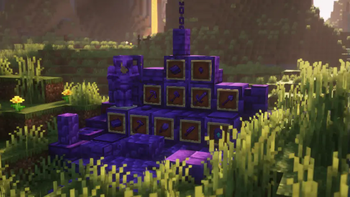
- This mod adds new ingot called Aethersteel which is two times stronger than Netherite.
- To create an Aethersteel Ingot, find Aethersteel Debris within y-44 to y-64 (it can be found on the patches of Aetherslate), then smelt Aethersteel Debris, and craft it using 4 Aethersteel Scrap and 4 Netherite Ingot.
- Aethersteel Upgrade Template can be obtained by mining Suspicious Aetherslate, there will be a chance that it will drop.
- To upgrade to Aethersteel, put an Aethersteel Upgrade Template, a Netherite tool and Aethersteel Ingot on the Smithing Table.
- Armor trims can be used on the Aethersteel armor.
Items
- Aethersteel Ingot
- Aethersteel Nugget
- Aethersteel Scrap
- Aethersteel Upgrade Template
Tools
- Aethersteel Armor
- Aethersteel Axe
- Aethersteel Hoe
- Aethersteel Knife (Needs Farmer's Delight to craft)
- Aethersteel Pickaxe
- Aethersteel Shears
- Aethersteel Shovel
- Aethersteel Sword
Blocks
- Aetherslate
- Aetherslate Bricks (With slab, stair, and wall variant and cracked)
- Aetherslate Tiles (With slab, stair, and wall variant and cracked)
- Aethersteel Block (With slab and stair variant)
- Aethersteel Bookshelf (Needs Iron Bookshelves to craft)
- Aethersteel Chain
- Aethersteel Debris
- Aethersteel Door and trapdoor
- Cobbled Aetherslate (Comes with a slab, stair, and wall variant)
- Polished Aetherslate (Comes with a slab, stair, and wall variant)
- Suspicious Aetherslate (Drops several items when mined)
To see the recipes use JEI or REI
Compatible Mods
Farmer's Delight and Iron Bookshelves
FAQs
Can I make a modpack with this mod?
Yes, you are allowed to use this mod on your modpacks.
Can make an addon for this mod?
Yes, you are allowed to make an addon for this mod.
Can I upload this mod to other websites?
No, you are not allowed to upload this mod on other websites, you are only allowed to put the link of this mod (from Modrinth or CurseForge) to other websites.
Supported Minecraft versions and mod loaders
| Minecraft | Forge | NeoForge | Maintained? |
|---|---|---|---|
| 1.21.4 | ❌ | ✅ | Yes |
| 1.21.1 | ❌ | ✅ | Yes |
| 1.20.1 | ✅ | ❌ | No |
| 1.19.4 | ✅ | ❌ | No |
| 1.19.2 | ✅ | ❌ | No |
Verfügbare Versionen
Aethersteel auf dem Server installieren
Server bestellen
Bestelle einen Minecraft Java Server mit mindestens 4 GB RAM (6 GB empfohlen).
forge Loader setzen
Wähle im Panel unter "Egg" den forge-Loader und die passende Minecraft-Version (1.21.4).
Mod installieren
Öffne den Mod-Browser im Dashboard und suche nach "Aethersteel". Klicke "Installieren" – fertig! Alternativ: Lade die .jar via SFTP in den /mods Ordner.
Kompatibilität
Mod-Loader
Minecraft-Versionen
1.21.4, 1.21.3, 1.21.2 (+4 weitere)
Server-seitig
✓ ErforderlichEmpfohlener RAM
6 GB(min. 4 GB)Häufige Fragen
Aethersteel Server crasht beim Start – was tun?
Häufigste Ursache: falsche forge-Version oder zu wenig RAM. Prüfe im Server-Log (latest.log), ob ein "OutOfMemoryError" oder "Mixin"-Fehler auftritt. Bei Mado Hosting: Stelle sicher, dass mindestens 4 GB RAM zugewiesen sind und der Loader zur Mod-Version passt (1.21.4). Über das Panel kannst du den Loader mit einem Klick wechseln.
Ist Aethersteel mit forge und neoforge kompatibel?
Aethersteel unterstützt offiziell forge, neoforge für Minecraft 1.21.4, 1.21.3, 1.21.2. Im Mado Dashboard werden inkompatible Loader-Kombinationen automatisch erkannt.
Server laggt mit Aethersteel – wie optimiere ich die Performance?
Empfohlener RAM: 6 GB (+1 GB pro 5 Spieler). Prüfe mit /spark profiler, ob Aethersteel den meisten Tick-Time verbraucht. Häufige Fixes: Server-View-Distance auf 8-10 reduzieren, bei Forge "performant" oder "starlight" als Zusatz-Mod installieren. Bei Mado Hosting läuft dein Server auf NVMe-SSDs mit dedizierten CPU-Kernen für minimale Latenz.
Ähnliche Mods

![[ETF] Entity Texture Features](https://cdn.modrinth.com/data/BVzZfTc1/af683d206d50b05258d865b0d6e4aa2f2cee12f2_96.webp)
![[EMF] Entity Model Features](https://cdn.modrinth.com/data/4I1XuqiY/6e5bbd0d06b1741bfdab6c0cfab6de8fdaf0064c_96.webp)



Modded Server mieten
Installiere Aethersteel mit nur einem Klick auf deinem Server.