anyfps
Allows your FPS to be capped above 250!
Screenshots
Über diese Mod
About
Simple mod that aims to fix many of the problems and limitations with the Vanilla FPS limiter. This includes:
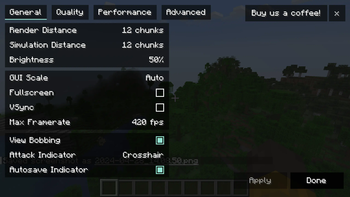
- the ability to set the FPS at any specific value
- the ability to have full control over the FPS slider functionality, including its min/max range and intervals of the slider's snapping points
Every feature above is configurable with the ModMenu mod.
Eventually, I plan to fix some of the Vanilla bugs with how the FPS is actually limited, primarily the bug where the FPS is always capped at roughly ~96% of the value it's set to.
Compatibility
This should already be compatible with any mod that doesn't change the video GUI like Sodium, however, Sodium compatibility is officially implemented. Only 1.20.1+ has been tested, but the mod is simple enough that it will likely work on versions far older.
Verfügbare Versionen
anyfps auf deinem Client installieren
Mod-Loader lokal installieren
Installiere fabric für deine lokale Minecraft-Version.
Passende Datei herunterladen
Wähle die anyfps-Datei für fabric und Minecraft 1.21.3.
Mod installieren
Lege die .jar-Datei in deinem lokalen .minecraft/mods-Ordner ab und starte Minecraft neu. Eine Installation auf dem Server ist nicht nötig.
Kompatibilität
Mod-Loader
Minecraft-Versionen
1.21.3, 1.21.2, 1.21.1 (+7 weitere)
Server-seitig
✗ Nicht unterstütztEmpfohlener RAM
4 GB(min. 3 GB)Häufige Fragen
Muss anyfps auf dem Minecraft Server installiert werden?
Nein. Modrinth kennzeichnet anyfps serverseitig als nicht unterstützt. Installiere die Mod nur im lokalen Minecraft-Mods-Ordner. Dein Server kann unverändert bleiben, sofern die Mod-Seite keine zusätzliche Abhängigkeit nennt.
Welche Version und welchen Loader braucht anyfps?
Nutze eine Datei für fabric und exakt deine Minecraft-Version. Unterstützte Versionen sind unter anderem 1.21.3, 1.21.2, 1.21.1. Loader-Dateien sind nicht untereinander austauschbar.
anyfps funktioniert nicht – was kann ich prüfen?
Prüfe zuerst Minecraft-Version, Loader-Version und erforderliche Abhängigkeiten. Lege die .jar-Datei im lokalen .minecraft/mods-Ordner ab und entferne ältere Duplikate. Da die Mod clientseitig ist, löst mehr Server-RAM dieses Problem nicht.
Ähnliche Mods


Minecraft Server für deine Gruppe
anyfps bleibt auf deinem Client. Hoste dazu eine kompatible Welt für deine Mitspieler.