
Architect's Palette
Block mod with good textures. Incredible.
Screenshots
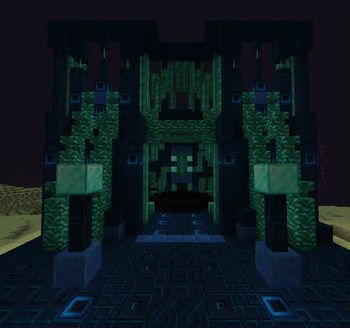
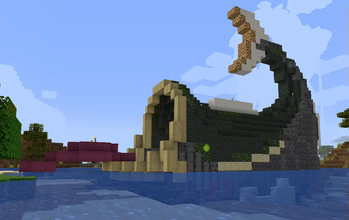
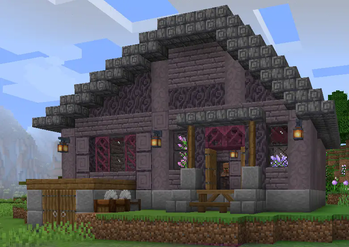
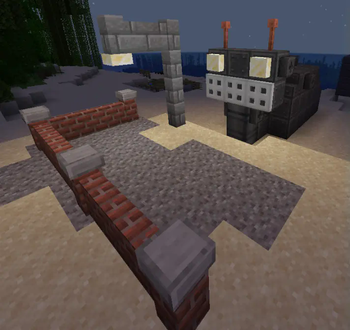
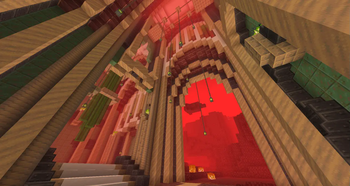
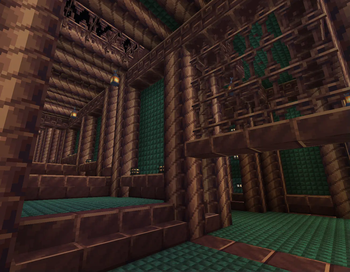
Über diese Mod
Architect's Palette adds many new blocks. They are awesome and look super cool. The recipes are generally balanced to be survival friendly, with high yields and common ingredients. There's a config and Quark support. The mod is good I swear.
Off the top of my head, there are blocks like...
- Fish blocks with scales
- Industrial metal plating
- Bricks made of bones, and a dark set made of withered bones
- Glowing crystals growing in the Nether
- Stone bricks made with ores, which the artists want to get rid of, but the community is oddly attached to so they're in a strange purgatory where we can't really get rid of them but really don't want to support them which is why there isn't a copper variant (please don't ask for a copper variant)
- Brick variants of some blocks that don't have brick variants (like basalt)
- Charcoal blocks made by smoking logs (in a smoker), much to the distaste of everyone who has ever seen the recipe.
- Original materials like Sunmetal, Olivestone, Cerebral Plating, and Abyssaline
- "Mossy" (Nether vine-y) Blackstone variants that were also implemented in Quark (we did ours first)
- A new crafting mechanic to facilitate some weirder materials such as Esoterrack and Twisted trees (it shows up in JEI and is datapack friendly)
- Incredible Board blocks that are just big planks
- Nubs, a new block shape used for shape detail in builds
- Incredible Heavy Bricks that are just big bricks
- Cute Acacia totems
Verfügbare Versionen
Architect's Palette auf dem Server installieren
Server bestellen
Bestelle einen Minecraft Java Server mit mindestens 3 GB RAM (4 GB empfohlen).
fabric Loader setzen
Wähle im Panel unter "Egg" den fabric-Loader und die passende Minecraft-Version (1.21.1).
Mod installieren
Öffne den Mod-Browser im Dashboard und suche nach "Architect's Palette". Klicke "Installieren" – fertig! Alternativ: Lade die .jar via SFTP in den /mods Ordner.
Kompatibilität
Mod-Loader
Minecraft-Versionen
1.21.1, 1.20.1, 1.19.2 (+3 weitere)
Server-seitig
✓ ErforderlichEmpfohlener RAM
4 GB(min. 3 GB)Häufige Fragen
Architect's Palette Server crasht beim Start – was tun?
Häufigste Ursache: falsche fabric-Version oder zu wenig RAM. Prüfe im Server-Log (latest.log), ob ein "OutOfMemoryError" oder "Mixin"-Fehler auftritt. Bei Mado Hosting: Stelle sicher, dass mindestens 3 GB RAM zugewiesen sind und der Loader zur Mod-Version passt (1.21.1). Über das Panel kannst du den Loader mit einem Klick wechseln.
Ist Architect's Palette mit fabric und forge und neoforge kompatibel?
Architect's Palette unterstützt offiziell fabric, forge, neoforge für Minecraft 1.21.1, 1.20.1, 1.19.2. Achtung: Forge- und Fabric-Mods sind NICHT untereinander kompatibel – wähle einen Loader und bleibe dabei. Im Mado Dashboard werden inkompatible Loader-Kombinationen automatisch erkannt.
Server laggt mit Architect's Palette – wie optimiere ich die Performance?
Empfohlener RAM: 4 GB (+1 GB pro 8 Spieler). Prüfe mit /spark profiler, ob Architect's Palette den meisten Tick-Time verbraucht. Häufige Fixes: Server-View-Distance auf 8-10 reduzieren, bei Forge "performant" oder "starlight" als Zusatz-Mod installieren. Bei Mado Hosting läuft dein Server auf NVMe-SSDs mit dedizierten CPU-Kernen für minimale Latenz.
Ähnliche Mods

![[ETF] Entity Texture Features](https://cdn.modrinth.com/data/BVzZfTc1/af683d206d50b05258d865b0d6e4aa2f2cee12f2_96.webp)
![[EMF] Entity Model Features](https://cdn.modrinth.com/data/4I1XuqiY/6e5bbd0d06b1741bfdab6c0cfab6de8fdaf0064c_96.webp)



Modded Server mieten
Installiere Architect's Palette mit nur einem Klick auf deinem Server.