
Arda Paths
Customize and reveal guiding paths for players to follow in the world.
Screenshots
Über diese Mod
ArdaPaths
Customize and reveal guiding paths for players to follow in the world.
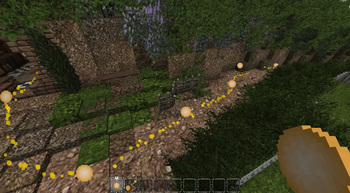
ArdaPaths is a Fabric mod designed to immerse players in a world by allowing configurable paths to show animated trails.
The mod is initially configured for use on ArdaCraft and with their recreation of Middle-earth. With ArdaPaths, players can embark on their own journey through Middle-earth like never before, tracing the iconic paths of beloved characters from the Lord of the Rings series.
Whether it's Frodo's perilous trek to Mount Doom or Aragorn's valiant march to reclaim his throne, each path can be meticulously plotted using the features in this mod.
Blocks and Items
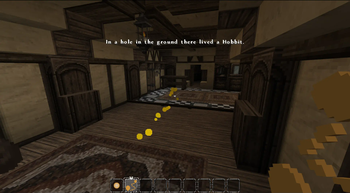
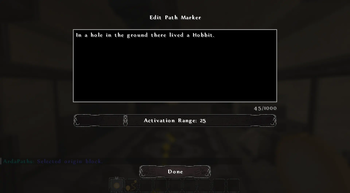
Path Marker: This is the main item of the mod. When placed in the world, multiple path markers can be connected together. By using the path marker item on a path marker block, then selecting another path marker, you can set the second block as the target; a path will now appear between the two blocks. Path markers can also have a message and a range configured that is displayed when players get close enough. Ctrl + Use with this item on an existing path marker allows you to configure the range and message. Using this item on a path marker, then clicking on another, will set the second marker as the targeted path.
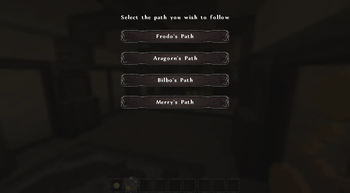
Pathfinder: This item is used by the player to select, reveal, and follow the paths created using the Path Marker. Using this item opens a selection menu that allows you to select from the configured paths and teleport to the selected path.
Configuration
By default, ArdaPaths is configured for use on the ArdaCraft server with four built-in paths of characters from the LOTR series.
New paths can be added to the arda-paths/server.json file with the following format:
{
    "paths": [
        {
            "id": "0",
            "name": "A Custom Path",
            "primary_color": {
                "red": 255,
                "green": 215,
                "blue": 0
            },
            "secondary_color": {
                "red": 230,
                "green": 194,
                "blue": 0
            },
            "tertiary_color": {
                "red": 255,
                "green": 227,
                "blue": 77
            },
            "chapters": {
                "default": {
                    "id": "default",
                    "name": "Default",
                    "date": "0",
                    "index": 0
                }
            }
        }
    ]
}
Verfügbare Versionen
Arda Paths auf dem Server installieren
Server bestellen
Bestelle einen Minecraft Java Server mit mindestens 3 GB RAM (4 GB empfohlen).
fabric Loader setzen
Wähle im Panel unter "Egg" den fabric-Loader und die passende Minecraft-Version (26.2).
Mod installieren
Öffne den Mod-Browser im Dashboard und suche nach "Arda Paths". Klicke "Installieren" – fertig! Alternativ: Lade die .jar via SFTP in den /mods Ordner.
Kompatibilität
Mod-Loader
Minecraft-Versionen
26.2, 26.1.2, 1.21.1 (+2 weitere)
Server-seitig
✓ ErforderlichEmpfohlener RAM
4 GB(min. 3 GB)Häufige Fragen
Arda Paths Server crasht beim Start – was tun?
Häufigste Ursache: falsche fabric-Version oder zu wenig RAM. Prüfe im Server-Log (latest.log), ob ein "OutOfMemoryError" oder "Mixin"-Fehler auftritt. Bei Mado Hosting: Stelle sicher, dass mindestens 3 GB RAM zugewiesen sind und der Loader zur Mod-Version passt (26.2). Über das Panel kannst du den Loader mit einem Klick wechseln.
Ist Arda Paths mit fabric kompatibel?
Arda Paths unterstützt offiziell fabric für Minecraft 26.2, 26.1.2, 1.21.1. Im Mado Dashboard werden inkompatible Loader-Kombinationen automatisch erkannt.
Server laggt mit Arda Paths – wie optimiere ich die Performance?
Empfohlener RAM: 4 GB (+1 GB pro 8 Spieler). Prüfe mit /spark profiler, ob Arda Paths den meisten Tick-Time verbraucht. Häufige Fixes: Server-View-Distance auf 8-10 reduzieren, bei Forge "performant" oder "starlight" als Zusatz-Mod installieren. Bei Mado Hosting läuft dein Server auf NVMe-SSDs mit dedizierten CPU-Kernen für minimale Latenz.
Ähnliche Mods




Modded Server mieten
Installiere Arda Paths mit nur einem Klick auf deinem Server.
Details
- Lizenz
- Creative Commons Attribution 4.0 International
- Server-seitig
- Erforderlich