
ArknightsFurniture
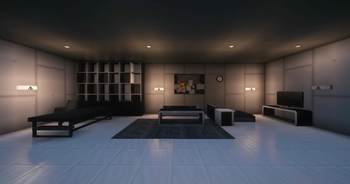
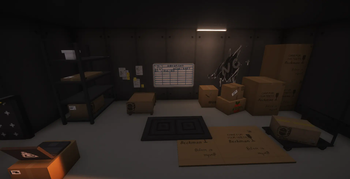
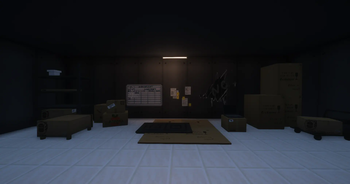
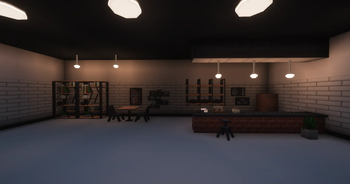
This mod adds furniture from the game Arknights to Minecraft.
Screenshots
Über diese Mod
About
This mod adds various types of furniture from the game Arknights. You can make them in Minecraft and use them to decorate your buildings! However, this mod is still in the development stage and some of the furniture models as well as the code will be updated in the future and more gameplay will be added to the module. Any good suggestions and comments you may have are appreciated. Thanks for the support!
About Future
- Addition of more block entities
- Improve infrastructure materials, block loot table, recipes, etc.
- Reworking or fixing some models and their textures
- obj models will be introduced in the module (but will avoid using them a lot).
- Arknights Furniture Mod will no longer be limited to Rhode Island Land Ship projects, but will be expanded into a general decorative mod based on the Arknights theme.
Attention
If you intend to use Sodium, you should install Indium, otherwise the rendering of the obj model will be problematic!
关于
这个模组添加了游戏明日方舟中的各类家具。你可以在我的世界游戏中制作他们,并用他们来装饰你的建筑!不过,这个模组还在开发阶段,一部分家具模型以及代码还会在未来更新,更多的玩法也会加入到模组中。大家有什么好的建议和意见都可以提出来,感谢支持!
关于未来
- 增加更多的方块实体
- 配套完善基建材料,各方块战利品列表、配方等
- 重做或修复部分模型及其贴图
- 将在模组内引入obj模型(但会避免大量使用)
- 明日方舟家具模组未来将不再仅限于罗德岛陆行舰工程,而是以明日方舟为母题拓展成一个一般向的装饰性模组
注意
如果您打算使用Sodium,您应该安装 Indium,否则obj模型的渲染将出现问题
Verfügbare Versionen
ArknightsFurniture auf dem Server installieren
Server bestellen
Bestelle einen Minecraft Java Server mit mindestens 3 GB RAM (4 GB empfohlen).
fabric Loader setzen
Wähle im Panel unter "Egg" den fabric-Loader und die passende Minecraft-Version (1.20.1).
Mod installieren
Öffne den Mod-Browser im Dashboard und suche nach "ArknightsFurniture". Klicke "Installieren" – fertig! Alternativ: Lade die .jar via SFTP in den /mods Ordner.
Kompatibilität
Mod-Loader
Minecraft-Versionen
1.20.1
Server-seitig
✓ ErforderlichEmpfohlener RAM
4 GB(min. 3 GB)Häufige Fragen
ArknightsFurniture Server crasht beim Start – was tun?
Häufigste Ursache: falsche fabric-Version oder zu wenig RAM. Prüfe im Server-Log (latest.log), ob ein "OutOfMemoryError" oder "Mixin"-Fehler auftritt. Bei Mado Hosting: Stelle sicher, dass mindestens 3 GB RAM zugewiesen sind und der Loader zur Mod-Version passt (1.20.1). Über das Panel kannst du den Loader mit einem Klick wechseln.
Ist ArknightsFurniture mit fabric und forge kompatibel?
ArknightsFurniture unterstützt offiziell fabric, forge für Minecraft 1.20.1. Achtung: Forge- und Fabric-Mods sind NICHT untereinander kompatibel – wähle einen Loader und bleibe dabei. Im Mado Dashboard werden inkompatible Loader-Kombinationen automatisch erkannt.
Server laggt mit ArknightsFurniture – wie optimiere ich die Performance?
Empfohlener RAM: 4 GB (+1 GB pro 8 Spieler). Prüfe mit /spark profiler, ob ArknightsFurniture den meisten Tick-Time verbraucht. Häufige Fixes: Server-View-Distance auf 8-10 reduzieren, bei Forge "performant" oder "starlight" als Zusatz-Mod installieren. Bei Mado Hosting läuft dein Server auf NVMe-SSDs mit dedizierten CPU-Kernen für minimale Latenz.
Ähnliche Mods

![[ETF] Entity Texture Features](https://cdn.modrinth.com/data/BVzZfTc1/af683d206d50b05258d865b0d6e4aa2f2cee12f2_96.webp)
![[EMF] Entity Model Features](https://cdn.modrinth.com/data/4I1XuqiY/6e5bbd0d06b1741bfdab6c0cfab6de8fdaf0064c_96.webp)



Modded Server mieten
Installiere ArknightsFurniture mit nur einem Klick auf deinem Server.