
Auto Fishing Deluxe
QOL Fishing - Deluxe Edition
Screenshots
Über diese Mod
Features:
> Auto-fishing

> Break Protection

> Fishing Rod Swap (On low durability)

> GUI / Inventory Failsafe

> In-Game Push Notifications

> Inventory Preview

> Item-Swap Failsafe

> Mouse un-grabber (Enables Alt + TAB away from the game without loosing focus)

> MouseMovement

> Random Delay, reel / cast (User choice)

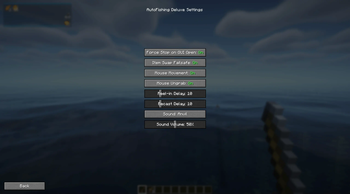
> Settings GUI

> Sound Warning for Failsafes

> ModMenu Integration

> And much more, join Discord for additional details
Dependency
- Fabric-Api
Tutorial
Default Keybinds:
Auto-Fishing: K
Settings: O
First throw the hook, then start the AutoFishing.
More info can be found on the Discord!

Disclaimer
This mod is intended for educational and entertainment purposes only. By downloading and using AutoFishingDeluxe, you acknowledge that the developers of this mod are not responsible for any misuse, violations of server rules, or consequences resulting from its use. Users are solely responsible for ensuring compliance with server policies, community guidelines, and applicable laws. Use at your own risk.
Verfügbare Versionen
Auto Fishing Deluxe auf deinem Client installieren
Mod-Loader lokal installieren
Installiere fabric für deine lokale Minecraft-Version.
Passende Datei herunterladen
Wähle die Auto Fishing Deluxe-Datei für fabric und Minecraft 1.21.8.
Mod installieren
Lege die .jar-Datei in deinem lokalen .minecraft/mods-Ordner ab und starte Minecraft neu. Eine Installation auf dem Server ist nicht nötig.
Kompatibilität
Mod-Loader
Minecraft-Versionen
1.21.8, 1.21.7, 1.21.6 (+6 weitere)
Server-seitig
✗ Nicht unterstütztEmpfohlener RAM
4 GB(min. 3 GB)Häufige Fragen
Muss Auto Fishing Deluxe auf dem Minecraft Server installiert werden?
Nein. Modrinth kennzeichnet Auto Fishing Deluxe serverseitig als nicht unterstützt. Installiere die Mod nur im lokalen Minecraft-Mods-Ordner. Dein Server kann unverändert bleiben, sofern die Mod-Seite keine zusätzliche Abhängigkeit nennt.
Welche Version und welchen Loader braucht Auto Fishing Deluxe?
Nutze eine Datei für fabric und exakt deine Minecraft-Version. Unterstützte Versionen sind unter anderem 1.21.8, 1.21.7, 1.21.6. Loader-Dateien sind nicht untereinander austauschbar.
Auto Fishing Deluxe funktioniert nicht – was kann ich prüfen?
Prüfe zuerst Minecraft-Version, Loader-Version und erforderliche Abhängigkeiten. Lege die .jar-Datei im lokalen .minecraft/mods-Ordner ab und entferne ältere Duplikate. Da die Mod clientseitig ist, löst mehr Server-RAM dieses Problem nicht.
Ähnliche Mods




Minecraft Server für deine Gruppe
Auto Fishing Deluxe bleibt auf deinem Client. Hoste dazu eine kompatible Welt für deine Mitspieler.