
BandwidthOptimizer
Save your MC bandwidth with big quantities.
Screenshots
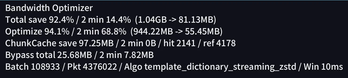
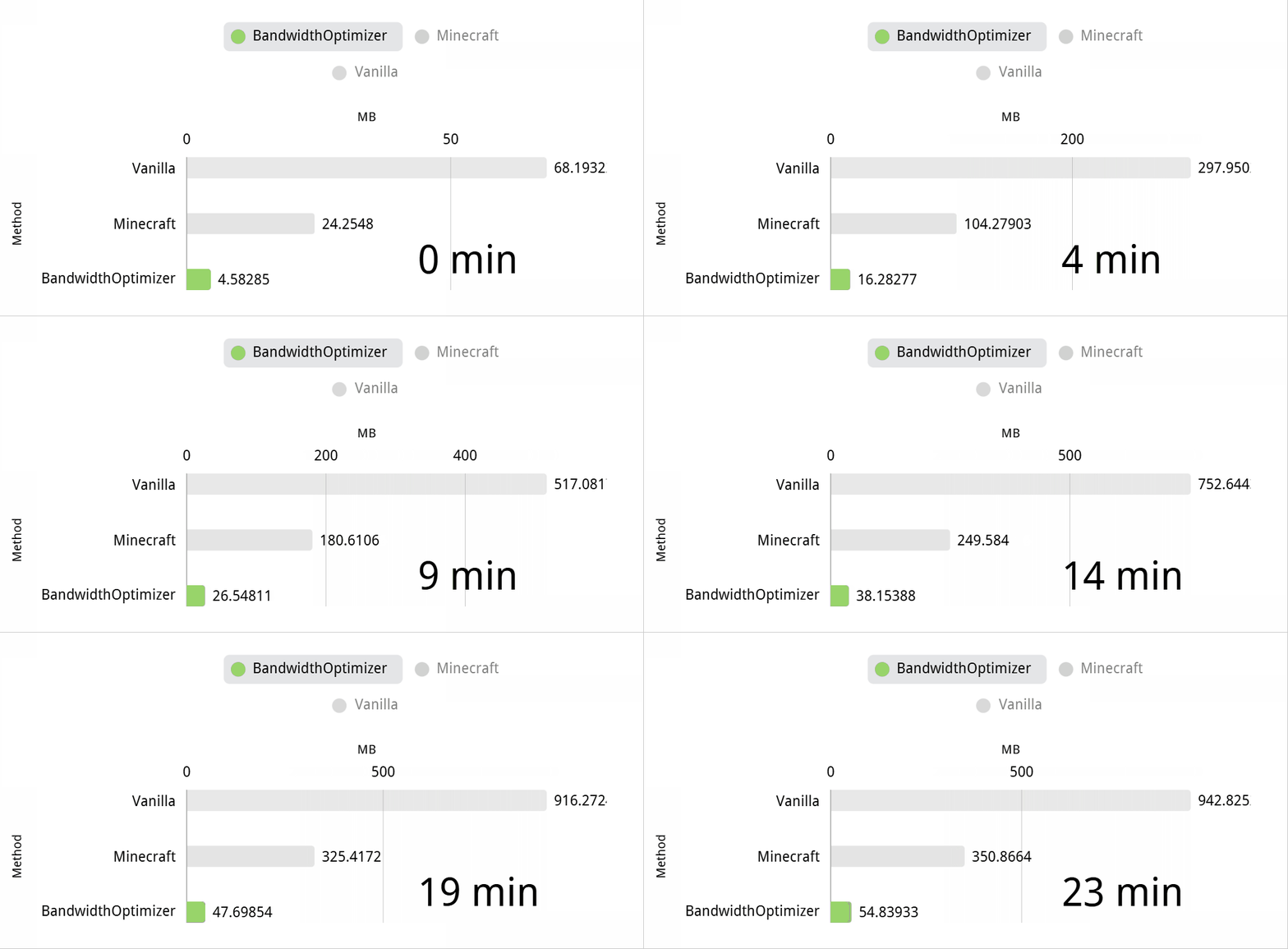
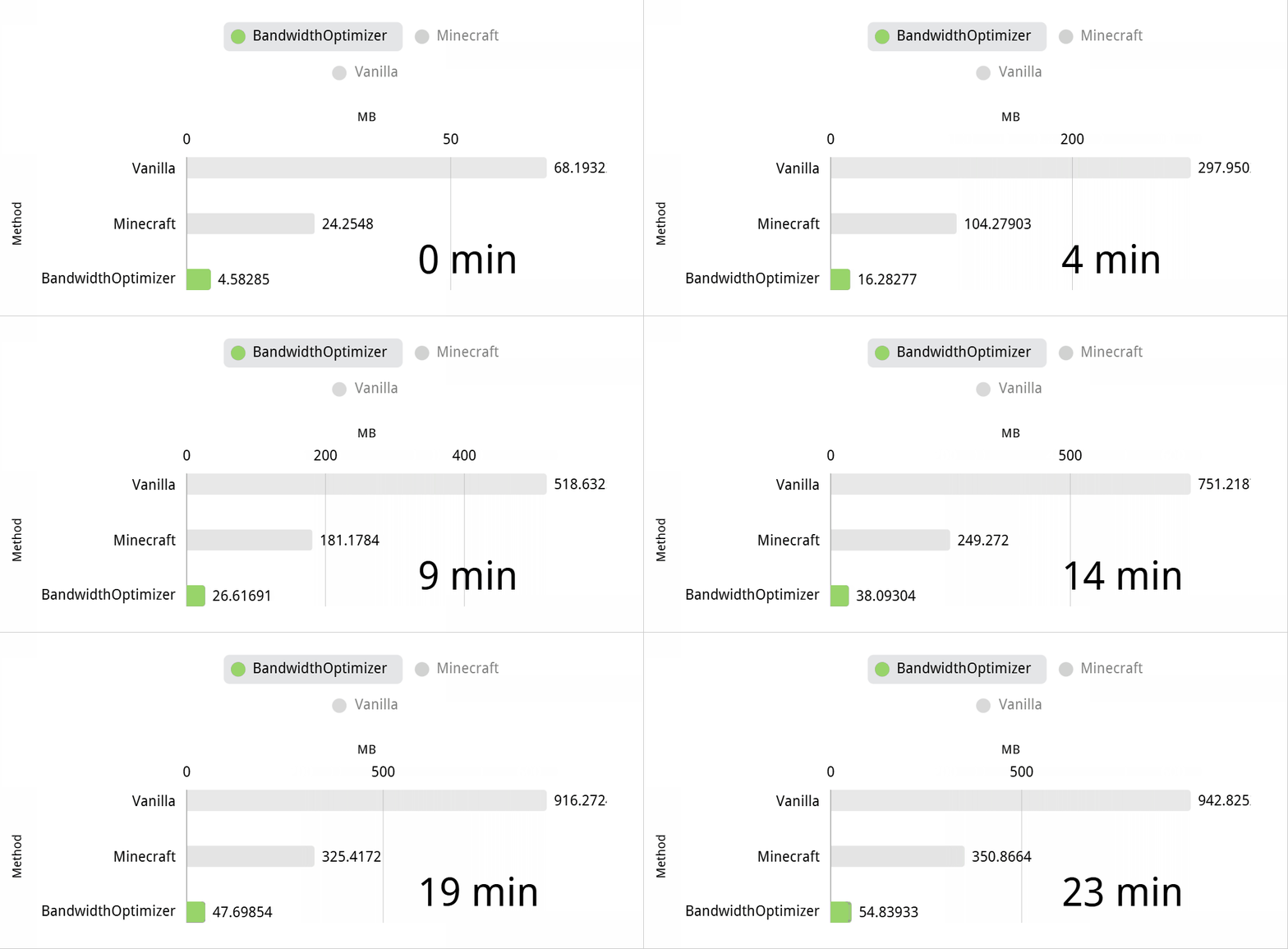
Über diese Mod
BandwidthOptimizer
BandwidthOptimizer is a client-and-server network optimization mod built for
heavily modded Minecraft servers. It reduces repeated packet traffic from chunk
travel, login synchronization, custom payloads, machines, storage systems, and
idle clients while restoring the original encoded packet stream before normal
Minecraft handling.
Both the server and every connecting client must install a compatible build.


Highlights
- Recoverable cross-frame streaming Zstd compression.
- Synchronized literal and template mapping for repeated packet structures.
- Ordered small-packet batching with protected flush and protocol boundaries.
- Verified
full,ref, andpatchchunk transport. - Persistent client chunk reuse across reconnects and repeated terrain visits.
- Incremental cache writes, bounded retention, corruption recovery, and
background maintenance. - Light and deep idle traffic reduction with state restoration when play resumes.
- Uploadable BO Stats reports with charts, player history, packet attribution,
cache results, bypass details, and idle-gate savings. - On-demand OP diagnostics, including exact packet-class tracing.
- Compatibility work for Create-heavy environments, Velocity, Voxy, AutoFish,
Aeronautics, and other network-intensive modpacks.
How It Works
BO operates after Minecraft or the mod loader has encoded a complete packet. It
may map, batch, compress, or reuse those encoded bytes. The receiver restores the
original packet bytes before vanilla packet decoding continues.
Cross-frame compression uses sequence and epoch validation. Missing or invalid
boundaries trigger bounded recovery and stream resynchronization. Chunk reuse is
hash-verified, and unavailable or stale references fall back to complete packet
data.
Idle traffic reduction has separate light and deep states. Presentation-only
traffic can be reduced while a player is inactive, then current block, entity,
HUD, and supported mod state is restored when the player returns.
Measured Results
Bandwidth savings vary by modpack, player activity, proxy topology, and packet
mix. The following results come from BO HUD snapshots and transport source
reports collected on real heavily modded servers. They are historical measured
baselines, not guaranteed results.
The primary ratio describes traffic that entered BO's managed transport path.
Whole-server totals also contain direct packets, compatibility bypasses, cache
reuse, and already compressed or media-like payloads, so those values should not
be treated as pure compressor efficiency.
Live HUD Baselines
| Environment | Client optimized flow | Server raw to actual | Server optimized flow | Direct flow | Players | Source |
|---|---|---|---|---|---|---|
| Create Delight Remake server 1 | 23.21 MB -> 3.93 MB (16.9%) |
305.35 GB -> 51.12 GB (16.7%) |
40.28 GB (13.2%) |
49.46 GB (16.2%) |
1 | HUD snapshot, v2.7.6.10 |
| Create Delight Remake server 2 | 24.51 MB -> 4.15 MB (16.9%) |
516.70 GB -> 83.24 GB (16.1%) |
57.57 GB (11.1%) |
57.01 GB (11.0%) |
4 | HUD snapshot, v2.7.6.10 |
Managed Transport Baselines
| Environment | Managed transport | Without WATUT/YSM-like streams | Notes |
|---|---|---|---|
| Create-focused core server | 38976.09 MiB -> 9455.03 MiB (24.3%) |
34580.44 MiB -> 5236.56 MiB (15.1%) |
Mixed traffic containing large poorly compressible sources |
| Create-focused mirror server | 1046.16 MiB -> 253.89 MiB (24.3%) |
902.82 MiB -> 113.55 MiB (12.6%) |
Smaller mixed sample with visible WATUT-like traffic |
| Create-focused test server | 1174.31 MiB -> 112.24 MiB (9.6%) |
Same sample | No WATUT/YSM exception in this TopN sample |
| Create Delight | 7865.72 MiB -> 1622.43 MiB (20.6%) |
7774.54 MiB -> 1539.90 MiB (19.8%) |
Public modpack source-report snapshot |
| Create Delight secondary snapshot | 4567.66 MiB -> 603.15 MiB (13.2%) |
Not separated | Earlier report snapshot |
High-Impact Packet Families
| Source | Environment | Raw observed | Actual transmitted | Actual/raw ratio |
|---|---|---|---|---|
ClientboundLevelChunkWithLightPacket |
Create-focused core server | 9062.88 MiB |
481.85 MiB |
5.3% |
ClientboundLevelChunkWithLightPacket |
Create-focused test server | 713.65 MiB |
16.84 MiB |
2.4% |
ClientboundTabListPacket |
Create-focused core server | 6354.97 MiB |
655.45 MiB |
10.3% |
lightmanscurrency:network |
Create-focused core server | 8206.80 MiB |
593.69 MiB |
7.2% |
create:deployer block entity data |
Create Delight | 510.41 MiB |
71.61 MiB |
14.0% |
Low-Benefit Control Samples
| Source | Environment | Raw observed | Actual transmitted | Actual/raw ratio | Path |
|---|---|---|---|---|---|
watut:main |
Create-focused core server | 4157.94 MiB |
3974.80 MiB |
95.6% |
BATCH_DIRECT_FALLBACK |
yes_steve_model:2_6_0 |
Create-focused core server | 514.63 MiB |
510.50 MiB |
99.2% |
BATCH_TRANSPORT_SHARE |
watut:main |
Create-focused mirror server | 146.07 MiB |
143.07 MiB |
97.9% |
BATCH_TRANSPORT_SHARE |
watut:main |
Create Delight | 91.18 MiB |
82.53 MiB |
90.5% |
BATCH_TRANSPORT_SHARE |
These control samples show why mixed-server totals can look worse than the
high-impact packet families: a second compression layer has little room to help
data that is already compressed, encrypted, media-like, or near-random.
Current 5.10.30.99 measurements have reduced managed traffic to about 3-11% of
its original size. This is a substantial improvement over the historical
baseline, but it is not guaranteed for every server; the final ratio depends on
packet composition and the amount of reusable traffic.
Some modpacks may contain mod conflicts that cause abnormal network packets. BO
cannot guarantee meaningful reduction of this abnormal traffic, but server
operators can run /bandwidthoptimizer stats to upload a BO Stats report and
locate its source.
Reproducing the Measurement
- Install the same BO version on the server and every client.
- Run a fixed activity pattern and duration, such as login bursts, repeated
chunk travel, a machine-heavy area, or normal online play. - Run
/bandwidthoptimizer statsand retain the returned BO Stats link. - Compare managed transport separately from direct and bypass traffic. Do not
countbandwidthoptimizer:transportcarriers as new source traffic. - Record the modpack, loader, Minecraft version, player count, duration, and BO
version with the result.
Tested Environments
Compatibility and measurement work has included Create Delight, Brass Concerto,
Aeronautics, and Mechanomania. Mechanomania's available historical snapshot
contained bypass and packet-rank evidence but no source raw/actual summary, so it
is listed as a tested environment rather than used for a compression-ratio claim.
These tests do not guarantee every mod combination or proxy topology.
Supported Versions
| Loader | Minecraft | Status |
|---|---|---|
| Forge | 1.19.2 | Release |
| Forge | 1.20.1 | Release |
| Fabric / Quilt | 1.20.1 | Release; Fabric API required |
| Fabric / Quilt | 1.21.1 | Release; Fabric API required |
| NeoForge | 1.21.1 | Release |
| NeoForge | 26.1.2 | Release |
| NeoForge | 26.2 | Beta |
Installation
- Download the build matching the Minecraft version and loader.
- Install it in the server
modsfolder. - Install the same BandwidthOptimizer version on every client.
- Install Fabric API for Fabric or Quilt builds.
- Restart the server and clients.
Commands
| Command | Purpose |
|---|---|
/bandwidthoptimizer hud |
Toggles the local client statistics HUD. |
/bandwidthoptimizer stats |
Uploads a server report and returns a clickable BO Stats link. OP only. |
/bandwidthoptimizer debug |
Opens on-demand diagnostic tools. OP only. |
BO Stats
Run /bandwidthoptimizer stats as an operator to upload the current report. The
returned bostats.torqueflux.com page presents server totals, player and
time-period traffic, transport and cache behavior, packet-source attribution,
bypass details, and idle-gate savings.
For disconnects or compatibility issues, include the BO Stats link together with
client, server, and proxy logs around the incident.
Configuration
The default configuration is suitable for most servers and modpacks. Advanced
administrators can tune the generated client and common configuration files after
collecting comparable BO Stats reports before and after each change.
Links
- CurseForge: https://www.curseforge.com/minecraft/mc-mods/bandwidthoptimizer
- Modrinth: https://modrinth.com/mod/bandwidthoptimizer
- GitHub: https://github.com/duckgun13476/BandwidthOptimizer
- Discord: https://discord.gg/qdMbM9Rq6B
License
GNU LGPL 2.1 or any later version (LGPL-2.1-or-later).
Verfügbare Versionen
BandwidthOptimizer auf dem Server installieren
Server bestellen
Bestelle einen Minecraft Java Server mit mindestens 3 GB RAM (4 GB empfohlen).
fabric Loader setzen
Wähle im Panel unter "Egg" den fabric-Loader und die passende Minecraft-Version (26.2).
Mod installieren
Öffne den Mod-Browser im Dashboard und suche nach "BandwidthOptimizer". Klicke "Installieren" – fertig! Alternativ: Lade die .jar via SFTP in den /mods Ordner.
Kompatibilität
Mod-Loader
Minecraft-Versionen
26.2, 26.1.2, 1.21.1 (+2 weitere)
Server-seitig
✓ ErforderlichEmpfohlener RAM
4 GB(min. 3 GB)Häufige Fragen
BandwidthOptimizer Server crasht beim Start – was tun?
Häufigste Ursache: falsche fabric-Version oder zu wenig RAM. Prüfe im Server-Log (latest.log), ob ein "OutOfMemoryError" oder "Mixin"-Fehler auftritt. Bei Mado Hosting: Stelle sicher, dass mindestens 3 GB RAM zugewiesen sind und der Loader zur Mod-Version passt (26.2). Über das Panel kannst du den Loader mit einem Klick wechseln.
Ist BandwidthOptimizer mit fabric und forge und neoforge und quilt kompatibel?
BandwidthOptimizer unterstützt offiziell fabric, forge, neoforge, quilt für Minecraft 26.2, 26.1.2, 1.21.1. Achtung: Forge- und Fabric-Mods sind NICHT untereinander kompatibel – wähle einen Loader und bleibe dabei. Im Mado Dashboard werden inkompatible Loader-Kombinationen automatisch erkannt.
Server laggt mit BandwidthOptimizer – wie optimiere ich die Performance?
Empfohlener RAM: 4 GB (+1 GB pro 8 Spieler). Prüfe mit /spark profiler, ob BandwidthOptimizer den meisten Tick-Time verbraucht. Häufige Fixes: Server-View-Distance auf 8-10 reduzieren, bei Forge "performant" oder "starlight" als Zusatz-Mod installieren. Bei Mado Hosting läuft dein Server auf NVMe-SSDs mit dedizierten CPU-Kernen für minimale Latenz.
Ähnliche Mods


Modded Server mieten
Installiere BandwidthOptimizer mit nur einem Klick auf deinem Server.
Details
- Lizenz
- GNU Lesser General Public License v2.1 or later
- Server-seitig
- Erforderlich