
Beltborne Lanterns: Accessories Layer
Provides compatibility with the Accessories mod, allowing lanterns to be worn in the "Belt" slot.
Über diese Mod


Beltborne Lanterns: Accessories Layer
Compatibility bridge between Beltborne Lanterns and Accessories (WispForest).
Equip your lantern in the Accessories Belt slot — it works just like the default belt: sways with physics, casts dynamic light, and keeps your hands free.
🧩 What it does
- Registers all Beltborne Lanterns items as valid Belt accessories.
- Syncs the belt state — equipping via Accessories or pressing B both work seamlessly.
- Fully client & server: renders the lantern on other players and emits light for everyone.
📷 Showcase
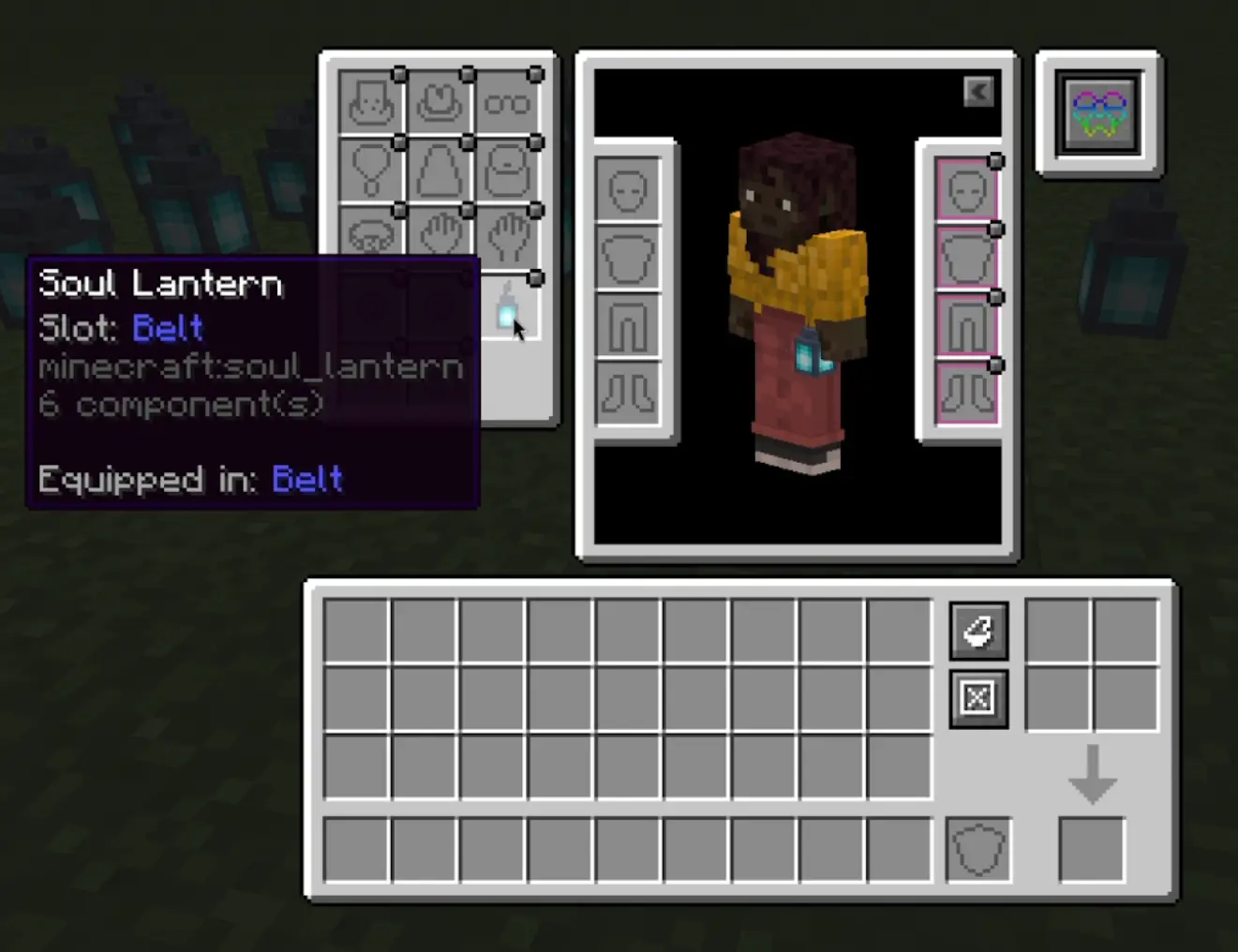
⚙️ Requirements
- Beltborne Lanterns — the core mod
- Accessories — the accessory API by WispForest
🔧 For Modpack Makers
By default, lanterns can only be placed in the Belt slot. You can customize this by editing config/bl_accessories_layer.json (auto-generated on first launch):
{
  "allowed_slots": ["belt"]
}
To allow additional slots (e.g. charm, necklace), add them to the list:
{
  "allowed_slots": ["belt", "charm", "necklace"]
}
No datapacks or item tags are needed — the mod handles slot validation automatically.
Credits
- @DistantDig — idea for configurable slot support (#7)
📜 License
This project is licensed under the Apache License 2.0 — see the LICENSE file for details.
Full license text: Apache 2.0
Crafted with ❤️ for the Minecraft community
Verfügbare Versionen
Beltborne Lanterns: Accessories Layer auf dem Server installieren
Server bestellen
Bestelle einen Minecraft Java Server mit mindestens 3 GB RAM (4 GB empfohlen).
fabric Loader setzen
Wähle im Panel unter "Egg" den fabric-Loader und die passende Minecraft-Version (1.21.10).
Mod installieren
Öffne den Mod-Browser im Dashboard und suche nach "Beltborne Lanterns: Accessories Layer". Klicke "Installieren" – fertig! Alternativ: Lade die .jar via SFTP in den /mods Ordner.
Kompatibilität
Mod-Loader
Minecraft-Versionen
1.21.10, 1.21.8, 1.21.4 (+3 weitere)
Server-seitig
✓ ErforderlichEmpfohlener RAM
4 GB(min. 3 GB)Häufige Fragen
Beltborne Lanterns: Accessories Layer Server crasht beim Start – was tun?
Häufigste Ursache: falsche fabric-Version oder zu wenig RAM. Prüfe im Server-Log (latest.log), ob ein "OutOfMemoryError" oder "Mixin"-Fehler auftritt. Bei Mado Hosting: Stelle sicher, dass mindestens 3 GB RAM zugewiesen sind und der Loader zur Mod-Version passt (1.21.10). Über das Panel kannst du den Loader mit einem Klick wechseln.
Ist Beltborne Lanterns: Accessories Layer mit fabric und neoforge und quilt kompatibel?
Beltborne Lanterns: Accessories Layer unterstützt offiziell fabric, neoforge, quilt für Minecraft 1.21.10, 1.21.8, 1.21.4. Im Mado Dashboard werden inkompatible Loader-Kombinationen automatisch erkannt.
Server laggt mit Beltborne Lanterns: Accessories Layer – wie optimiere ich die Performance?
Empfohlener RAM: 4 GB (+1 GB pro 8 Spieler). Prüfe mit /spark profiler, ob Beltborne Lanterns: Accessories Layer den meisten Tick-Time verbraucht. Häufige Fixes: Server-View-Distance auf 8-10 reduzieren, bei Forge "performant" oder "starlight" als Zusatz-Mod installieren. Bei Mado Hosting läuft dein Server auf NVMe-SSDs mit dedizierten CPU-Kernen für minimale Latenz.
Ähnliche Mods

![[ETF] Entity Texture Features](https://cdn.modrinth.com/data/BVzZfTc1/af683d206d50b05258d865b0d6e4aa2f2cee12f2_96.webp)
![[EMF] Entity Model Features](https://cdn.modrinth.com/data/4I1XuqiY/6e5bbd0d06b1741bfdab6c0cfab6de8fdaf0064c_96.webp)



Modded Server mieten
Installiere Beltborne Lanterns: Accessories Layer mit nur einem Klick auf deinem Server.