
Better Mipmaps
Unlocks mipmap levels higher than 4 to reduce visual arifacts with high resolution resource packs
Screenshots
Über diese Mod
Overview
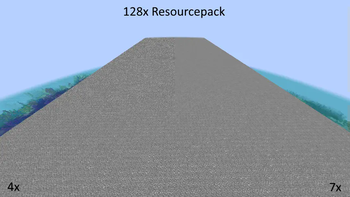
Have you ever noticed how noisy Minecraft looks in the distance when using a high-resolution resource pack?The reason is that by default, Minecraft only supports full mipmaps for 16x16 textures and below.
Anything higher than that will have incomplete mipmaps.
This mod fixes this by increasing the maximum level of mipmaps to 10 (1024x1024).
The optimal mipmap level depends on the resolution of your resource pack and can be found in the table below:
| Texture Resolution | Optimal Mipmap Level |
|---|---|
| 1 | 0 |
| 2 | 1 |
| 4 | 2 |
| 8 | 3 |
| 16 | 4 |
| 32 | 5 |
| 64 | 6 |
| 128 | 7 |
| 256 | 8 |
| 512 | 9 |
Technical Details
The problem with generating a full mipmap pyramids for Minecraft textures is that Minecraft combines all block textures into one big texture atlas. The maximum mipmap level of this atlas is a smallest maximum mipmap level of any individual texture.
So even when using a 99% complete resource pack, a single left-over 16x16 texture will limit the atlas to 4 mipmap levels. To work around this, this mod will automatically attempt to upscale smaller textures before the stitching process.
Verfügbare Versionen
Better Mipmaps auf deinem Client installieren
Mod-Loader lokal installieren
Installiere fabric für deine lokale Minecraft-Version.
Passende Datei herunterladen
Wähle die Better Mipmaps-Datei für fabric und Minecraft 1.21.11.
Mod installieren
Lege die .jar-Datei in deinem lokalen .minecraft/mods-Ordner ab und starte Minecraft neu. Eine Installation auf dem Server ist nicht nötig.
Kompatibilität
Mod-Loader
Minecraft-Versionen
1.21.11, 1.21.10, 1.21.9 (+14 weitere)
Server-seitig
✗ Nicht unterstütztEmpfohlener RAM
4 GB(min. 3 GB)Häufige Fragen
Muss Better Mipmaps auf dem Minecraft Server installiert werden?
Nein. Modrinth kennzeichnet Better Mipmaps serverseitig als nicht unterstützt. Installiere die Mod nur im lokalen Minecraft-Mods-Ordner. Dein Server kann unverändert bleiben, sofern die Mod-Seite keine zusätzliche Abhängigkeit nennt.
Welche Version und welchen Loader braucht Better Mipmaps?
Nutze eine Datei für fabric und exakt deine Minecraft-Version. Unterstützte Versionen sind unter anderem 1.21.11, 1.21.10, 1.21.9. Loader-Dateien sind nicht untereinander austauschbar.
Better Mipmaps funktioniert nicht – was kann ich prüfen?
Prüfe zuerst Minecraft-Version, Loader-Version und erforderliche Abhängigkeiten. Lege die .jar-Datei im lokalen .minecraft/mods-Ordner ab und entferne ältere Duplikate. Da die Mod clientseitig ist, löst mehr Server-RAM dieses Problem nicht.
Ähnliche Mods




![[ETF] Entity Texture Features](https://cdn.modrinth.com/data/BVzZfTc1/af683d206d50b05258d865b0d6e4aa2f2cee12f2_96.webp)

Minecraft Server für deine Gruppe
Better Mipmaps bleibt auf deinem Client. Hoste dazu eine kompatible Welt für deine Mitspieler.