
Modrinth · Fabric
Big Globe auf deinem Minecraft Server
Big Globe läuft auf Minecraft Servern mit Fabric. Bestell deinen Server, stell den Loader im Panel ein und installiere die Mod mit einem Klick im Mod-Browser.
The world is big. Go explore it!
- Downloads
- 853.4K
- Autor
- Builderb0y
- Loader
- Fabric
- Minecraft
- 1.19.2 – 26.2
- Aktualisiert
- –
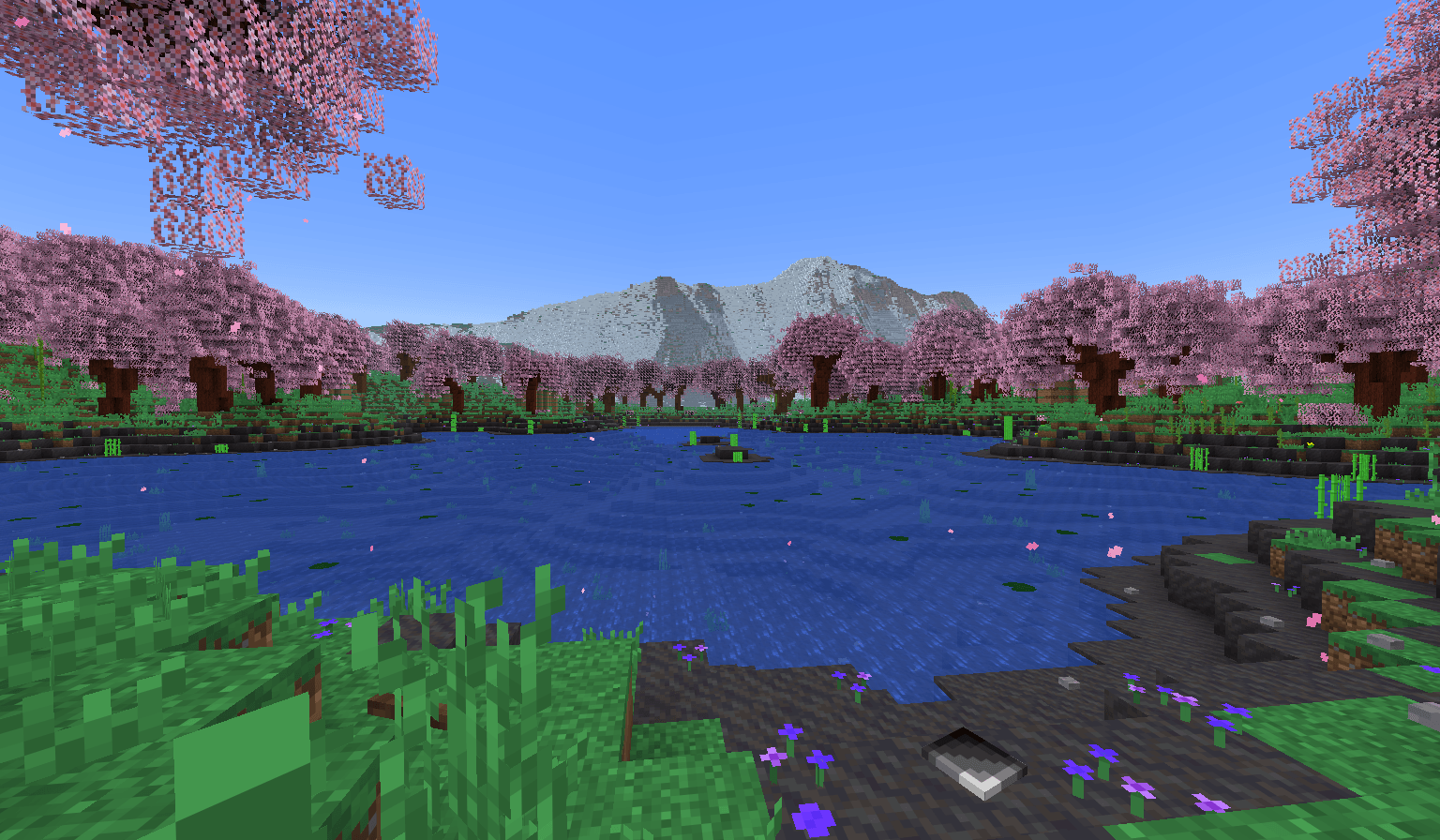
Screenshots
So sieht Big Globe aus


Bilder: Big Globe auf Modrinth, vom Projektteam veröffentlicht.
Einrichtung
Big Globe auf dem Server installieren
Server und Spieler brauchen denselben Loader und dieselbe Minecraft-Version. Sichere die Welt, bevor du Mods hinzufügst oder aktualisierst.
- 01
Konfigurieren
6 GB RAM sind vorausgewählt. Laufzeit und Add-ons wählst du selbst, bezahlt wird per Kreditkarte oder PayPal.
- 02
Loader einstellen
Stell im Panel die Serversoftware auf Fabric und wähl die passende Minecraft-Version, zum Beispiel 26.2.
- 03
Mod installieren
Such im Mod-Browser nach „Big Globe“ und installiere die Version für deinen Loader. Alternativ lädst du die .jar per SFTP in den Ordner mods. Erforderliche Abhängigkeiten stehen auf der Projektseite.
- 04
Verbinden
Alle Spieler installieren Big Globe in derselben Version lokal und verbinden sich über die Serveradresse aus dem Panel.
- Auf dem Server
- Erforderlich
- Auf dem Client
- Erforderlich
- Loader
- Fabric
- Minecraft
- 26.2, 26.1.2, 26.1.1 +22 weitere
- Lizenz
- LicenseRef-All-Rights-Reserved
Das Panel
Mods installieren, Fehler finden.
Echte Screenshots aus dem Mado Panel. Beides ist bei jedem Minecraft Server enthalten.
Mod-Browser
Modrinth und CurseForge direkt im Panel.
Der Browser filtert nach deiner Minecraft-Version. Mods installierst du mit einem Klick, ohne .jar-Dateien hochzuladen.

KI-Crash-Analyse
Wenn ein Mod crasht, liest die Analyse das Log.
Mods scheitern oft an einer falschen Loader-Version, Java-Version oder fehlenden Abhängigkeit. Die Analyse nennt eine wahrscheinliche Ursache und einen Lösungsvorschlag.

Versionen
Veröffentlichte Versionen
Nimm die Datei, die zu Loader und Minecraft-Version deines Servers passt. Server und Spieler brauchen dieselbe Version.
Big Globe · Modrinth- Big Globe-6.4.0-MC26.213. November 2026Minecraft 26.2 · Fabric
- Big Globe-6.4.0-MC26.1.213. November 2026Minecraft 26.1, 26.1.1, 26.1.2 · Fabric
- Big Globe-5.3.2-MC1.21.1113. Mai 2026Minecraft 1.21.11 · Fabric
- Big Globe-5.3.2-MC1.21.1013. Mai 2026Minecraft 1.21.10, 1.21.9 · Fabric
- Big Globe-5.3.2-MC1.21.813. Mai 2026Minecraft 1.21.6, 1.21.7, 1.21.8 · Fabric
Originalbeschreibung des Projektautors
Important info first
This mod MIGHT CHANGE in the future, potentially breaking old worlds in the process!
The end dimension is only supported in V3.6.0 and above. In older mod versions, the end is vanilla.
Biomes added by other mods WILL NEED A DATA PACK to generate in Big Globe worlds.
Ores, flowers, and other features and structures added by other mods WILL NEED A DATA PACK to generate in Big Globe worlds.
Data packs that provide compatibility for other mods can be found on my Discord server. Or, you can search Modrinth for compatibility packs that other people have made.
This mod generates worlds on a VERY LARGE scale, both horizontally and vertically. Exploration and resource collecting will be difficult.
This mod uses more RAM than vanilla due to worlds being taller. Be prepared to have to allocate a lot of RAM to the game.
This mod is not planned to support Forge or NeoForge, however it does work with Sinytra Connector. Just note that if you are using an older version of Big Globe than V4.5.0, you will need to disable MobSpawnerLogic_SpawnLightning inside .minecraft/config/bigglobe/mixins.properties for this to work.
This mod cannot be made into a data pack, nor can it be server-side only. Data packs can't add blocks/items/entities to the game (and Big Globe has a lot of those), and also vanilla density functions can't replicate the equations Big Globe needs to generate its terrain.
Ok, now on to the description
Big Globe is, at its heart, a worldgen mod which overhauls all 3 vanilla dimensions to be bigger. Ever since Minecraft 1.18, mods and data packs have been able to change how tall worlds are, and Big Globe takes full advantage of this. The overworld in Big Globe is 2048 blocks tall, while the nether and end are both 1024 blocks tall.
But Big Globe isn't just about making worlds taller. It also provides completely custom terrain features for just about everything, AND it comes with over 100 new blocks to make the game feel more immersive. Most of them are designed to be decorational or fit in with vanilla, but some of them have their own mechanics too, to make certain parts of the game easier. You can find a full list of current blocks and items here.
Big Globe also comes with its own scripting language which data packs can use to add their own worldgen features governed by arbitrary rules. The overwhelming majority of Big Globe's terrain features are, in fact, scripts. But with great power comes great cost: most worldgen added by other mods or other data packs will have no effect in Big Globe worlds. But all is not lost! Data packs designed for Big Globe can place content from other mods or other data packs, so you can make a "compatibility" data pack to bridge the gap between how vanilla does things and how Big Globe does things.
Getting started
Big Globe also changes where some resources generate. If you can't find something and don't know where to look for it, this link might help you.
Recommended other mods to use in combination with Big Globe
Sodium, Lithium, Ferrite Core, and Starlight/ScalableLux: recommended because Big Globe demands a lot of resources by default, and these mods can reduce that somewhat.
C2ME: recommended because it contains a number of optimizations which can improve performance while doing worldgen. Note however that Big Globe already has concurrency built-in to its chunk generator, so the multi-threading aspect of C2ME will be less effective in Big Globe worlds than in vanilla worlds.
Structure Layout Optimizer: recommended because Big Globe needs to generate structures in a larger radius than vanilla, and sometimes needs to re-generate them from scratch. Structure Layout Optimizer can help make that process faster.
Vertigo: recommended in multiplayer because Big Globe will consume vastly more bandwidth without Vertigo installed. Neither recommended nor discouraged in singleplayer. Vertigo might help reduce memory usage somewhat in both singleplayer and multiplayer.
Distant Horizons or Voxy: recommended in V4 in order to see terrain and structures far away. This can make it easier to find areas that interest you, and make it easier to collect resources, as some resources only spawn in specific areas. As of V5.1, Big Globe has its own LOD renderer built-in. And as of V5.0, a more limited version of this LOD renderer existed which lacked the ability to see structures.
In 3.x, mods which let you teleport between locations you've already visited are recommended because worlds as large as Big Globe make transportation difficult otherwise. In 4.0 and later versions, Big Globe has this functionality built-in.
In 4.x and later versions, Satin is recommended, because waypoints and hyperspace look cooler when Satin is installed. Note that Satin is NOT required in MC 1.21.2 and later, and it's also NOT required in V5.0.4 and later.
A word on licensing
When this project got started, I didn't care about it too much, since I hadn't put that much effort into it at the time. As such, I chose a pretty permissive license. Since then, this project has grown a lot, I've put a lot more effort into it, and I've grown more protective of it. For a long time now I've felt like the license I chose is a bit too permissive. As such, V6 is now ARR.
Big Globe Server crasht beim Start – was tun?
Häufige Ursachen: Loader- oder Minecraft-Version passen nicht zur Mod-Datei, eine Abhängigkeit fehlt oder der RAM reicht nicht. Such im Log (latest.log) nach „OutOfMemoryError“, „Mixin“ oder fehlenden Mods. Bei Mado wertet die KI-Crash-Analyse das Log aus und schlägt eine Ursache vor. Loader und Version änderst du im Panel.
Mit welchem Loader läuft Big Globe?
Laut Modrinth unterstützt Big Globe Fabric für Minecraft 26.2, 26.1.2, 26.1.1.
Wie viel RAM braucht ein Server mit Big Globe?
Als Orientierung 4–6 GB für einen Server mit dieser Mod. Das ist eine Schätzung, keine gemessene Mindestanforderung. Weitere Mods, viele Spieler und große Sichtweiten brauchen mehr. Ob eine Mod die Tick-Zeit belastet, siehst du mit dem spark-Profiler.
Ähnliche Mods
Beliebte Mods aus derselben Kategorie
 Server-fähig

TerraBlender
von Adubbz
A library mod for adding biomes in a simple and compatible manner!
 Server-fähig

Biomes O' Plenty
von Forstride
Adds 50+ unique biomes to enhance your world, with new trees, flowers, and more!
 Server-fähig

Cobblemon
von CobbledStudios
A Pokémon mod for Fabric and NeoForge
 Server-fähig

YUNG's API
von YUNGNICKYOUNG
Library mod for YUNG's mods.
Bereit für deinen Server mit Big Globe?
6 GB RAM ab 12,00 € im Monat. 35 % auf den 1. Monat mit MADO35.