
BlockPrintr
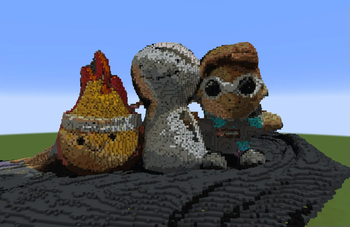
This mod converts scan files (.laz, .ply, and many more!) into block-based builds, printing 3D structures directly in your Minecraft world.
Screenshots
Über diese Mod
BlockPrintr converts 3D scan files into your Minecraft world in a few simple clicks. It supports various file formats, allowing you to bring the real world into the game.
There's other ways to put 3D objects into Minecraft, but our goal is to make it SIMPLE and FREE! We simplify the process by doing all the work for you, so without changing any settings you can already have a clean looking Minecraft representation.
Supported File Types:
- .glb
- .gltf
- .obj
- .laz
- .las
- .dxf
- .xyz
- .pts
- .ply
There's lots of customization features so that you can easily change how your structure looks in game. From different block palettes, to more advanced settings like shading and brightness adjustments.
The default hotkey to open the menu is "ENTER"
Simply drag a compatible scan file into the inputs folder, and then either click "Quick Place" or the "Edit" button to change block and color settings.
Verfügbare Versionen
BlockPrintr auf deinem Client installieren
Mod-Loader lokal installieren
Installiere fabric für deine lokale Minecraft-Version.
Passende Datei herunterladen
Wähle die BlockPrintr-Datei für fabric und Minecraft 1.21.4.
Mod installieren
Lege die .jar-Datei in deinem lokalen .minecraft/mods-Ordner ab und starte Minecraft neu. Eine Installation auf dem Server ist nicht nötig.
Kompatibilität
Mod-Loader
Minecraft-Versionen
1.21.4, 1.21.3, 1.21.2 (+2 weitere)
Server-seitig
✗ Nicht unterstütztEmpfohlener RAM
4 GB(min. 3 GB)Häufige Fragen
Muss BlockPrintr auf dem Minecraft Server installiert werden?
Nein. Modrinth kennzeichnet BlockPrintr serverseitig als nicht unterstützt. Installiere die Mod nur im lokalen Minecraft-Mods-Ordner. Dein Server kann unverändert bleiben, sofern die Mod-Seite keine zusätzliche Abhängigkeit nennt.
Welche Version und welchen Loader braucht BlockPrintr?
Nutze eine Datei für fabric und exakt deine Minecraft-Version. Unterstützte Versionen sind unter anderem 1.21.4, 1.21.3, 1.21.2. Loader-Dateien sind nicht untereinander austauschbar.
BlockPrintr funktioniert nicht – was kann ich prüfen?
Prüfe zuerst Minecraft-Version, Loader-Version und erforderliche Abhängigkeiten. Lege die .jar-Datei im lokalen .minecraft/mods-Ordner ab und entferne ältere Duplikate. Da die Mod clientseitig ist, löst mehr Server-RAM dieses Problem nicht.
Ähnliche Mods

![[ETF] Entity Texture Features](https://cdn.modrinth.com/data/BVzZfTc1/af683d206d50b05258d865b0d6e4aa2f2cee12f2_96.webp)
![[EMF] Entity Model Features](https://cdn.modrinth.com/data/4I1XuqiY/6e5bbd0d06b1741bfdab6c0cfab6de8fdaf0064c_96.webp)



Minecraft Server für deine Gruppe
BlockPrintr bleibt auf deinem Client. Hoste dazu eine kompatible Welt für deine Mitspieler.